Tonked Melee Range
TMR is designed to help players melee-kite targets in PvP. Originally created for TBC Anniversary 2.5.5
Screenshot 2026-06-29 162127.png
Screenshot 2026-06-29 162142.png
Screenshot 2026-06-29 162154.png
Description
TonkedMeleeRange
TonkedMeleeRange is a lightweight melee-awareness helper for Warriors and other melee players in TBC Classic / Anniversary. It presents practical range, facing, parry, and swing-timing feedback in a compact, adjustable display.
The addon presents range and combat information the game client already exposes, helping you read melee spacing more clearly in PvP, dungeons, and raids.
Features
Range Icon
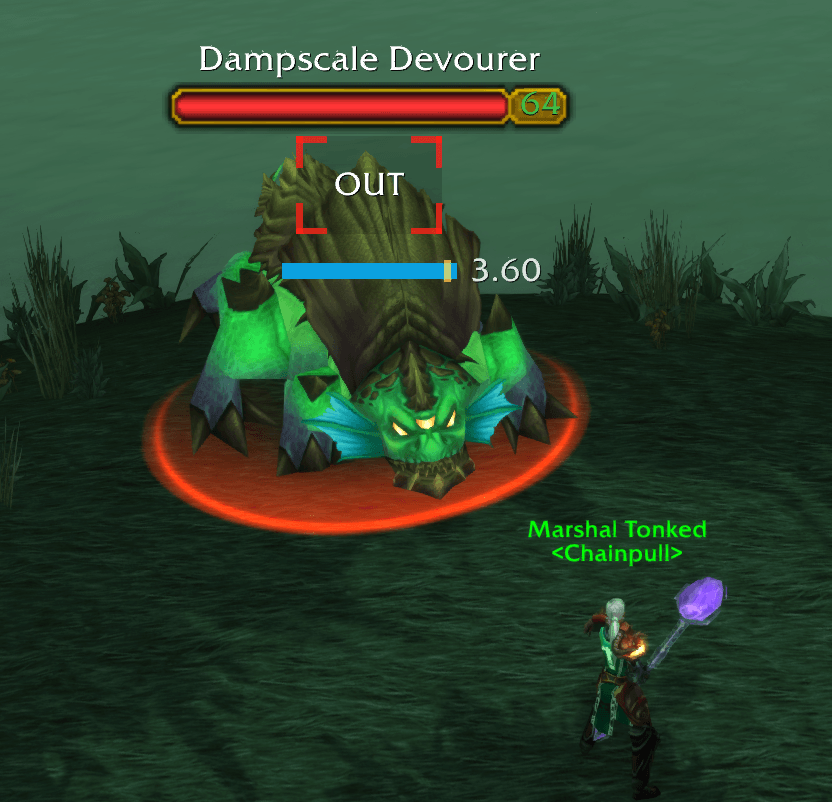
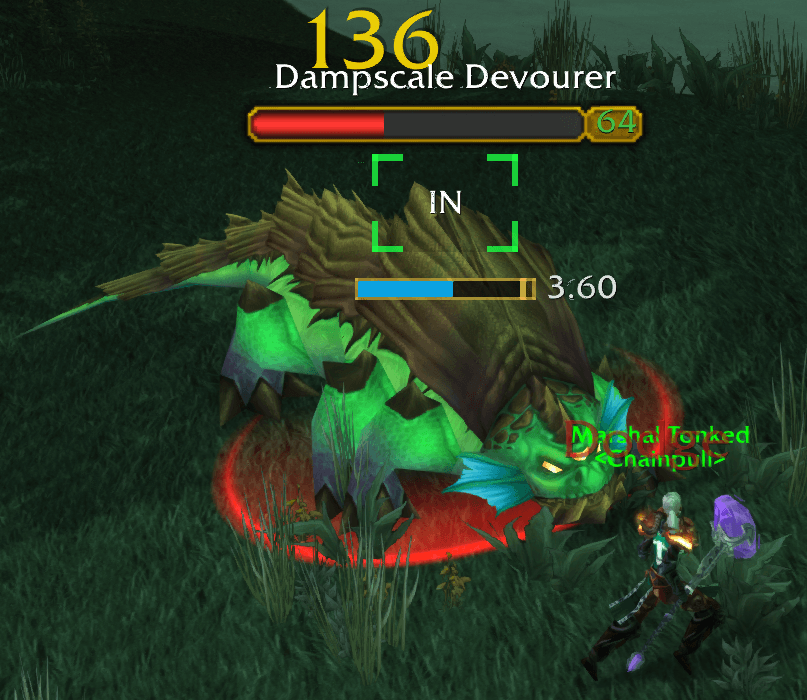
Shows whether your current target is inside or outside practical melee range.
The Range Icon supports optional IN / OUT text, classic and flat corner-marker styles, customizable colors and alpha, and can be hidden entirely when you only want TMR's combat warnings or swing timer.
Class-Aware Range Checks
TMR uses close-range melee ability checks when the game client exposes them.
Warriors commonly use Hamstring, Hunters may use Wing Clip, Rogues may use abilities such as Sinister Strike or Gouge, and supported Druids, Paladins, and Shamans use similar melee-range abilities where available. When no reliable live probe is available, TMR can briefly infer range from combat feedback.
Combat Warnings
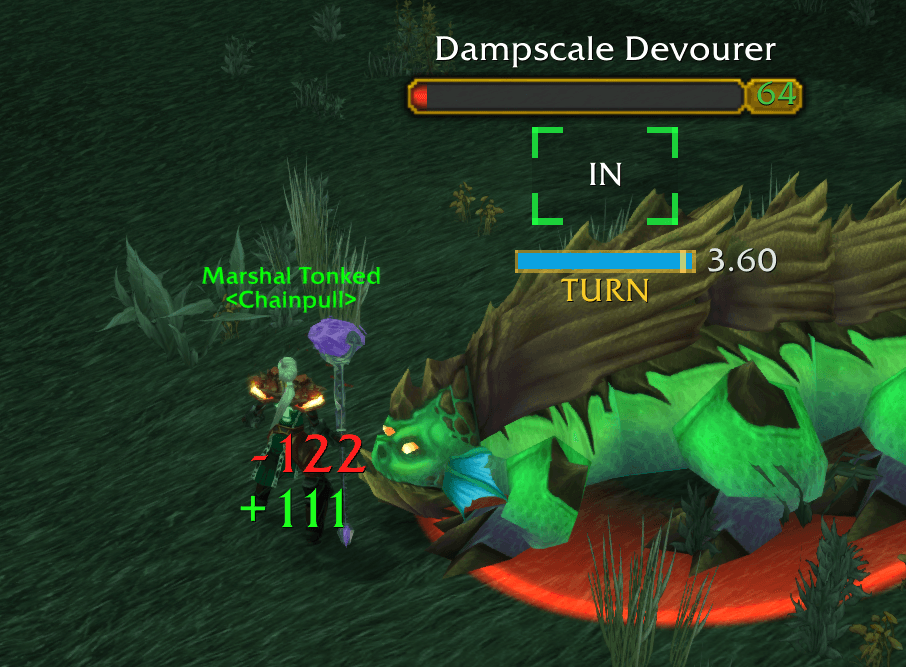
TURN warns when you appear to be in melee range but are not facing your target.
PARRY warns when your current target parries one of your attacks, helping make poor melee positioning easier to notice during PvE encounters.
TURN and PARRY have separate text, color, size, position, sound, and sound-selection controls. PARRY temporarily takes priority when both warnings apply.
Swing Timer
Tracks your main-hand swing so you can better time when to step into range for your next attack.
The integrated swing timer includes smooth animation, a swing buffer marker, an optional weapon-speed number, configurable size and placement, and a readability border while the target is hittable.
Queued Attack Indicator
For Warriors, the swing timer can change color while Heroic Strike or Cleave is queued for the next melee swing.
This makes queued attacks easier to notice while target swapping or fighting multiple enemies.
Flexible Placement
Combat Warnings and the Swing Timer can each be placed at the target nameplate or at a stable screen-center location.
This supports both the original PvP kiting layout and a centralized PvE layout for large bosses or busy raid encounters. The Range Icon remains nameplate-bound.
Preview and Reset Options
Use Preview controls to tune the Range Icon, Swing Timer, TURN, and PARRY without needing a target or waiting for combat events.
Reset Layout & Placement restores visual geometry and anchors without changing feature choices, colors, sounds, or minimap settings.
Restore Fresh Install Defaults restores the complete default configuration after a confirmation prompt.
Sounds, Minimap Button, and Commands
TURN and PARRY can use built-in, bundled TMR, or SharedMedia sounds when available.
Open the options menu with the minimap button or /tmr options.
Who Is This For?
TonkedMeleeRange was originally built for Arms Warriors in PvP, especially players practicing melee spacing, Hamstring kiting, swing timing, and range dancing.
It can also be useful for Hunters, Rogues, Enhancement Shamans, Retribution Paladins, Feral Druids, and other melee characters who want compact, practical range, combat-warning, and swing-timing feedback.
Commands
/tmr - Show available commands
/tmr options - Open the options menu
/tmr preview - Toggle Range Icon and Swing Timer preview
/tmr warningpreview - Toggle TURN and PARRY visual preview
/tmr resetlayout - Reset layout and placement defaults
/tmr rangeprobe - Show the active melee range-check source
/tmr above or /tmr below - Move the Range Icon above or below the target healthbar
/tmr minimap - Toggle the minimap button
/tmr swinganchor center - Place the Swing Timer at screen center
/tmr warninganchor center - Place Combat Warnings at screen center
/tmr spacing 1 - Adjust Range Icon-to-Swing Timer spacing
/tmr queued - Toggle Warrior Heroic Strike / Cleave queue colors
Use nameplate instead of center with the anchor commands to return to nameplate placement.
Notes
TonkedMeleeRange uses range, facing, and combat information exposed by the game client. Edge cases can still occur because of server timing, latency, target-nameplate behavior, and Classic's melee-range evaluation.
WoW addons cannot read exact player-to-target yard distance or draw real 3D range circles on the ground, so TMR focuses on practical combat feedback rather than exact measurement.
Tonked Melee Range Team