TokenPanda
- By
TokenPanda is an independent WoW Token addon for Classic and Retail, featuring live prices, historical charts, projections, alerts, purchase history, realm-aware data, Journalator imports, DataBroker support, and TokenPandaTray synchronization.
TokenPanda 1.5.0 Beta
⚠ TOKENPANDATRAY 1.5.0 BETA OR NEWER IS REQUIRED
NOTE: TokenPandaTray is a portable companion app that keeps TokenPanda data synchronized, up to date, and protected.

If you are updating TokenPanda to 1.5.0 Beta, you must also update TokenPandaTray to 1.5.0 Beta or newer.
TokenPanda 1.5.0 completes the transition to the modern Flavor + Region data architecture.
The legacy root HistoricalData.lua fallback path has been removed. TokenPanda now relies on the modern HistoricalData and RealmData files maintained by TokenPandaTray.
TokenPanda can also detect the TokenPandaTray version that produced the current data and warn when the detected version is missing, legacy, or below the version required by the addon.
View the TokenPandaTray release and release notes
What is TokenPanda?
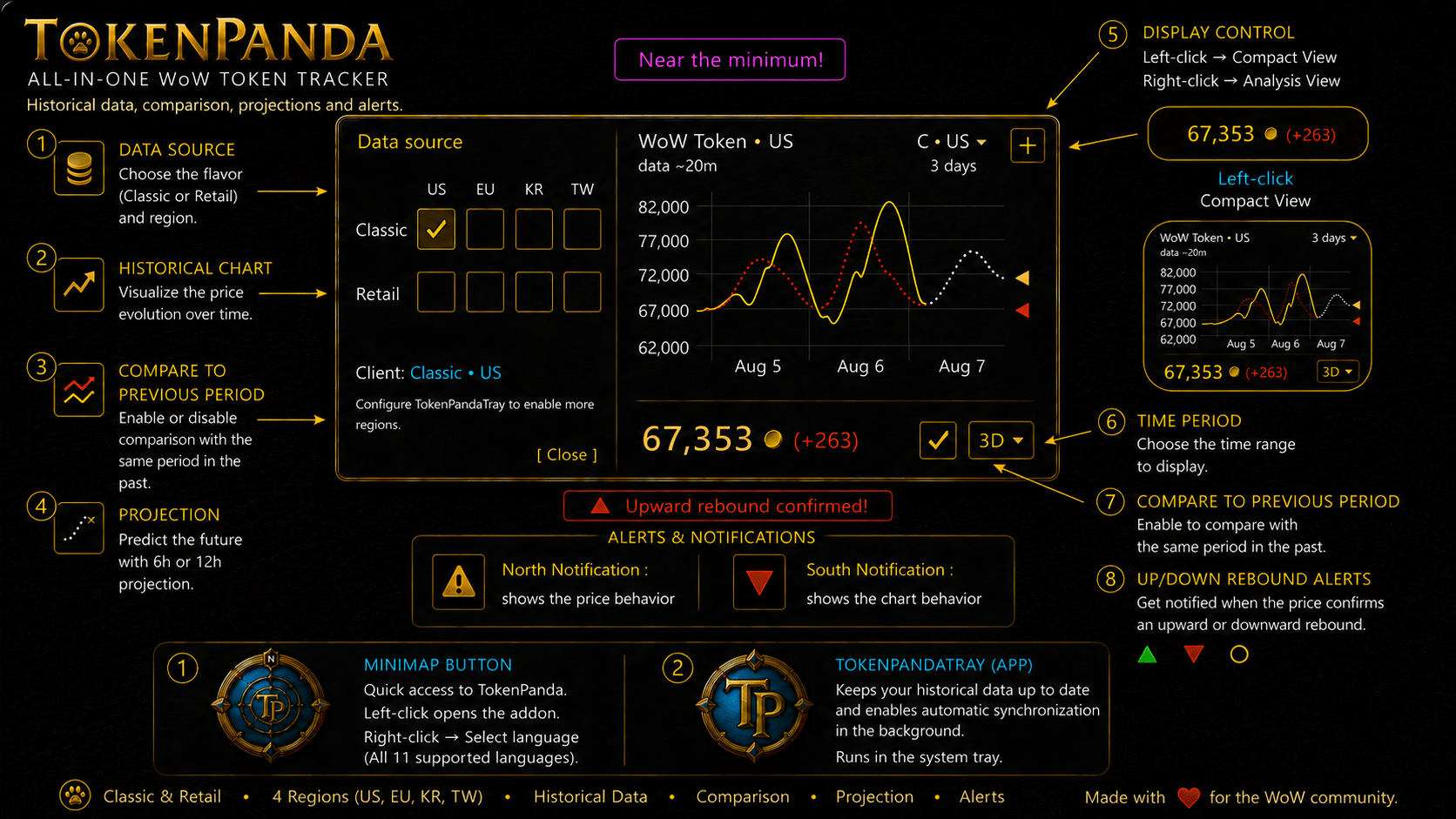
TokenPanda is an independent addon for World of Warcraft Classic and Retail that displays the current WoW Token price, historical price information, previous-period comparisons, approximate trend projections, alerts, and your own WoW Token Purchase History directly inside the game.
TokenPandaTray is the portable Windows companion application used to synchronize and protect the HistoricalData and RealmData used by the addon.
Current release:
TokenPanda 1.5.0 Beta
TokenPandaTray 1.5.0 Beta
TokenPanda Visual Guide
Click any image to view it at full size.
| Main Window | Purchase History | Add / Edit Purchase | Journalator Import |
|---|---|---|---|
 |
 |
 |
 |
| Purchase Markers | Matchbox 2.0 | Price Projection | TokenPandaTray |
 |
 |
 |
 |
Main features
- Support for World of Warcraft Classic and Retail
- Current WoW Token price
- Historical periods: 3D, 7D, 14D, 1M, 3M, 6M, and ALL
- Previous-period comparison
- Approximate 6- and 12-hour trend projection in the 3D chart
- Extended comparison information across the projected area
- Possible rebound and trend-change detection
- Independent upper and lower notification areas
- Visual alerts for trends, proximity to lows, and new lows
- Minimized, normal, analysis, and integrated views
- Independent saved position for each view
- Matchbox 2.0 Flavor + Region selector
- Independent historical data for Classic and Retail
- Account-wide WoW Token Purchase History
- Automatic capture of successful WoW Token purchases
- Manual Add, Edit, and Delete purchase management
- Journalator CSV import
- Built-in Journalator Import Help
- Optional purchase markers on the historical chart
- Character and Realm purchase metadata
- Realm-aware purchase records
- Realm autocomplete with free-text support
- RealmData synchronization through TokenPandaTray
- TokenPandaTray version awareness
- Required HistoricalData and RealmData validation
- TokenPandaTray update warning with contextual
[!]indicator - Improved critical-data protection and recovery
- Cross-tuple charts that stop at the last real sample instead of extending stale data
- Manual Refresh support for non-current tuples
- Full WoW Token price support above 1,000,000 gold
- Compact graph-scale labels for extreme price ranges
- Regions: US, EU, KR, and TW
- Eleven supported interface languages
Compatibility
- World of Warcraft Classic
- World of Warcraft Retail
- Windows 10 or Windows 11, 64-bit, for TokenPandaTray
- Regions: US, EU, KR, TW
Supported interface languages:
enUS · deDE · esES · esMX · frFR · itIT · koKR · ptBR · ruRU · zhCN · zhTWInstallation
1. Install the addon
- Close World of Warcraft.
- Extract
TokenPanda-1.5.0-beta.zip. - Copy the included
TokenPandafolder into the appropriate AddOns directory.
Classic:
World of Warcraft/_classic_/Interface/AddOns/Retail:
World of Warcraft/_retail_/Interface/AddOns/The final path must be:
Interface/AddOns/TokenPanda/TokenPanda.toc2. Start TokenPandaTray
- Download and extract
TokenPandaTray-1.5.0-beta.zip. - Run
TokenPandaTray.exe. - Select your World of Warcraft folder.
- Configure the Classic and Retail regions you want to synchronize.
- Enable synchronization.
TokenPandaTray is portable and requires no traditional installation.
Open TokenPanda
Enter:
/tokenpandaor use the minimap icon.
Controls
- Minimap left-click: show or hide TokenPanda
- Minimap right-click: show or hide the menu
- Drag minimap icon: move it
- Minimize button: compact view
- Right-click minimize button: switch between normal and analysis views
- [H]: open Purchase History
- Flavor / Region selector, such as [C · US]: open Matchbox 2.0
- Red [!] indicator: TokenPandaTray or required-data attention
- Each main view keeps its own saved position
Chart
Available periods:
3D · 7D · 14D · 1M · 3M · 6M · ALL- Yellow line: current period
- Red line: previous equivalent period
- Gray line: approximate projected trend
- Purchase marker: optional personal WoW Token purchase indicator
Move the mouse over the graph to inspect contextual information such as:
- date and time
- current-period price
- previous-period price
- absolute and percentage differences
- projected values
- personal Token purchase information
The approximate projection is available in the 3D chart and can display a 6- or 12-hour horizon.
TokenPanda always preserves the complete WoW Token price.
For extremely large price ranges, only the graph Y-axis scale may use compact K labels to preserve readability. The actual Token price, historical samples, hover values, Purchase History, and price variation remain complete and precise.
Price and rebound alerts
TokenPanda uses two independent notification areas.
Upper notification
The upper notification focuses on price behavior, including situations such as:
- proximity to a minimum
- reaching a minimum
- detecting a new minimum
Lower notification
The lower notification focuses on chart behavior and rebound/trend signals, including:
- possible upward rebound
- possible downward rebound
- confirmed upward rebound
- confirmed downward trend change
These signals are based on recent historical data and can change when new values arrive.
Purchase History
Click on:
[H]to open the account-wide WoW Token Purchase History.
Purchase records can include:
- Date
- Time
- Price
- Character
- Realm
- Flavor
- Region
- Origin
TokenPanda can automatically record successful WoW Token purchases after Blizzard confirms the purchase.
Each successful purchase is stored as an independent record.
Add, Edit, and Delete purchases
Add
Use:
[ Add ]to manually create a purchase record.
Available fields include:
- Date
- Time
- Price
- Character
- Realm
Price can be left blank.
When suitable historical data exists, TokenPanda resolves the most recent historical price at or before the specified purchase timestamp.
It never uses a future historical sample.
Edit
Click an existing Purchase History row to edit it.
Delete
Use the red:
[x]beside a record.
TokenPanda asks for confirmation before deleting the purchase.
Show purchases on the chart
Purchase History includes:
[ Show on chart ]When enabled, personal WoW Token purchases can appear on the historical graph as purchase markers.
The marker uses the exact purchase timestamp and can provide contextual information when hovering over the graph.
Journalator CSV import
Purchase History includes:
[ Import ]to import WoW Token purchase history from Journalator CSV exports.
Typical workflow:
- Open Journalator.
- Select WoW Tokens.
- Choose the desired period.
- Wait for Journalator to finish loading the requested data.
- Click Export Results.
- Copy the CSV.
- Return to TokenPanda.
- Open Purchase History.
- Click Import.
- Paste the CSV.
- Import the records.
TokenPanda also includes:
[ ? ]beside Import to open built-in Import Help.
Journalator may change its interface or workflow in future versions. If the current Journalator interface no longer matches these instructions, refer to the current Journalator documentation.
Realm-aware Purchase History
Purchase records can retain both Character and Realm information.
The Realm field supports autocomplete using available realm information while always remaining a free-text field.
TokenPandaTray 1.5.0 maintains separate RealmData catalogs for supported Classic and Retail versions across:
US · EU · KR · TWRealmData improves features such as:
- Realm selection
- Realm autocomplete
- Realm-aware Purchase History metadata
Matchbox 2.0
Press the Flavor + Region selector, for example:
[C · US]to open Matchbox 2.0.
Available tuples:
Classic
US · EU · KR · TWRetail
US · EU · KR · TWMatchbox 2.0 shows:
- available and unavailable data sources
- current WoW client Flavor and Region
- currently displayed data source
- manual selection state
- data freshness information for non-current tuples
- Refresh support for non-current tuples
Manual selections remain active only for the current session.
After /reload or a complete restart, TokenPanda returns to the data source matching the current WoW client.
When viewing a tuple different from the currently running WoW client, TokenPanda stops the chart at the timestamp of the last available sample instead of extending stale data forward as an artificial flat line.
For fresh data from another tuple, first use Force Data Update in TokenPandaTray and then use Refresh in TokenPanda.
HistoricalData
Historical data is stored independently by Flavor and Region:
Data/<Flavor>/<Region>/HistoricalData.luaExamples:
Data/Classic/US/HistoricalData.lua
Data/Retail/EU/HistoricalData.lua
This keeps Classic and Retail data isolated from each other.
Starting with TokenPanda 1.5.0, this modern Flavor + Region structure is the only supported HistoricalData path.
The previous root HistoricalData.lua compatibility path and addon legacy fallback logic have been removed.
RealmData
TokenPandaTray 1.5.0 maintains realm catalogs at:
Data/<Flavor>/<Region>/RealmData.luaThese catalogs are maintained independently for supported Classic and Retail versions and regions.
RealmData is part of the required modern TokenPanda data structure.
TokenPandaTray
TokenPandaTray synchronizes and protects the data used by TokenPanda.
It maintains:
Data/<Flavor>/<Region>/HistoricalData.lua
Data/<Flavor>/<Region>/RealmData.lua
TokenPandaTray can manage multiple Classic and Retail region combinations independently.
TokenPanda 1.5.0 can identify the TokenPandaTray version that produced synchronized data.
If the detected version is missing, legacy, or below the version required by the addon, a red [!] indicator can appear beside the active Flavor + Region selector.
Selecting the warning opens the TokenPandaTray Update Required notice.
TokenPandaTray also provides critical-data recovery for missing, empty, invalid, or unusable TokenPanda data.
Smart mode
Smart mode detects whether World of Warcraft is running.
Normal periodic synchronization can pause while WoW is running and resume when WoW is not running.
Critical data protection remains available independently of the normal synchronization pause.
“No history”
If TokenPanda shows no historical data:
- Check that TokenPandaTray 1.5.0 or newer is running.
- Confirm synchronization is enabled.
- Verify the World of Warcraft folder.
- Verify the correct Classic/Retail Flavor and region.
- Force a data update in TokenPandaTray.
- Check the current Matchbox 2.0 data source.
- Use
/reloador the available Refresh action after TokenPandaTray has updated the required data.
If TokenPanda detects missing, invalid, legacy, or incompatible required data, the red [!] indicator can provide additional information.
Updating
- Fully close World of Warcraft and TokenPandaTray.
- Replace the old TokenPanda addon folder with the new version.
- Replace the old TokenPandaTray executable with version 1.5.0 Beta or newer.
- Start TokenPandaTray.
- Review the configured Classic and Retail regions.
- Synchronize the enabled data sources.
- Start World of Warcraft.
Do not mix files from different addon versions.
Common problems
The addon does not appear
Avoid a duplicated folder:
Incorrect: AddOns/TokenPanda/TokenPanda/TokenPanda.toc
Correct:   AddOns/TokenPanda/TokenPanda.toc
Locale keys appear on screen
Fully close WoW, replace the complete addon folder, and restart the game.
The chart does not update
Confirm that TokenPandaTray is synchronizing the correct Flavor and Region.
For a tuple different from the currently running WoW client, first force a data update in TokenPandaTray and then use Refresh in TokenPanda.
If Tray still reports that WoW is running after the game closes, restart TokenPandaTray and synchronize again.
TokenPanda shows a red [!]
The detected TokenPandaTray version or required data does not satisfy the current TokenPanda requirements.
Click the [!] indicator to review the detected condition.
Update TokenPandaTray to 1.5.0 Beta or newer and synchronize the required data.
Realm autocomplete is unavailable or incomplete
Update TokenPandaTray to 1.5.0 Beta or newer and synchronize the corresponding Classic/Retail + Region tuple.
The Realm field always remains available for manual text entry.
Projection disclaimer
TokenPanda includes approximate value projections intended only to represent a possible trend.
Projected values:
- are not guaranteed future prices
- can change when new historical data is received
- should not be used as the sole basis for a decision
Every decision must be made under the user's own judgment and must not depend exclusively on the trend prediction provided by the addon.
Security and privacy
TokenPandaTray:
- does not request World of Warcraft or Battle.net passwords
- does not sign in to Battle.net
- does not modify the World of Warcraft executable
- does not require an account
- downloads public data and maintains TokenPanda local data files
Bug reports
Use the project's GitHub Issues section.
When reporting a synchronization or data issue, include:
- TokenPanda version
- TokenPandaTray version
- game Flavor: Classic or Retail
- selected region
- whether World of Warcraft was running
- relevant TokenPandaTray log information when available
Independent project
TokenPanda is independent and unofficial.
It is not affiliated with, sponsored by, authorized by, or endorsed by Blizzard Entertainment or by the operators of any public data service used by the project.
World of Warcraft, WoW, and Blizzard Entertainment are trademarks or registered trademarks of Blizzard Entertainment, Inc.
Author
EZ-Mouse Dev.
Obsessed with perfection.
TokenPanda Team