


Screenshot 2026-01-19 150317.png
Screenshot 2026-01-19 145813.png
Screenshot 2026-01-19 145733.png
Description
TOGBankClassic - Guild Bank Management for Classic Era, TBC, Mists of Pandaria Classic & WoW Forever
Are you tired of logging into multiple bank alts to find items? Does your guild rely on character banks instead of the guild vault? TOGBankClassic is the solution!
TOGBankClassic is a powerful, feature-rich addon that transforms how your guild manages inventory across multiple bank characters. View, search, and request items from all your guild bank alts without ever logging out—all in one convenient interface.
Core Features
One Guild Bank Window
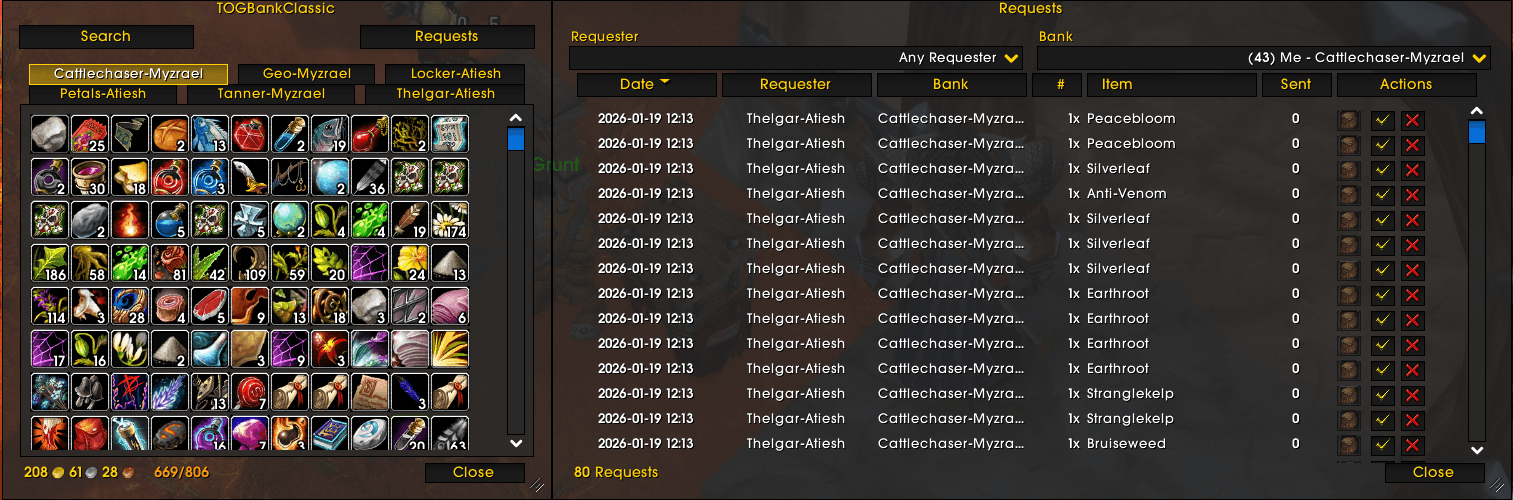
- One-Click Access: the minimap button opens the Guild Bank window — every bank character's items as one sortable list, with Browse, Bankers, Requests, Log and Shopping List tabs, a List Setup tab for whoever edits the shopping list, and a Shop tab for a guild bank that sells
- Bigger When You Need It: a Window and Text Size slider (80% to 200%) enlarges the writing, icons and rows of every TOGBank window together — saved per character, restored at login
- No Alt-Hopping: Never log out to check what's in stock—see everything at a glance
- Real-Time Updates: Inventory automatically syncs across all guild members using the addon
- Mail Integration: Track items in transit—what is waiting in a bank character's mailbox counts as part of the total
- Item Tooltip: Hover any item anywhere in-game to see which bankers have it and their exact stock levels—no addon window needed
- Bankers Tab: one row per bank character — online or not, what it stores (from its guild note), who runs it (officers set that with a right-click; everyone sees it on hover), whether your copy is current, when it last published, and how much it holds. Click one to browse just that bank. Its search box matches a guild's name too, so typing a sister guild's name lists just its bank characters
- Bank Log: what has moved in and out of the guild bank, newest first — deposits, withdrawals, money, and every request as it is placed, filled, cancelled or reopened, with who was on each side where the addon can tell
- Remembers Itself: where you put the window, how big you made it and which tab you were on, through reloads and logouts
- The old tab-per-character Inventory window is still there as
/togbank legacywhile the new one settles
Powerful Search and Filters
- Guild-Wide Search: one search box across every bank character — every word you type has to appear somewhere in the row
- Filters Across The Top: bank, type, subtype, slot, quality, level range and Usable by me (hides anything your character cannot use — wrong class, race, armour or weapon type, or too high a level); they apply as you change them, and Clear puts them all back
- Sortable Columns: click any column heading — name, quantity, banker, type, required level — to sort by it; click again to reverse
- Banker Column: which bank character holds the item, with a dot for that bank's status (green current, red behind, yellow an update on its way)
- Click to Request: click any row to open a request dialog with smart quantity suggestions
- Availability Info: See max requestable amounts based on officer-configured limits
- Full Names: items with a random suffix ("Spiked Club of the Bear") show their full name everywhere, so two variants never read as one
Smart Request System
- In-Game Requests: Guild members request items directly through the addon—no whispers needed
- Request Tracking: View all pending, fulfilled, and completed orders on the Requests tab, in the same striped-row style as the rest of the window, with one search box that matches the date, requester, bank or item
- Timeline Tooltips: Hover any request's date to see when it was submitted, filled, or cancelled (with reason)
- Cancel Reasons: Bankers select a reason before cancelling; reason is stored and shown to the requester, and a cancelled request's date glows gently so you know to look
- Out-Of-Date Requesters: a request from a guildmate whose addon is too old to see the current bank contents shows their version beside their name, so a banker knows why an item may not be where they expect
- Requests Archive: Requests older than a configurable threshold automatically move to an Archive tab, keeping the main view focused
- Stale Request Management: orders left unfilled past your chosen age close automatically, and officers can clear them in one go with the "Cancel Stale" button
- Priority System: Mark requests as Rush, High, Normal, or Low priority for better organization
- Officer Controls: Officers can configure guild-wide request percentage limits (1-100% of inventory)
Automated Order Fulfillment
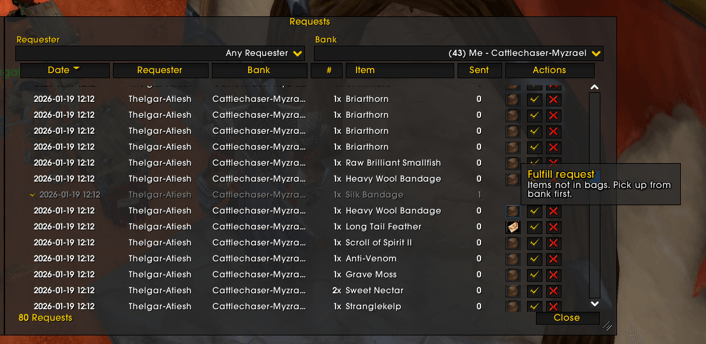
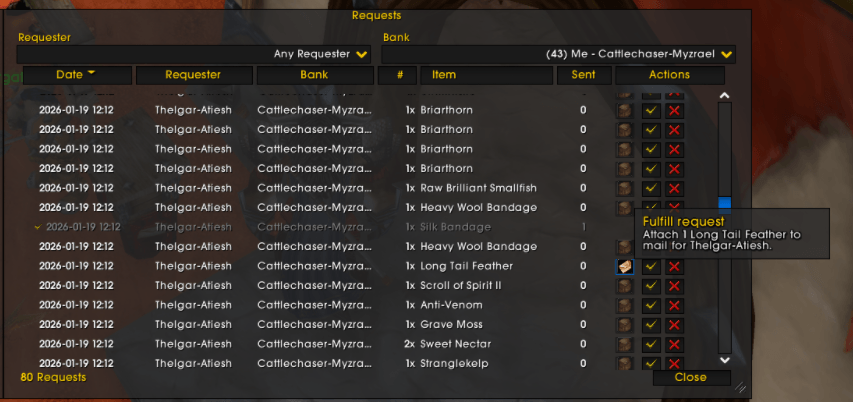
- One-Click Fulfill: Bankers click "Fulfill" button—addon automatically attaches items to mail
- Collect From The Bank: the same button works at the bank — each click pulls out what an order still needs, splitting oversized stacks and putting the spare straight back. Gather at the bank, walk to the mailbox, keep clicking to send
- Smart Stack Splitting: Automatically splits oversized stacks with confirmation dialogs
- Example: Request for 2 Felcloth from a 5-stack? Addon prompts to split precisely 2 items
- Complex requests (e.g., 175 Runecloth from mixed stacks) handled automatically
- Optimal Stack Selection: Intelligent bin-packing algorithm selects best stack combinations
- Visual Indicators: Button icons change to show split needed vs. ready to mail
- One Mail Per Person: several orders for the same guildmate go in one mail — click Fulfill on each and they are added to the mail already open for them, then Send once
- Fulfill Oldest: one envelope button that works the queue oldest-first — at the mailbox it picks the oldest order you can fill, adds that person's other orders, does every stack split at once, attaches and sends; at the bank the same button collects what the open orders need, swapping unneeded stacks into the bank when your bags are full
- Mailbox Window: a striped-row view of your inbox that opens beside the mail frame — one row per mail, click to see each attachment with its tooltip, filter by item, sender or subject, take a needed item with a click, Take Needed to collect only what the open orders are short of, and an envelope on each row to return a mail to its sender
- Stay-Online Line: after filling orders, the bottom bar of every window tells a bank character whether the update has reached anyone yet — red until it has been sent, amber once someone has it, green when a guildmate confirms — so nobody logs off leaving the guild seeing stock that is already gone
- Instant Updates: the moment a bank character fills an order, every guildmate's Requests tab shows it — the fill travels ahead of the bulk sync
Guild Shop, Donation Points and One Price List
- Shop Tab: for a guild bank that sells, an officer switches on a fifth tab — the bank's items with an Est. column showing what each is worth, from your price sources, and a hover that says where the figure came from and how old it is. Off by default; most guild banks are not shops, and off, nothing changes
- Shop Orders: while the shop is on, every request is a shop order — the request dialog shows the estimate (with any discount), the order remembers what you were shown, and the bank character sets the real price when it is filled
- Open And Closed: officers close ordering guild-wide for a stocktake or while nobody is around to fill orders, put the whole shop on sale with a percentage Shop discount, and take a single item off the list with Ctrl+right-click (it stays visible, marked not for sale)
- Donation Points: what you mail to a bank character earns points, valued the moment it arrives at a rate the officers set — a cautious market figure, never a spike, never less than a vendor pays — written down once and never changed.
/togbank donationsprints the board; the Donations window shows it to everyone with your own balance; officers can correct a balance with a reason that is kept - One Price List: an officer names a Price authority, and that character's price sources become the guild's price list, sent to everyone and kept between sessions — so two bank characters value the same donation the same way, and the estimate you see does not depend on what you have installed
Guild Shopping List
- Shopping List Tab: what the guild wants crafted or gathered, how many the guild bank already holds, and how many are still needed, with a + on each crafted item to see what it takes — and underneath, every reagent the whole list takes, with what the guild bank holds, what the shopping-list character already has, what you hold yourself (bags and bank), and what that character is still missing, so the guild can see at a glance how much of each it still has to send
- The Shopping-List Banker: the character with
[GSL]in their public note is treated like a bank character — their bags, bank and mail are shared with the guild — but view-only, since the guild sends to them rather than ordering from them - Who To Send To: the tab names the guild's shopping-list character (the one with
[GSL]in their public note), online first, so everyone knows who to mail what they gather - Order From The List: click any row to request that item from the bank character holding the most of it — the same request window, limits and rules as the Browse tab
- Still Needed Stands Out: on the Shopping List tab, the Still needed number gently pulses until the bank has enough, and while the guild has gather dates set they pulse gently on the bottom line
- List Setup Tab: the guild master, officers and a member with
[GSL]in their public note see what is on the list in a box at the top — laid out like TOG Profession Master's shopping list, with -, + and a red x on each row, and a click on a crafted item to see the reagents it takes — and search any recipe or any item in the game by name underneath to add it (items stay searchable whichever profession is picked). They also set the dates the guild is gathering for. Everyone else sees the list but cannot change it - Reagent Tracker: a small window of the reagents still to gather that stays up while you play and updates as you loot — open it from the Shopping List tab or with
/togbank tracker - One List For The Guild: changes reach everyone online straight away and anyone offline when they next log in
- Replaces GuildShoppingList: a guild that used it gets its list and gather dates copied across automatically. Keep GuildShoppingList turned on until the guild master, an officer or the
[GSL]member has logged in once with both addons — the copy can only read GuildShoppingList's list while that addon is enabled. After that, GuildShoppingList can be removed
One Bank Across Sister Guilds
- If your guild lists sister guilds in the Guild Roster addon, an officer can open the bank to them: their bank characters appear alongside yours — on the Bankers tab, in the Banker column, in tooltips and in the request dialog, each tagged with its guild's name — and their members browse your bank characters and place orders with them like your own
- Orders, fills, bank contents and who runs each bank character travel between the guilds on their own. Off by default; both guilds' officers switch it on, and a sister guild's bank characters are recognised by the
gbankmark in their public note - Each guild keeps its own officer settings — request limits, the shop, the discount and the sister-guild switch itself are never changed by the other guild
- Keeps going when someone logs off: if the sister guild member you were getting the bank from goes offline, the next online member of that guild is asked straight away
- Catch up now:
/togbank ssyncasks your sister guilds for their bank at once, and/togbank ssync Nameasks one member (the realm can be left off) - With GreenWall: if your guilds share chat through GreenWall, opening the Guild Bank window tells the other guilds you are there, so their copy of your bank updates within seconds
Blazing-Fast Synchronization
- Bank contents travel as compact numbers, not item links. Your own client rebuilds each item from its ID, so nothing is sent that your game already knows — measured at 85% less data than the old format across 227 items on a live guild.
- Nothing is sent when nothing changed. A bank character's contents get a version stamp when they are scanned — only when something actually changed, so opening the bank to look costs nothing — and members compare stamps before asking for anything. A stamp says when it was published, so "who has the newest copy" is one glance.
- Seconds, not minutes. When a bank character's new version is announced — on the ten-minute check-in, when they open the Inventory window or type
/togbank share, or the moment they hide or show an item — everyone online who is behind on it has the update within seconds; the announcement itself is the offer. - Only what changed. Catching up on a bank you already hold sends just the few things that moved since your copy, checked against the bank character's own fingerprint before it is applied — a fraction of the size of the whole bank. Someone who has never seen that bank, or has been away a long time, still gets the full contents.
- Tiny messages. Every bank character has a permanent four-digit number, the same on everyone's screen, so a guild-wide check-in is a few hundred bytes and a "I have newer copies of these" reply is a single message however many banks it covers.
- No single bottleneck. Data comes from whichever guild member has the freshest copy, not from one designated player who has to be online. Downloads from different guildmates run at the same time, and the short back-and-forth that sets them up travels on a fast lane of its own, so it is answered even while the other player is busy sending to someone else.
- Nobody is refused. A player sends to three people at a time; anyone else is told their place in the queue and waits their turn, or asks someone else who has the same bank.
- The colour tells you where you stand. On the Bankers tab each bank's Status is green Current, red Behind (a newer copy exists and is on its way), yellow Not published yet (your own bank, read but not sent to the guild yet), Old format (that bank has not published on this version yet), grey No data or Newer copy unreachable (the only newer copy is on a guildmate whose addon is too old to send it); the old Inventory window's tabs are coloured the same way. Hover for who said what.
- Log in and catch up. Anything you missed while offline arrives shortly after you log in, without you asking.
- Built to stay quiet. Traffic is queued and paced so a busy guild chat doesn't get flooded and messages don't arrive garbled. In a raid group it pauses altogether, so raid addons have the chat channel to themselves — the bottom bar says so, and a setting lets you keep syncing anyway.
- Shared accounts handled. A bank character played from more than one computer never publishes a stale vault over the guild's newer copy: that computer's own tab goes red, says what to open, and publishes only once it has caught up.
- Nothing to configure. All of this runs on its own; the one sync setting is the raid pause.
Advanced Features
For Guild Members
- Minimap Button: Quick access to the Guild Bank window—toggle visibility in options
- Request History: View your past requests with fulfillment status
- Fair Distribution: Officer-configured limits ensure equitable access to guild resources — enforced however an order is placed, and your own open orders count towards them
- Donation Points: what you mail to the bank earns points on a board the whole guild shares; your balance is on the Donations window's status line
- Window Persistence: All window sizes and positions save automatically across reloads, per character; a window that has ended up off screen comes back with Recenter All Windows under Settings > Appearance
- Visual Consistency: every window shares the same title, bottom status bar, thin scrollbars and borders, and a ? beside Close that explains it — on the Guild Bank window it pulses gently until you have hovered it once on each tab
- Escape Closes: Escape closes every open TOG Bank window like the game's own windows — a setting under Appearance turns that off
- Item Links Work Like The Game's: Shift-click an item to link it in chat, Ctrl-click to preview it in the dressing room, following your own key bindings
- Mute Warnings: Checkbox to hide low-priority warnings for cleaner chat
For Bank Alts
- Automatic Detection: Add "gbank" to Public Note or Officer Note—addon handles the rest. Write what the bank keeps beside it ("gbank herbs, potions") and it shows in the Bankers tab's Stores column
- Auto-Scan: Configure to scan bank/bags/mail automatically when opened
- Mail Fulfillment: Receive requests, click Fulfill, send mail—streamlined 3-step process, with the recipient filled in for you
- Highlight Needed Items: tick Highlight needed items on the Requests tab and everything in your bags and bank that no open order needs is greyed out, so what to send stands out — only the exact variant ordered, for items with a random suffix. It works with the default bags (on WoW Forever the Combined Backpack and the bank tabs too), Bagnon, ElvUI and Baganator, and is remembered between sessions
- Bank Collection: click the same Fulfill button at your bank to pull out what open orders need before you head to the mailbox — and when your bags are full, it swaps something no order needs into the bank to make room
- Hide Items From The Guild: right-click any item on your own tab to hide it — your hearthstone, stock you are holding back, old gear. It stays on your tab greyed with a red mark; to everyone else it is as if you do not have it. Right-click again to show it. A Bank setting hides every soulbound item at once
- Numbered Automatically: every bank character gets a permanent four-digit number the first time its bank is scanned — nothing to type, and it shows beside the name in
/togbank roster - Donation Tracking: Optional feature to accept and track donations from guild members; a mailed donation is logged as a deposit, naming the sender, when you take it out of the mail
- Know Before You Log Off: the bottom bar tells you whether your latest update has reached the guild, and warns you in chat if you start the logout countdown while it has not
- Share Button: a circling-arrows button beside the settings gear publishes your bank to the guild straight away, the same as
/togbank share— handy right after you have moved items
For Officers
- Request Limits: Set max request percentage (e.g., 50% = members can request up to half of available stock)
- Protects Unique Items: Always allows requesting at least 1 if available (gear, BoE epics, etc.)
- Syncs Guild-Wide: your settings reach everyone online straight away, and anyone who was offline picks them up when they next log in — you only set them once
- Auto-Cancel Threshold: choose how many days an unfilled order stays open before it is closed as stale
- Custom Cancel Reasons: write your own reasons for cancelling an order, and choose which ones members and bankers each see
- Help Notes: add a note of your own to each window's help tooltip, so guild-specific rules are visible where people need them
- Who Runs Each Bank Character: right-click a row on the Bankers tab and type a name (guildmates' names complete as you type) or anything at all; it shows to the whole guild on hover
- The Shop: the Shop switch, Shop ordering open, Shop discount, and Ctrl+right-click to take one item off sale
- Donations And Pricing: Donation points per gold, and the Price authority whose price sources become the guild's one price list
- Sister-Guild Bank: open the bank to the guilds listed as sisters in Guild Roster — off by default, and both guilds' officers switch it on. Your settings stay yours; a sister guild's officers cannot change them
- Settings That Stick: every officer setting knows which change is newest, so a bank character who logs in holding old values can never undo yours
If Something Goes Wrong
- Built-in logging. Turn it on with
/togbank debug, send it to its own chat tab with/togbank debugtab, and grab a copy for a bug report with/togbank debuglog. Off by default, so it costs you nothing when you're not using it. - Update notifications. You're told when a newer version is out, so you're not silently running an old one while your guild has moved on.
- Diagnostics on request. If a problem needs digging into, there are extra tools behind
/togbank devthat support can walk you through on Discord.
How It Works
Setup (One-Time)
- Bank Characters: Add "gbank" to character's Public Note or Officer Note
- Check It Is Enabled: In AddOns settings, open the Bank section and make sure Enable for <character> is ticked. That is the only setting that governs whether this character's bank is scanned and shared, and it is on by default — so usually there is nothing to do here.
- Scan Inventory: Open your bank and then close it — the scan runs on close. The guild picks it up on the next ten-minute check-in, or straight away if you type
/togbank share - Done! Inventory is now visible to all guild members using TOGBankClassic
- Shopping List (optional): put
[GSL]in the public note of the character the guild sends gathered materials to. It can edit the shopping list, is named on the Shopping List tab, and shares its bags, bank and mail as a view-only bank — open its bank and a mailbox once so everything it holds is counted. Addgbankas well to make it an ordinary bank people can order from
Daily Usage
For Guild Members:
- Click the minimap button to open the Guild Bank window
- Type in the search box (e.g., "Felcloth"), or narrow the list with the filters across the top
- Click the row → dialog shows available quantity
- Enter amount → click "Send Request"
- Wait for mail notification—it's that easy!
For Bank Alts:
- Open the Guild Bank window → the Requests tab (it opens there by itself when you click the mail frame's Send Mail tab on a bank character)
- See all pending requests with quantities
- Click "Fulfill" on any request — or the Fulfill Oldest envelope to work the queue oldest-first
- Addon attaches items (auto-splits if needed) and fills in the recipient
- Send mail → done! Several orders for one person go in the same mail
Why Choose TOGBankClassic?
Efficiency
- Time Savings: What once took 10+ minutes of alt-hopping now takes 30 seconds
- Bandwidth Friendly: bank contents travel as compact numbers instead of full item links — measured at 85% less data across 227 items on a live guild's bank characters
- Zero Lag: Smart throttling and caching prevents performance issues
Reliability
- No lost orders: every change to an order is tracked, so two people acting at once can't overwrite each other
- Self-correcting: if your data drifts out of step with the guild, the next sync repairs it — and if it ever gets badly out of shape,
/togbank wipere-fetches everything from your guild - Fails safely: when something goes wrong you get a message explaining it rather than silence
User Experience
- Intuitive Interface: one window with Browse, Bankers, Requests, Log, Shopping List, List Setup (for the list's editors) and (for a shop) Shop tabs, in the same striped-row style throughout, and a size slider for anyone who finds the lists hard to read
- Smart Defaults: Works out-of-box with sensible settings—configure only if needed
- Error Handling: Graceful failures with informative messages (never crashes silently)
Active Development
- Regular Updates: Frequent bug fixes and feature additions
- Community-Driven: Features requested by actual guild bank managers
- Well-Documented: Extensive in-code documentation and design docs
Slash Commands
Everyday Commands
/togbank— open or close the Guild Bank window, the same as the minimap button (shift-click that for the options)/togbank legacy— open or close the old Inventory window, a tab per bank character/togbank mailbox— open the Mailbox window while you are at a mailbox (it opens by itself for bank characters — or for every character, or never, under Settings > General; there is also a TOG Bank button on the mail frame's title bar)/togbank donations— the donation points board and your own balance;/togbank donations windowopens the Donations window;/togbank donations <name>for one member;/togbank donations logfor the entries your own bank character wrote; officers correct a balance with/togbank donations adjust <name> <points> <reason>/togbank help— list every available command/togbank roster— list the bank characters with their four-digit numbers/togbank sync— manually pull the latest data from your guild (automatic every ten minutes)/togbank ssync— ask your sister guilds for their bank now;/togbank ssync <name>asks one sister guild member (realm optional). It tells you why if nobody can be asked/togbank tracker— open or close the Reagent Tracker, a small window listing the shopping list's reagents still to gather, which stays up while you play/togbank share— announce your own bank's current version to the guild now (automatic every ten minutes, whenever you open the Inventory window, and the moment you hide or show an item); on a bank character the circling-arrows button beside the settings gear does the same/togbank version— show which version you are running/togbank wipeframes— forget every saved window position and size: open windows recentre at once, sizes go back to default on the next reload. For a window that is simply off screen, Recenter All Windows under Settings > Appearance moves it without touching sizes/togbank helpreset— forget which help icons you have hovered, so they pulse again
/bank and /gbank can be enabled as shortcuts in the options, if nothing else has claimed them.
Resetting Data
/togbank wipe— clear this guild's stored data (it re-syncs from your guild afterwards)/togbank wipeall— clear everything and start fresh
Troubleshooting
/togbank debug— turn debug messages on or off/togbank debugtab— send debug messages to their own chat tab instead of cluttering yours/togbank debuglog— print a recent slice of the log to paste into a bug report
There are further diagnostic commands behind /togbank dev, intended for development and support. /togbank dev help lists them; you should not need them in normal play.
Configuration
Access Options
- Press ESC → Options → AddOns → TOGBankClassic
- Or shift-click the minimap button
Key Settings
- General: Minimap button, hide in combat, Window and Text Size (80% to 200%, per character), chat message volume, sounds, Keep syncing in a raid group (off by default), Open the Mailbox window at a mailbox (on by default) and Mailbox window on non-bank characters (off by default)
- Appearance: A transparency slider for each window, Reset All Windows to Solid, Recenter All Windows for a window lost off screen, Close windows with Escape (on by default), and Pulsing glow on cancelled requests (on by default)
- Bank (bank characters only): Enable for <character> — the one switch that governs whether this bank is scanned and shared — Hide soulbound items from the guild, and the donation options
- Officer, in three sections: Request settings — request limits and how long requests stay open; Shop — Shop turns the Shop tab on for a guild bank that sells (off by default), Shop ordering open is the shop's open/closed sign, Shop discount a percentage off every estimate on the Shop tab; Donations and pricing — Donation points per gold, what a donation earns (1 by default), and Price authority, the character whose price sources become the guild's one price list; Sister guilds — Sister-guild bank, which opens this bank to the guilds listed as sisters in Guild Roster (off by default; both guilds' officers must list each other there, or nothing is shared)
- Debug: Persistent logging and debug categories
Dependencies & Compatibility
Required
All of these install automatically through the CurseForge app — you do not need to fetch them yourself.
- Ace3 — core framework
- VersionCheck-1.0 — tells you when a new version is out
- LibGuildRoster — guild roster and online/offline tracking
- AceCommQueue — keeps addon traffic orderly so nothing arrives garbled
- ItemDB — the offline item database bank contents are named from, suffixes included
- DeltaSync — the shared guild-sync engine
- LibAceGUIWidgets — the shared search box, date picker and window widgets
- ProfessionDB — the recipe database the Shopping List's recipes and reagents come from
- LibDBIcon-1.0 — the minimap button (on WoW Forever it comes built in, since it is not published there)
Optional — GreenWall
If your guild and its sister guilds share chat through GreenWall, TOG Bank uses it to let the other guilds know when you open the Guild Bank window, so sister-guild banks update faster. Without it everything still works; updates just arrive on the normal ten-minute cycle.
Optional — bag addons
The "Highlight needed items" option (for bank characters, on the Requests tab) works with the default Blizzard bags and with the bag addons below. The look differs depending on which one you use — that is a limit of what each addon lets others change, not a bug:
- Bagnon — dims the items you don't need. Limited to the first 20 distinct items.
- ElvUI — dims the items you don't need, in both the bag and bank windows, using ElvUI's own shading.
- Baganator — puts a gold marker on the items you do need. Nothing is dimmed, because corner markers are the only thing Baganator lets other addons add.
Compatibility
- World of Warcraft Classic Era (Interface 11509)
- World of Warcraft The Burning Crusade (Interface 20506)
- World of Warcraft Mists of Pandaria Classic (Interface 50504) — new and not yet tested with a guild; please report anything that looks wrong
- World of Warcraft Forever (Interface 16001) — new: checked on one bank character, but syncing between several players there has not been tried yet; please report anything that looks wrong
- Works alongside other guild management addons
- Other bag addons are not interfered with, but item highlighting only supports the four listed above — everything else in the addon works normally regardless of which bag addon you run
Works With the Rest of the TOG Addons
TOG Profession Master
If your guild also runs TOG Profession Master, the two talk to each other automatically — there is nothing to set up on this side beyond having TOGBankClassic loaded.
- Crafters can see guild bank stock without leaving the profession window. A [Bank] button appears next to any reagent your bankers actually hold — in the recipe breakdown, the cooldown panel, shopping lists and the Reagent Tracker. If nothing is in stock, no button.
- They can request reagents from there too. Click [Bank], pick which banker to ask, choose a quantity, and the order arrives in TOGBankClassic like any other request — including your officer-configured limits.
- No duplicate bookkeeping. TOG Profession Master reads the same stock figures this addon already keeps, so there is only ever one set of numbers to trust.
TOG Tools
If you also run TOG Tools, its Logs > Guild Bank tab — empty on Classic Era on its own, because Era has no guild bank — fills in with this addon's bank log: every bank character's deposits, withdrawals and money, and every request as it is placed, filled, cancelled or reopened, as they happen. TOG Tools keeps the long history; this addon keeps only the most recent entries for its own Log tab. Nothing to set up on either side.
Shared Foundations
The TOG addons are built on a common set of libraries rather than each reinventing the same plumbing:
- DeltaSync — the guild-sync engine that keeps data current across members
- LibGuildRoster — guild roster and online/offline tracking
- AceCommQueue — keeps addon traffic orderly so nothing arrives garbled
- ItemDB — an offline item database, so item names and details work without waiting on the game to load them
- LibAceGUIWidgets — the search box, date picker, pulsing highlights and window-position memory the TOG windows share, so they all look and behave alike
- VersionCheck — tells you when a newer version is out
In practice that means a fix to the shared sync layer benefits every TOG addon at once, and running several of them costs less than the sum of their parts. Each is published separately and installs automatically through the CurseForge app.
Recent Updates
v1.7.1 - WoW Forever
New
- TOG Bank now installs on WoW Forever as well as Classic Era, The Burning Crusade and Mists of Pandaria Classic. It has been checked on one bank character, but syncing between several players there has not been tried yet, so please report anything that looks wrong. The minimap button comes built in on WoW Forever, so nothing extra needs installing for it there.
- On WoW Forever, order highlighting now works: with it switched on, a bank character's bags (including the Combined Backpack) and bank tabs are greyed out apart from the items open orders still need. It follows you as you switch bank tabs.
Fixed
- A bank character's own bank no longer shows as "Old format" on the Bankers tab in the moments after it is first read. It now says "Not published yet" in yellow until it goes out to the guild.
v1.7.0 - The Shopping List
New
- A Shopping List tab in the Guild Bank window: what the guild wants crafted or gathered, how many the guild bank already holds, and how many are still needed. Underneath is every reagent the whole list takes, with what the bank holds, what you hold yourself (bags and bank), and what is still missing, and a + on each crafted item shows what that item takes.
- Click a row on the Shopping List tab to request that item, or that reagent, from the bank character holding the most of it.
- A List Setup tab for the guild master, officers, and a member with [GSL] in their public note (the same marker GuildShoppingList uses). What is on the list sits in a box at the top, laid out like TOG Profession Master's shopping list: - and + change a count and the red x takes it off. Underneath, search for any recipe or item by name to add it. Set the dates the guild is gathering for here too.
- On the Shopping List tab, the Still needed number gently pulses until the bank holds enough, and the gather dates on the bottom line pulse while they are set.
- The Shopping List tab names the guild's [GSL] character, online first, so everyone knows who to send what they gather.
- The [GSL] character's bags, bank and mail are shared like a bank character's, and the reagent list has a GSL column for what they already have. Missing is what they still need. They show on the Bankers tab as a view-only bank. On the [GSL] character itself, the You column counts the same bags, bank and mail, so the two match; the mail counts from the last time that character opened a mailbox.
- In List Setup, click a crafted item to see the reagents it takes, laid out like TOG Profession Master's shopping list. Any item in the game can be searched and added, whichever profession is picked, so hand-ins such as the E'kos for the Jujus can go on the list.
- A Reagent Tracker: a small window with the reagents still to gather, what the bank holds and what you hold yourself, updating as you loot. Open it from the Shopping List tab's Tracker button or with /togbank tracker; it stays up while you play and Escape leaves it alone. Like every window, it has its own transparency slider in the Appearance settings.
- If your guild used GuildShoppingList, its list comes across by itself: the first time the guild master, an officer or the [GSL] member logs in with both addons turned on, the list and its gather dates are copied into the Shopping List. It happens once, and anything it could not match to a recipe or item is named in chat so it can be added by hand.
- A change made by the [GSL] member reaches guildmates who are offline at the time when an officer or bank character next shares the guild's settings, which can take up to about ten minutes after they log in.
- Guildmates still on an older version of TOG Bank keep syncing the guild bank as before, but they do not see the Shopping List or the [GSL] character's stock until they update. The [GSL] character's own player needs this version for their bags, bank and mail to be shared.
- Required: this version needs ProfessionDB, which the CurseForge app installs for you.
Fixed
- After a TOG Bank window closed, its help "?", settings gear, share button and status-bar text could turn up on the next addon window that opened. Closing a TOG Bank window now takes all of them with it.
- When two officers changed the same guild setting at the same moment, members could keep switching between the two values. Everyone now settles on the same one.
v1.6.1 - Sister-Guild Failover
New
- If your guild also runs GreenWall to share chat with its sister guilds, opening the Guild Bank window now lets the other guilds know you are there, so their copy of your guild's bank starts updating within seconds instead of waiting for the next ten-minute cycle. It needs the sister-guild bank switched on and GreenWall connected; without GreenWall nothing changes.
- The Bankers search box now also matches a guild's name, so typing a sister guild's name lists just its bank characters.
- TOG Bank now installs on Mists of Pandaria Classic as well as Classic Era and The Burning Crusade. It is new there and has not yet been tested with a guild, so please report anything that looks wrong.
- A new Appearance setting, Close windows with Escape, is on by default: Escape closes every open TOG Bank window, like the game's own windows. Turn it off to keep them open when you press Escape.
- /togbank ssync asks your sister guilds for their bank right now instead of waiting for the next automatic update. Add a name, /togbank ssync Name, to ask one sister guild member directly; the realm can be left off. If nothing can be asked, it tells you why: the sister-guild bank is switched off, the name is not in a sister guild, or that player is offline.
Changed
- The minimap button library (LibDBIcon) is now installed alongside TOG Bank instead of being bundled inside it, so it stays up to date on its own. The CurseForge app installs it for you; if you install addons by hand, install LibDBIcon-1.0 as well.
Fixed
- Escape now closes the Guild Bank window. Before, it only did if you had opened one of the older windows (such as the Inventory or Search window) earlier in the session. Closing the older Inventory window also no longer closes the Guild Bank window with it.
- The Cancel Stale and Fulfill Oldest buttons from the Requests window can no longer be left behind on another window (TOG Bank's or another addon's) after the Requests window closes for good, such as when your requests move into the Guild Bank window's tab.
- Shift-clicking the minimap button opens the options, as its tooltip says; this page used to say right-click.
- Players outside your guild (and outside a sister guild you have opened the bank to) can no longer ask your addon for your guild's order history.
- A sister guild's officer settings no longer change yours. Your request limit, shop, discount and Sister-guild bank switch are set by your own officers only. Before, a sister guild's bank character or officer could overwrite them.
- Who runs each bank character now shows up in the sister guild too. Before, it usually did not, depending on who happened to answer the sync.
- Closing a window and then changing Window and Text Size no longer resizes a window belonging to another addon.
- Changing Window and Text Size no longer pulls the Search and Requests windows away from the side of the old Inventory window.
- An officer changing one guild setting could accidentally undo another one for the whole guild, if their game had not yet received the latest value. This is how the Sister-guild bank switch could end up turned off guild-wide. Now changing a setting only ever sends the setting you changed. Officers still on the previous version can still cause this until they update.
- Shift-click and Ctrl-click on an item anywhere in the addon now do exactly what they do everywhere else in the game: Shift-click puts the item link into your open chat box (or the auction house search box, or a macro you are editing), and Ctrl-click previews it in the dressing room. They follow your own key bindings for "chat link" and "dress up", so a rebound key works here too. Before, Ctrl-click on a Browse or Shop row opened a request instead of a preview, and the keys were fixed.
- With Window and Text Size set below 100%, a window shrunk to its smallest size no longer has its filter row and buttons spilling past the border. The game's own dropdowns and buttons do not shrink with the text, so a window's smallest size now stays at what it is at 100% while the text gets smaller. Changing the size while a window is open also takes effect on that window at once instead of after the next reload, and a window sitting under its new minimum is enlarged to fit.
- When a bank character in a sister guild logs off, the other guild now notices as soon as the game says so. It stops asking that character for the bank, asks the next online member of that guild straight away instead of waiting for the next ten-minute update, and the Bankers tab shows them offline. Before, a logged-off sister-guild bank character could keep showing as online to the other guild, and that guild's copy of the bank fell behind while it kept asking someone who was not there.
v1.6.0 - The Shop Tab
New
- A share button for bank characters. On a bank character, a circling-arrows button now sits beside the settings gear at the bottom of the Guild Bank window. One click publishes your bank to the guild straight away, the same as typing
/togbank share— handy right after you have moved items and want guildmates to see them without waiting for the next automatic update. Other characters do not see the button. - Bigger text, icons and rows, on a slider. Window and Text Size in the addon's General options enlarges the writing, the icons and the row height of every TOGBank window together, from 80% up to 200%. It is your own setting, kept per character, and the windows come back that size the next time you log in. Made for anyone who finds the bank list hard to read. It covers the lists on every tab (their rows, text, icons and column headings), the Requests tab's action icons, the status line, the filter rows along the top (search boxes, dropdowns, tick boxes and buttons), the buttons along the bottom of the window, the officers' Settings tab on the Requests tab (its number boxes, cancel-reason list, tick boxes and Save button), the menus and the dialogs. Still at the normal size: the frames drawn around dropdowns and the filter rows' level boxes (their writing grows), the numbers you type into the level boxes, the tab buttons and the scroll bars.
- A Shop tab, for guild banks that sell. It is off unless an officer turns it on (Shop, under Requests in the addon's options) — most guild banks are not shops, and off, nothing changes. On, the Guild Bank window gains a fifth tab: the bank's items with an Est. column showing what each is worth, as an estimate from your price sources (type
/itemdbto pick sources and scan the auction house), and a hover that says where the number came from and how old it is. Every figure is an estimate — the bank character sets the real price when your order is filled. The whole guild sees the same tab within seconds of the switch. - Officers can close shop ordering guild-wide. Untick Shop ordering open in the Shop section of the officer settings for a stocktake, a pricing mistake, or while nobody is around to fill orders; anyone who clicks an item is told the shop is not taking orders right now. Tick it again to reopen. This is the shop's sign only: with the Shop off it is greyed out and a plain bank's requests are never affected.
- Officers can put the whole shop on sale. Shop discount in the shop settings takes a percentage off every estimate on the Shop tab — set 50 and every item shows at half its market estimate, the hover says what the discount was taken from, and the tab's status line says 50% OFF so nobody mistakes the sale price for the market. The bank character still sets the real price when an order is filled.
- Officers can take a single item off the shop list. Ctrl+right-click any row and it is marked (not for sale) for the whole guild: it stays in the list so everyone can see the bank holds it, but a click on it says an officer has taken it off the shop list instead of opening a request. Ctrl+right-click again to put it back on sale. The hover on a row tells an officer which way the click will go.
- Donation points. What you mail to a bank character is now worth points, valued the moment it arrives from the bank character's price sources (a cautious figure — the lowest current listing or the historical price, never a spike — and never less than a vendor would pay), at a rate an officer sets (Donation points per gold, 1 by default). The value is written down once and never changes, however the market moves later. Points are the whole guild's record, not one bank character's:
/togbank donationsprints the board and your balance in chat, and/togbank donations windowopens the Donations window, which shows the same board to everyone with your own balance on its status line. Officers can correct a balance, with a reason that is kept, using/togbank donations adjust. Scores earned before this version are carried forward as they were. - Officers can say who runs each bank character. Right-click a row on the Bankers tab and type a name — start typing and guildmates' names complete, as in the mail window — or anything at all, such as "shared account". It shows for the whole guild when you mouse over that banker.
- While the shop is on and ordering is open, every request is a shop order — there are no free requests past the price. Whichever tab or window you order from, the request dialog shows the estimate for that item (with the discount, if there is one) and the order remembers what you were shown: hover the date of any order on the Requests tab to see it. An item nothing can price yet can still be ordered; the dialog says so, and the bank character prices it when they fill it, as with every order.
- One price list for the whole guild. Until now every client priced from its own price addons, so two bank characters could value the same donation differently, and the estimate you saw in the shop depended on what you had installed. An officer now names a Price authority (in the shop settings): that character's price sources become the guild's price list, sent to everyone in the guild and kept on each client between sessions. Donations are credited from it wherever they arrive, the Shop tab and the request dialog show its figures, and the hover says so — "guild list (Name), min buyout, 3h old". Items the list does not know fall back to your own sources as before; anything below what a vendor pays is still valued at the vendor price. Leave the field blank and nothing changes. The list refreshes when the authority's price data changes (at most hourly otherwise), and the Shop tab's status line names whose list you are looking at and how old it is.
- One bank across sister guilds. If your guild lists sister guilds in the Guild Roster addon, the bank now spans them: their bank characters appear alongside yours — on the Bankers tab, in the Banker column, in tooltips and in the request dialog — each tagged with its guild's name in grey, and their members can browse your bank characters and place orders with them just as your own members do. Orders and their fills travel between the guilds, so the bank character sees an order from a sister guild's member within seconds and the member sees it filled. It is off until an officer ticks Sister-guild bank in its own section of the officer settings — and the sister guild's officers tick it on their side too; the list of which guilds are sisters lives in Guild Roster's settings. Bank characters in a sister guild are recognised by the same
gbankmark in their public note (officer notes do not cross guilds). Those notes reach a sister guild through Guild Roster from its version 0.8.0: the member who serves each guild's roster to the other needs that version or newer, and until they have it the sister guild's members see no bank characters from yours.
Changed
- The Donations window's column is Points, not Score, and a Value column beside it shows what each member's gifts were worth in gold when they arrived;
/togbank donationssays the same beside each name. Points show exactly, to two decimals, instead of being rounded up. - Removed: the Ordering open box on the Shop tab's strip — the one in the shop settings is the control.
- The officer settings are in sections. The request settings (archive, auto-cancel, maximum request amount, with their example box) come first; then a Shop section with its own explanation — the Shop switch, Shop ordering open and Shop discount, all of which are about shop orders and do nothing with the Shop off; then Donations and pricing (points per gold and the price authority), which apply with or without the shop. Before this the shop's sign sat directly under Maximum Request Amount and read as if it closed a plain bank's requests.
- Column headings line up with their numbers: Qty is centred under its heading on the Browse and Shop tabs, and Lvl, Est., Items and Money sit under theirs instead of off to one side.
- The Shop tab has the Browse tab's full set of filters — bank, type, subtype, slot, quality, level range, usable by me, and Clear — not just a search box, and its own filters stay set while you switch tabs.
- The ? help on every window and tab is brought up to date: the Bankers tab's says how to see who runs a bank character and how an officer sets it, the Shop tab has help of its own, and the Browse, Requests, Search and old Inventory windows describe what is there now — the column order, the status dot, a sister guild's tag, shop orders, the envelope and broom buttons.
- The Type and Qty columns on the Browse and Shop tabs are only as wide as the longest entry in your bank needs, plus a little, so the item name gets the room instead of empty space. They never grow past the old width, and a filter does not move them.
- The Browse and Shop tabs read as a waterfall, from a guild's feedback: Type, Qty, Lvl, then the item name, then the bank's status dot in its own column, then the banker (and the estimate last on the Shop tab). The short facts sit to the left of the name so your eyes stop zig-zagging across the row. The status dot column sorts the banks that need attention first.
- Removed: the per-character Enable donations box. The Mailbox window is the mailbox for a bank character, and its own setting (Open the Mailbox window at a mailbox) is the one control; the older per-mail donation popup only appears when that is unticked, so you no longer get both windows at once.
- Everyone needs this version to sync with each other. The way clients pass bank contents around has moved onto the shared sync library the addon already ships with, and a client on v1.5.1 or earlier and one on this version can no longer exchange bank contents at all — a bank character scanned on the older client keeps showing you the last copy you received until its owner updates, and its members see nothing new from yours. Everything else (requests, orders, settings, donation points, the price list) still crosses between the versions. Update the whole guild together, and update DeltaSync along with it — this version needs its latest release, and says so once in chat if yours is out of date.
- A sister guild's client learns your guild's banker numbering from the first hash list it is sent, so its first pull fetches your bank characters at once rather than after a later cycle.
- When a guildmate logs in with out-of-date guild settings, one bank character or officer sends them the new ones, instead of every bank character and officer online sending the same thing. In the first ten minutes after an officer changes a setting, a few may still answer.
- When filling an order means splitting a stack — say the order wants 8 and you have a stack of 5 and one of 10 — the split-off 3 now goes onto the 5, so the order is mailed as one stack of 8 instead of two attachments, saving the extra postage. This works with Fulfill Oldest and with a row's Fulfill button, whenever the stack has room; otherwise it splits into a free bag slot as before.
- After updating, a bank character with a suffixed or enchanted item sitting in its mail is fetched once more by everyone: the first scan on this version records that item with its full name, which changes the record of that bank once. It settles on its own; a bank with nothing like that in its mail is unaffected.
- The Inventory window no longer shows a “Loading items...” wait; the rows draw at once. An item the addon cannot name shows a question-mark icon straight away instead of after ten seconds.
Fixed
- A sister guild's bank characters now show up on the Bankers tab (and everywhere else bank characters are listed) as soon as Guild Roster has that guild's member list. Before, they could stay missing until you logged out and back in.
- A sister guild's bank characters showed "No data": their contents never arrived. The addon asked a sister-guild member it believed was offline, or one who does not run TOGBank at all. It now asks a member who is actually online, preferring one known to run a current TOGBank, and asks straight away when one is confirmed (they message your TOGBank, or the version check reports them) instead of waiting up to ten minutes. This needs Guild Roster's latest version on both guilds' clients.
- Who runs each bank character now crosses between sister guilds without wiping anything: each guild sees the other guild's entries, and neither guild's list overwrites the other's. Each guild's officers set it for their own bank characters; right-clicking a sister guild's bank character tells you so.
- Members could order more than the officer's Maximum Request Amount: the limit was only checked in the request dialog, so ordering from another addon's button (such as TOG Profession Master's [Bank]) skipped it, and anyone could place the maximum again and again. The limit is now enforced however an order is placed, and your own open orders of an item count towards it — the request dialog shows how many you already have on order. A member who was offline when an officer changed the limit now gets the new value the moment they log in, whenever a bank character or officer is online to hand it over, instead of waiting for a later update.
- When one guildmate was asked which versions of two different bank characters they held, their answer about the first was taken as an answer about both — so the second bank could be judged "nobody has it" while that guildmate had it all along, and the fetch went round a retry for nothing. Each answer now settles only the bank characters it was asked about.
- Donations taken through the Mailbox window earned no donation points — only the old per-mail popup credited them. Both now credit the same way, and a transfer from another bank character is no longer counted as a donation.
- An officer's guild settings (ordering closed, the shop switch, items taken off sale, request limits) could be undone within ten minutes by a bank character who logged in still holding the old values. Settings now know which change is newest and an older copy can no longer overwrite it.
- An officer's changes to the guild settings reached only members of a higher rank than the officer — the guild leader's own screen and every ordinary member kept the old values, and the officer was told it had synced. Once the guild leader has logged in on this version, every member takes an officer's changes. Until then only the guild leader's changes are certain to reach everyone.
- Each setting now remembers its own last change, not the settings as a whole: an officer who had been offline through "ordering closed" and then set a discount no longer reopens ordering with it.
- A bank character run from several computers had each computer's donation records wipe out the others' from every member's board. Each computer now keeps its own record and members see them all added together. (That computer's own board still lacks what the other computers credited.)
- On a slow server a mailed stack could be credited twice as a donation (a sum of gold already could not); both are credited once now.
- The donation popup opened for mail from another bank character; those are transfers and it stays closed for them.
- The Shop tab did not refresh when a bank character's new scan arrived, and an officer's Ctrl+right-click on a Shop row changed the chat line but not the row until a tab switch. Both repaint the tab you are on.
- Donation points for one person could be split across "Alice", "Alice-Realm" and "alice" — an officer's adjustment typed in lower case went under its own name. One person, one line, however the name is spelled.
- The request dialog said only "Unable to send request" when an officer closed ordering or took the item off sale after you had opened it; it now tells you which.
- The Donations window listed members in an unpredictable order beside their rank numbers; it follows the board's order now.
- A Unique-Equipped item (one you can only wear one of, but can carry several) was treated like a Unique one: left sitting in the bank character's mail, skipped when gathering for orders, and never credited as a donation. Only truly Unique items get that treatment now; Unique-Equipped ones are taken, collected and credited like anything else.
- Logging in on a busy client, the bank characters could take a minute or two to fill in instead of appearing on the first pass. The addon's messages share the game's chat bandwidth with every other addon you run, and just after you enter the world the game allows very little of it — so a large message could still be arriving when a short one that referred to it had already got through, and the short one was thrown away. Those are now held for the moment and used as soon as the message they were waiting on lands, so the banks fill in on the first pass rather than on the next sweep.
- A weapon or piece of armour with a random suffix (“of the Bear”) in a bank character's mail showed as the plain item in the Donation window; it now shows the exact variant. In the Mailbox window, an order for one variant marked every variant of that item as needed and Take Needed could take the wrong one; only the requested variant is marked and taken now.
- Hovering an item on the Requests tab shows the tooltip for the exact variant that was ordered, and no longer searches every bank character's contents to find it. An item the addon cannot name shows its name line instead of an empty tooltip.
- Items the addon's item data does not know keep their suffix and enchant in the link instead of dropping to the plain item.
- A suffixed item (“Dreadblade of the Bear”) sitting in a bank character's mail was recorded as the plain item, so it showed as a separate row from the same weapon in the bags, taking it from the mail logged a withdrawal of one and a deposit of the other, and the log could not say who had sent it. The mail is now read with the full name: one item, one row, and the sender is named.
- Ordering a suffixed item highlighted every version of that item in the bank character's bags; only the ordered version is highlighted now.
- In the Search window, two versions of a suffixed item were filed under whichever name was seen first, so the other could not be found by its own name. Each version is searchable by its full name.
- Removed: two item-data files, 3.7 MB, that every client loaded at login and nothing read since the ItemDB addon became required. Logins are lighter for it.
v1.5.1 - /togbank Opens The Guild Bank Window
New
- A setting to stop the Mailbox window opening by itself. Bank characters get it beside the mail frame whenever they open a mailbox; if you would rather it did not, untick Open the Mailbox window at a mailbox under Settings > General. The TOG Bank button on the mail frame and
/togbank mailboxstill open it whenever you want it. On unless you turn it off. - The Mailbox window on your other characters too. Tick Mailbox window on non-bank characters, just under that setting, and every character gets the window at a mailbox, not only the bank ones. Off unless you turn it on.
Changed
/togbank(and the/bank//gbankshortcuts, if you have them on) now opens the Guild Bank window, the same as the minimap button. The old tab-per-character Inventory window is/togbank legacy.
Notes for v1.5.0 and earlier are in the CHANGELOG.md file that shipped with each of those versions.
Credits
Developed by:
- Dominion-Myzrael - Original Developer
- GrumpyPlayers (SG Soul) - Developer that Revived the addon
- Lothsahn - Original Developer
- Huntmehuntme-Myzrael - TOGBankClassic Fork Developer
- Pimptasty - TOGBankClassic Fork Developer
Special Thanks:
- The Old Gods guild community for extensive beta testing
- GBankClassic-Revived team for the original foundation
- Bagnon team for their excellent bag addon and integration support
- Ace3 library maintainers for the excellent framework
- WoW Classic community for feedback and support
License
TOGBankClassic is open-source software. See LICENSE file for details.
Perfect For
- Raiding Guilds: Manage consumables, flasks, resistance gear across multiple bank alts
- Crafting Guilds: Track raw materials and provide easy access for crafters
- PvP Guilds: Distribute consumables and gear to members efficiently
- Leveling Guilds: Share leveling gear and consumables with new members
- Classic Era Servers: No guild vault? No problem—this addon is your solution
Tips & Best Practices
- Designate 2-3 bank alts: Spread items across multiple characters for better organization
- Use Officer Notes: Keep Public Notes clean by adding "gbank" to Officer Notes instead
- Regular Scans: Bank alts should scan inventory daily to keep data fresh
- Request Limits: Set limits to 50-75% to prevent single members from depleting stocks
- Priority System: Train members to use Normal priority unless truly urgent
- Mail Monitoring: Enable mail scanning to track items in transit
Download TOGBankClassic today and revolutionize your guild's bank management!
No more alt-hopping. No more whisper spam. Just efficient, organized guild banking.
Bug Reports & Feature Requests
Discord is the only place bug reports and feature requests are tracked. Reports left as CurseForge comments or elsewhere are likely to be missed.
Join the Discord — for bugs, feature requests, questions, or anything else.
Before reporting a bug, this makes it far easier to fix:
- Type
/togbank debuglogin-game and include the output. - Mention which game version you are on (Classic Era or Burning Crusade).
- Say which bag addon you use, if any — Bagnon, Baganator, ElvUI or the default bags.
- Quote the wording from the patch notes above, if one of them describes what you are seeing.
TOG Bank Team


