![Titan Panel [Weekly Conquest] logo](https://media.forgecdn.net/avatars/thumbnails/239/868/64/64/637117138939008175.png)
Titan Panel [Weekly Conquest]
- By
Titan Panel plugin to show your current Conquest progress toward the weekly quest
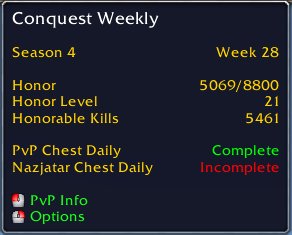
The tooltip shows the Season and Week you're currently on, your Honor details, and if you've collected the daily PvP chests.

With 1.4.0, the completion icon has switched to the yellow question mark. The chest icon now indicates that you have a weekly reward chest you haven't looted yet. Additionally, there is an icon to indicate whether War Mode is enabled.

While working on the weekly quest, your Conquest value is shown, starting in green.

Once you've reached the required Conquest to complete the quest, the value will be shown in red and a chest will indicate that you should turn in.

After you've turned in this week's quest, you'll see that you're all done and caught up.
Description
A simple plugin that shows your current Conquest count on your Titan Panel, rather than having to open the PvP Finder window.
While you're on the weekly quest, you'll see your Conquest count. The number starts off green, and shifts to red as you approach the maximum. Once you've reached the maximum (500), a treasure chest icon will appear after the number to remind you to turn in and avoid overcapping. Once you're caught up and have turned in the current week's quest, the display will change to "Done!" to indicate that you don't need any more Conquest right now. For your convenience, clicking it will open the PvP Finder window.
This addon uses Eliote's Titan Panel Library. This little file does a great job of handling a lot of the backend stuff to make a Titan Panel plugin work, so I can spend more time on making the plugin do what I want it to.
Bug reports and feature suggestions should be submitted using the ticket tracker.
The Titan Panel [Weekly Conquest] Team


Owner


![Titan Panel [Item Level] project image](https://media.forgecdn.net/avatars/thumbnails/60/424/256/256/636141548096550406.jpg)