![Titan Panel [ Specs & Loadouts ] logo](https://media.forgecdn.net/avatars/thumbnails/1694/845/64/64/639075849806481349.png)
Titan Panel [ Specs & Loadouts ]
- By
Titan Panel plugin that allows quick and easy talent/spec switching with a right-click menu.
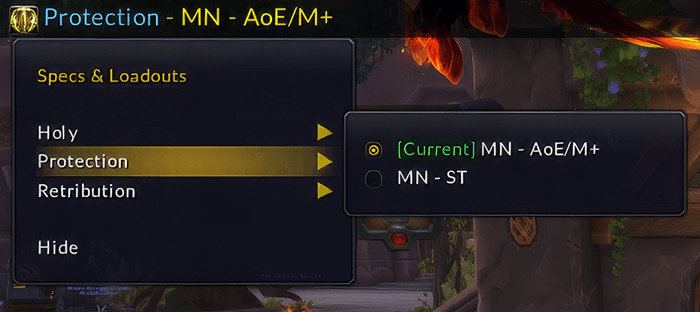
TitanSpecsLoadOuts-RightClickMenu.png
Description
Titan Panel [Specs & Loadouts]
Quickly view and swap your talent loadouts directly from Titan Panel — created by scootR.
Titan Panel [Specs & Loadouts] shows your current specialization and active talent loadout on the Titan bar, and adds a right-click menu that groups your saved loadouts under each spec — so you're always one click away from your next setup.
Why this addon?
If you frequently swap between raid, Mythic+, solo, or utility setups, this plugin removes a lot of clicks:
- See your current spec and loadout at a glance on the Titan bar
- Right-click to open the spec/loadout menu
- Pick any saved loadout under any spec
- If needed, the addon switches your spec first, then applies that loadout automatically
Features
- Titan bar display showing current spec (blue) and active loadout name (yellow)
- Right-click menu grouped by all class specializations
- Saved loadouts listed per spec — including loadouts from other specs
- Cross-spec switching — pick a loadout under a different spec and the addon handles the spec switch first, then applies the loadout
- Same-spec loadout switching — switch between loadouts within your current spec instantly
[Current]marker on the active loadout in the right-click menu- Dynamic spec icon — Titan bar icon updates to match your current specialization
- Left-click opens the Talents & Loadouts UI
- Tooltip showing spec, loadout, and left/right click hints
- Lightweight and focused — single-purpose Titan Panel plugin
Requirements
- World of Warcraft Retail
- Titan Panel (required dependency)
Installation
- Download and extract.
- Place the
TitanSpecsLoadoutsfolder in:_retail_/Interface/AddOns/ - Log in and enable Titan Panel [Specs & Loadouts] in your addon list.
- Right-click the Titan bar and add the plugin if it doesn't appear automatically.
Usage
- Bar display — current spec and loadout name shown at a glance.
- Left-click — opens the Talents & Loadouts UI.
- Right-click — opens the spec/loadout selection menu. Choose any spec to expand its saved loadouts, then click to switch.
Notes
- In combat, WoW blocks spec and talent changes natively. The addon surfaces Blizzard's own error in that case.
- Cross-spec switching involves a brief delay (~0.5 s) while WoW processes the spec change and releases its internal talent lock before the chosen loadout is applied — this is expected behavior.
- Uses modern Retail talent loadout APIs (
C_ClassTalents,C_SpecializationInfo).
Author
Created by scootR
- Website: scootr.ca
- BlueSky: bsky.app/profile/scootr.ca
- GitHub: github.com/jshields-ca/TitanSpecsLoadouts
Feedback
Bug reports and suggestions welcome via GitHub Issues or CurseForge comments. Please include your class/spec, WoW version, and a short reproduction path.
The Titan Panel [ Specs & Loadouts ] Team