TimelessForever_Suite
All-in-one WoW QoL suite featuring cursor nightlight lantern, 1-click auto-fishing, clean square minimap with addon tray, in-game chat translation, and UI frame customization.
01_Settings_Hub_And_Modules.jpg
TimelessForever_HeaderBanner_800px.png
TimelessForever_Nightlight_Tier4_Table_800px.png
Description
If you find a bug leveling please tell me
i still need to work out the class lvl and when they unlock this is what i needhelp with
# 🌟 TimelessForever Addon Suite
**The Ultimate Quality-of-Life, Immersion & UI Suite for World of Warcraft: Forever**
*By Chelliebellie / GameHiveHQ*
---
## 🧭 What is TimelessForever?
**TimelessForever** is a modular, zero-taint quality-of-life and immersion suite crafted specifically for **World of Warcraft: Forever**. Every module in the suite is built from the ground up to be ultra-lightweight and independent, running seamlessly together under one unified in-game settings hub (`/tf` or `/timelessforever`) and minimap launcher.
Whether you're braving dark caves and night dungeons with dynamic torchlight, automating fishing with smart weapon-swapping, organizing your minimap buttons into a sleek slide-out tray, translating chat in real time, or optimizing client CVars for maximum FPS and camera distance, **TimelessForever** is built to elevate your WoW Forever journey!
---
## 📦 Included Modules & Features
🔦 1. TimelessForever_nightlight — Dynamic Cursor Lantern
*Bring atmospheric illumination to the darkest corners of Azeroth.*
- **Realistic Light in the Dark**: Dynamic spotlight and lantern that smoothly tracks your mouse cursor.
- **Optical Darkness Falloff**: Darkens surrounding environment with soft radial falloff for realistic cave and night exploration.
- **Organic Torch Flicker**: Subtle procedural lighting flicker mimicking real campfire and torchlight.
- **8 Ambient Color Presets**:
- 🕯️ Warm Torchlight (Classic Amber)
- 🌙 Elune Moonlight (Silver Blue)
- 🕯️ Cozy Candlelight (Soft Gold)
- 🔥 Campfire Ember (Deep Orange)
- ✨ Holy Radiance (Warm White)
- 🔮 Arcane Lantern (Violet)
- 🌿 Fel Torch (Emerald Green)
- ☀️ Pure Daylight (Crisp White)
- 🎨 Custom Color Picker
- Tier 0 = Level 1 (Dormant)
- Tier 1 = Level 4 (Basic Light)
- Tier 2 = Level 10 (Health Dimming)
- Tier 3 = Level 14 (Aggro Warning)
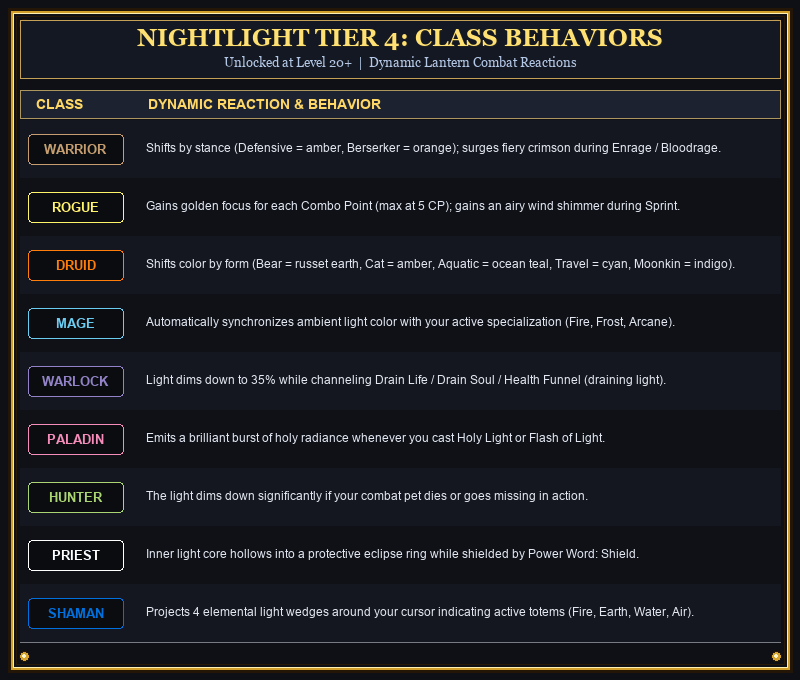
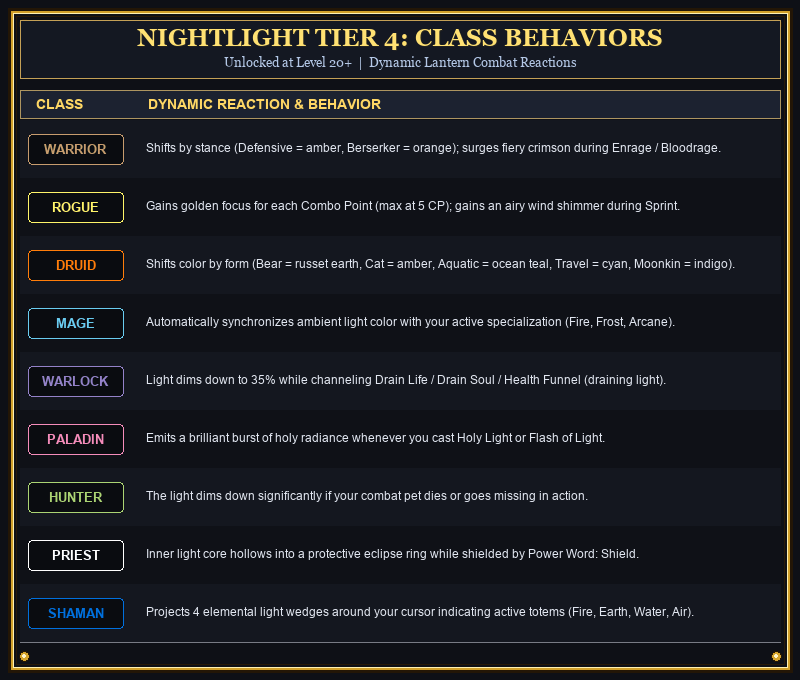
- Tier 4 = Level 20 (Class Behaviors)
- **Interactive Control**: Draggable floating lantern icon; use mousewheel up/down to dynamically resize the light beam.
- **Slash Commands**: `/nightlight`, `/nl`, `/torch`
---
### 🎣 2. TimelessForever_Fishing — Complete Fishing Automation
*Relax and fish with modern quality-of-life mechanics.*
- **Smart Rod Detection & Auto-Swap**: Automatically equips your fishing pole when casting begins and instantly swaps back to your battle weapons upon entering combat or moving!
- **Click-Anywhere Reel In**: Right-click anywhere on the screen to reel in your catch as soon as the bobber splashes.
- **Double-Click Cast**: Quick double right-click anywhere in the water to cast your line.
- **Lure Reminders & Audio Alerts**: Never fish without your bait or lure buffs again.
- **Floating Quick-Toggle**: 1-click on-screen enable/disable button.
---
### 🗺️ 3. TimelessForever_Minimap — Modern Square Minimap
*Clean, modern display replacing the bulky default round map.*
- **Sleek Square Design**: Borderless or custom beveled square minimap.
- **Live Coordinates**: High-accuracy real-time player and cursor coordinate readouts.
- **Zone Header Banner**: Prominent, clean zone and subzone display.
- **Addon Tray Integration**: Seamlessly docks with the Addon Tray drawer.
---
### 🎒 4. TimelessForever_MinimapBag — Minimap Button Collector
*Say goodbye to cluttered minimap borders.*
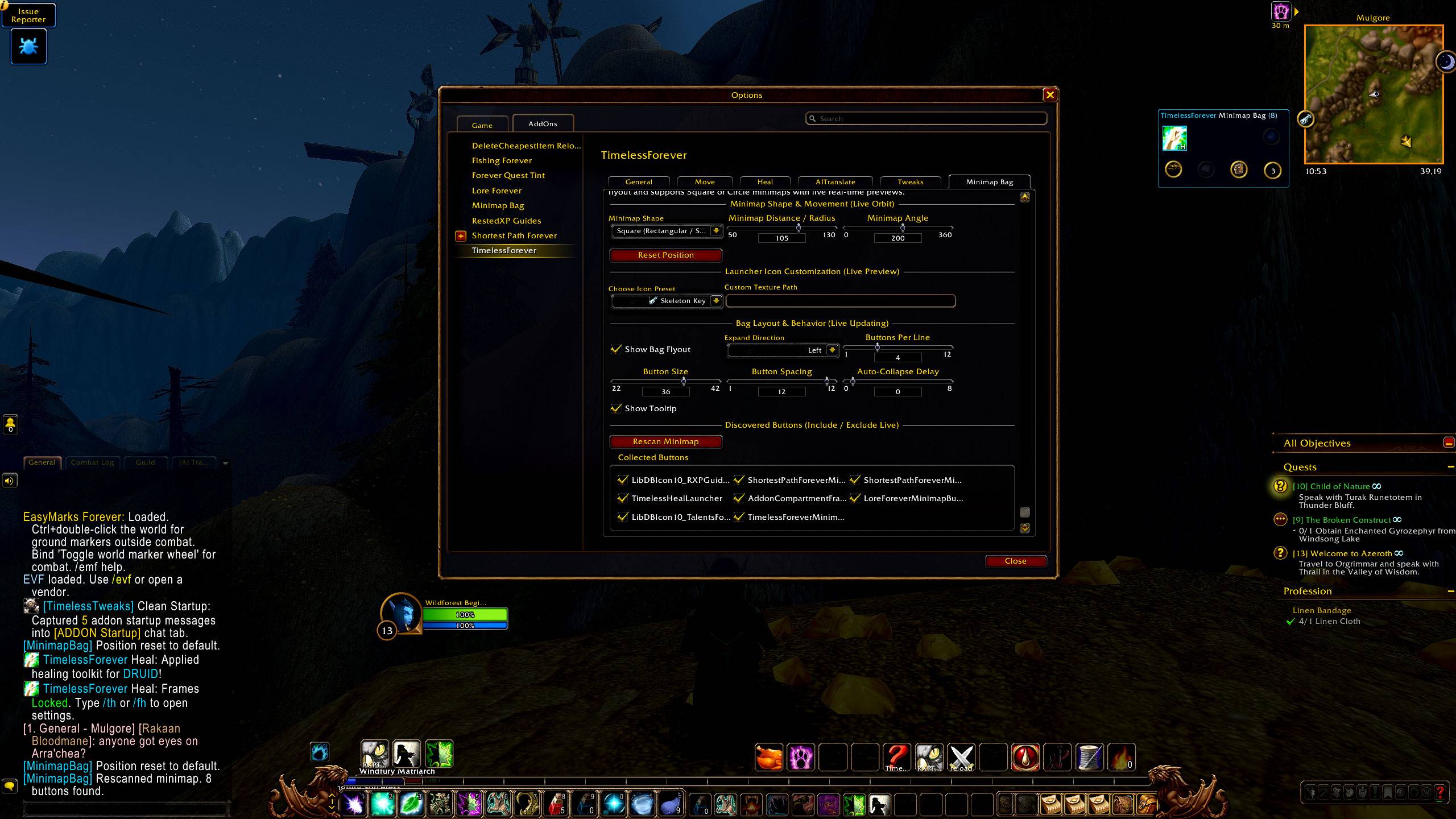
- **Automated Button Gathering**: Consolidates third-party addon icons into a clean, expandable slide-out tray.
- **Smart Docking**: Supports docking along square and circular minimap perimeters.
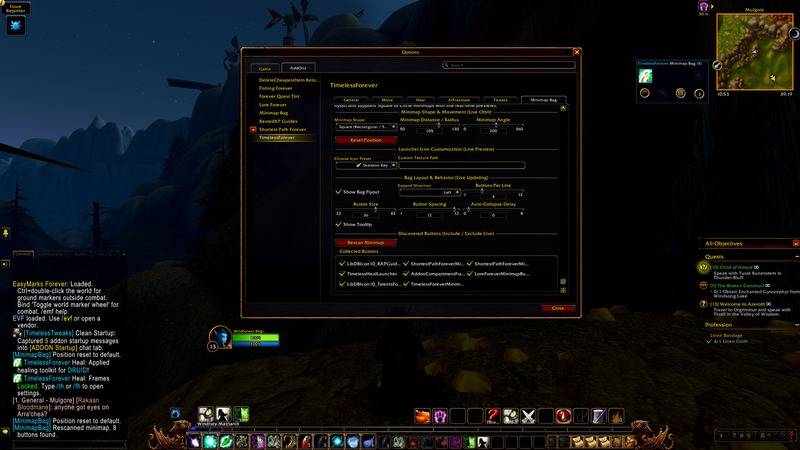
- **Customizable**: Adjust button sizes, drawer spacing, and expansion direction.
---
### ⚡ 6. TimelessForever_Tweaks — Graphics & CVars Optimizer
*Unlock hidden client settings for peak visual clarity and performance.*
- **Extended Camera Zoom**: Camera zoom multiplier slider up to 2.6x for wide raid and open-world awareness.
- **Nameplate Customization**: Extended draw distance and collision stacking controls.
- **Combat Text & Performance**: Streamlined scrolling combat text and 1-click performance presets.
---
### 📦 7. TimelessForever_Move — Blizzard UI Frame Unlocker
*Freedom to position your UI exactly where you want.*
- **Movable Default Frames**: Drag, move, scale, and save positions for Character Sheet, Spellbook, Quest Log, Merchant, Bags, Gossip, and more.
- **Zero-Taint Architecture**: Safe for combat; will never lock up your action bars.
---
### 💚 8. TimelessForever_Heal — Mouseover Healing Unit Frames
*Compact, high-speed unit frames crafted for healers.*
- **Ultra-Low Latency**: Instant health updates and incoming heal predictions.
- **Aura & Debuff Filtering**: Prioritizes dispellable debuffs and active HoTs.
- **Mouseover Ready**: Seamless compatibility with `/cast [@mouseover]` macros and click-casting.
---
### 🧭 9. TimelessForever — Unified Settings Hub & Macro Engine
*Single command to control your entire interface.*
- **Central Dashboard**: Type `/tf` or `/timelessforever` to access all modules from one window.
- **In-Game Macro Generator**: Automatically creates a `/timelessforever` button in your macro panel with custom icons.
- **Minimap Launcher**: Left-click to open settings, right-click for quick actions context menu, drag to reposition.
---
## 🎮 Slash Commands
| Command | Action |
| :--- | :--- |
| `/timelessforever` (or `/tf`, `/forever`) | Open master settings dashboard |
| `/timelessforever nightlight` (or `/nl`) | Toggle cursor lantern |
| `/timelessforever fishing` (or `/fish`) | Open fishing automation settings |
| `/timelessforever minimap` | Configure square minimap |
| `/timelessforever bag` | Configure addon button tray |
| `/timelessforever translate` | Configure chat translation |
| `/timelessforever tweaks` | Open graphics & camera optimizer |
| `/timelessforever move` | Toggle frame unlocker |
| `/timelessforever heal` | Configure mouseover healing frames |
| `/timelessforever macro` | Generate action-bar macro |
---
## 📥 Installation for World of Warcraft: Forever
1. Download the latest release `.zip` from CurseForge.
2. Extract the folder directly into your **World of Warcraft: Forever** AddOns directory:
```text
World of Warcraft\_forever_\Interface\AddOns\
TimelessForever_Suite Team