Tidy Friends
- By
Friends list, made easy to read: big class crests, class-colored names, clear online status and tidy realm names, with presets and a live preview.
Description
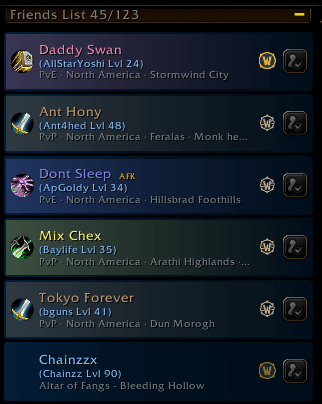
📌 Tidy Friends makes your Friends list easy to read at a glance, and it still looks like Blizzard made it. Each friend gets a big class crest, their character name in class color, their BattleTag and level underneath, and a clear online status. Realm names become "PvP · North America". Everything keeps working the Blizzard way: whisper, invite and the right-click menu, in and out of combat.
🔥 Features
✅ See who's who – Class crests or class icons, sized to fit, with each character's name in their class color.
✅ Two kinds of names – The character name stands out, and the BattleTag or Battle.net name sits beside or below it, with its own size and color.
✅ Clear status – Online, AFK, Busy and "in another game", shown as text, a dot, a bar or a glow, in colors you pick.
✅ Smart realm names – WoW Forever's long realm names become "PvP · North America" or "RP · Europe", and friends on your own realm show "Your realm". You can also show the realm number, the full name, or no realm at all.
✅ Offline friends your way – Dimmed, grey, or left as they are.
✅ Presets – Tidy, Portrait, Character First, Compact and Crest, plus Classic for Blizzard's exact look, one click away.
✅ Make it yours – Choose the icon style and size, which details show and in what order, the font size and color of each line, class-tinted or plain card backgrounds, and whether notes, the favorite star, the game icon and the invite button show. Each size slider starts in the middle, so you can go bigger or smaller.
✅ Live preview – Sample friends at the top of the settings cycle through online, AFK, busy, other game and offline, so you see each change before you open your list. "Open Friends List" shows the real one.
✅ Sort and group (Classic versions) – Sort by name, status, level or zone, group by game, zone or class, and fold away or hide offline friends.
✅ Safe and light – just install and play!
Donations at buymeacoffee.com/foofiaddons support further feature development
Tidy Friends Team

Owner