


Three Crowns Guild Chat
- By
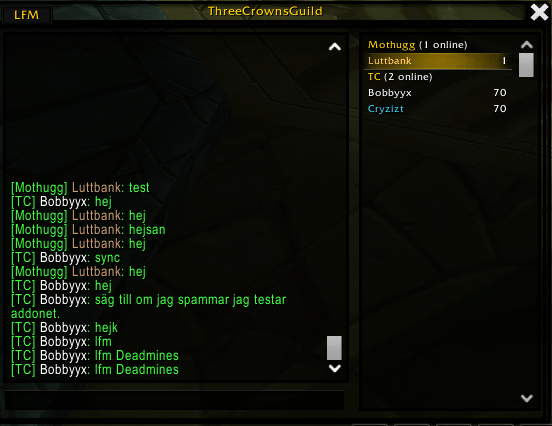
ThreeCrownsGuild — shared guild chat and online roster for WoW Forever
to see the guilds
Description
ThreeCrownsGuild — shared guild chat and online roster for WoW Forever
Three Crowns Guild Chat connects multiple guilds on the same realm through shared chat, an online member list, and group recruitment notifications. Stay in your own guild while keeping in touch and finding dungeon groups with your wider community.
Shared guild chat
Write in guild chat with /g as usual. Your messages are automatically shared with players using the addon in the connected guilds. Messages from other guilds show their guild tag and player name, making it easy to see who is speaking.
Sharing is enabled by default. Use /tc sync off to stop automatically sharing your own guild messages, or /tc sync on to enable it again. You can still read shared messages and send one manually with /tc your message.
Officer chat and regular whispers remain private.
See who is online
Type /tc to open the addon window and browse online players grouped by guild. Your own guild shows all online members; connected guilds show players using the addon.
Presence updates automatically, including for players who are not chatting. Click a player’s name to whisper them, or click a guild heading to collapse its list.
The addon saves up to 200 chat messages so you can review recent conversations.
Find players for your group
Click LFM in the addon window or type /tc lfm to recruit across connected guilds.
Enter your dungeon, check the suggested missing roles, and send your notification. Other addon users receive a notification on screen and in chat, with a clickable name to contact you.
For example, you can ask your community for a healer and two DPS without posting separately in every guild.
Use /tc lfm off to hide incoming recruitment notifications, or /tc lfm on to show them again.
Make the display your own
Right-click a player and choose Set nickname to give them a nickname visible only to you. You can also show or hide guild tags and surnames.
Useful commands:
/tc— open or close the addon window./tc sync onor/tc sync off— enable or disable automatic guild chat sharing./tc your message— send a message to connected guilds./tc lfm— open the group recruitment dialog./tc who— refresh the online member list./tc tag onor/tc tag off— show or hide guild tags./tc surname onor/tc surname off— show or hide surnames.
You can use /tcg instead of /tc for every command.
Getting started
A guild officer must add the same connection settings to Guild Info in each participating guild. Once this is configured, members simply install the addon and start playing. Everyone participating in shared chat and recruitment needs the addon installed.
Supports WoW Forever and TBC Anniversary. TBC support is still being tested. Other WoW versions are not supported.
Three Crowns Guild Chat Team


![Titan Panel Classic WOTLK [Guild] project image](https://media.forgecdn.net/avatars/thumbnails/599/130/256/256/637978024720831062.png)