
ThreatDiff
- By
See your exact threat lead or gap on every enemy's nameplate, plus a Details-style threat meter showing who's about to pull. Colour-coded for tanks and DPS, fully customisable, lightweight. Built for WoW Forever. /tdiff
td-4.png
td-3.png
td-1.png
td-2.png
Description
ThreatDiff
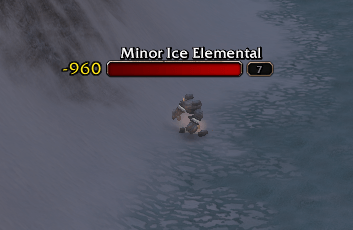
See how much threat you have on every enemy you're fighting, and how close you are to pulling aggro. Built for World of Warcraft: Forever.
Quick start
- Install it, log in, and turn on enemy nameplates (default key: V).
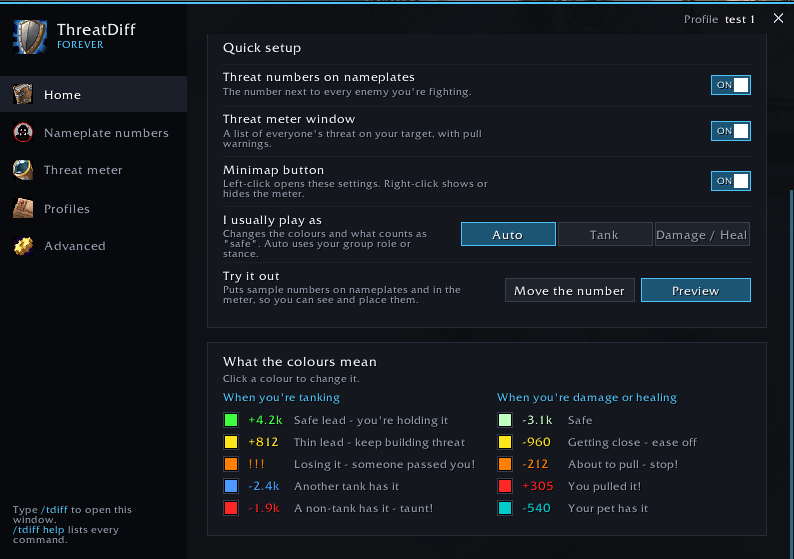
- Type /tdiff or click the minimap button to open settings.
- Click Preview on the Home page to see sample numbers without a fight.
- Set "I usually play as" to Auto, Tank, or Damage / Heal. Done.
Reading the numbers
- +1.2k means you're ahead of everyone else by that much threat.
- -850 means someone is ahead of you by that much.
- Colours show where you stand. Tanks see safe lead, thin lead, losing it, or a taunt warning. Damage and healers see safe, getting close, about to pull, or you pulled it. Pets get their own colour.
- Damage and healers can switch to "Threat until pull" to see how much more threat they can do before taking aggro.
Threat meter
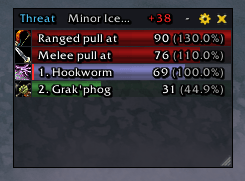
- A Details-style window ranking your group by threat, with class colours and icons.
- Melee / Ranged pull rows show where aggro would flip.
- Healers: target your tank and the meter follows their target.
- Resizable, collapsible, lockable, and can hide outside combat.
Make it yours
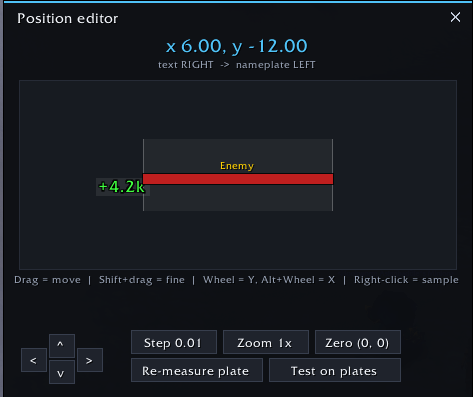
- Place the number left, right, above or below the nameplate, with exact offsets or by dragging.
- Fonts, bar styles, colours and transparency. Works with SharedMedia.
- Profiles per role or activity, saved automatically for each character.
- Minimap button: left-click settings, right-click meter, shift-click preview.
- Very light: nothing updates every frame.
Not seeing numbers?
- Numbers show only on enemies you're in combat with, and clear when combat ends.
- Make sure enemy nameplates are on (V).
- WoW Forever hides threat on enemies you're not targeting. ThreatDiff keeps their last number, dimmed, for a few seconds. Target or mouse over them to refresh.
- Still stuck? Run /tdiff probe in a fight and include the output in your bug report.
Commands
/tdiff settings · /tdiff help all commands · /tdiff test preview · /tdiff edit position editor · /tdiff pos 2.34 10.25 exact position · /tdiff role auto|tank|dps · /tdiff on|off · /tdiff meter show/hide the meter (also lock, unlock, collapse, reset) · /tdiff minimap · /tdiff profile · /tdiff reset · /tdiff probe
Found a bug?
Report it on GitHub. The form asks for what you need to include, such as your version and the /tdiff probe output.
ThreatDiff Team
