1.1 Release! 
A better view of every enemy in the fight.
Threat Board is a compact enemy-tracking panel for WoW Forever that brings enemy health, threat, casts, and crowd control information into one organized view.
Instead of scanning multiple nameplates across your screen, Threat Board gives you a centralized list of enemies so you can quickly see what's happening, identify threats, and manage your targets.
Built with tanks in mind, but useful for anyone who needs better awareness of multiple enemies during combat.
Features
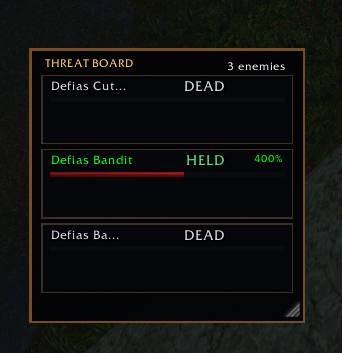
Dynamic Enemy Tracking – Automatically tracks hostile enemies as they enter nameplate range.
Encounter Tracking – Retains tracked enemies that move out of range or flee during combat, keeping them visible until they die or the encounter ends.
Current Target Highlighting – Clearly identifies your current target, updating automatically when you switch targets or use Tab targeting.
Threat Monitoring – Color-coded threat indicators help you identify which enemies you're holding, which are at risk of pulling away, and which are attacking other players.
Lost Threat Alert - An optional configurable sound plays when a mob who's threat you once held is lost.
Enemy Health – Individual health bars make it easier to monitor the state of every tracked enemy.
Cast Tracking – Displays enemy casts and channels, including cast progress and interruptibility.
Crowd Control Tracking – Identifies enemies currently affected by crowd control.
Configurable Enemy Limit – Track unlimited enemies by default, or set a limit to keep the panel manageable.
Movable and Resizable – Position and resize the panel to fit your UI.
Interface
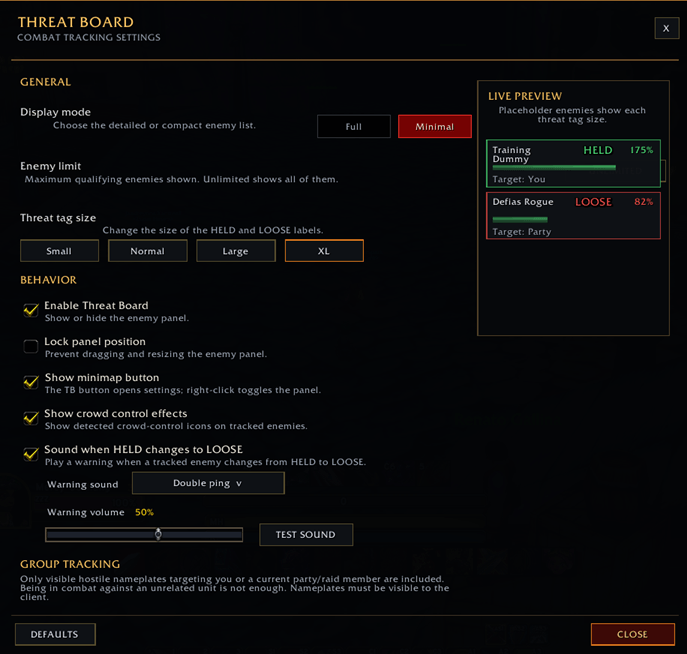
Threat Board defaults to Minimal View, keeping the information accessible without taking up unnecessary screen space.
A Full View option is also available for players who prefer a more detailed presentation.
The panel can be moved by dragging its header and resized from its bottom-right corner. Additional configuration options are available through the minimap button.
Configuration
The primary slash command is /tb.
| Command | Description |
|---|---|
/tb help |
Display available commands |
/tb toggle |
Toggle the panel |
/tb show |
Show the panel |
/tb hide |
Hide the panel |
/tb reset |
Reset saved settings |
/tb test |
Toggle test mode |
/tb view |
Switch between Minimal and Full views |
/tb limit off |
Remove the enemy limit |
/tb limit 1-150 |
Set a custom enemy limit |
/tb idle on |
Include idle hostile enemies |
/tb idle off |
Exclude idle hostile enemies |
/tb lock on |
Lock panel position and resizing |
/tb lock off |
Unlock panel position and resizing |
/tb width 140-620 |
Set panel width |
Additional command aliases: /threatboard and /ep.
Important Notes
Threat Board is designed specifically for WoW Forever.
Enemy tracking relies on information exposed through the game's nameplate system.
Enemies outside the game's available nameplate range cannot be discovered.
Clicking enemy rows to select targets is not supported by the WoW Forever client. Use normal game targeting, including Tab targeting. Your selected target is highlighted automatically.
Some health, threat, cast, and aura information is restricted by the game API. Threat Board uses supported game mechanisms rather than attempting to calculate unavailable values.
Feedback & Bug Reports
Feedback, bug reports, and feature suggestions are welcome and encouraged. When reporting an issue, please include your WoW Forever client build and a description of what happened.
AI Disclaimer
Codex was used to assist with building this addon
If this was helpful and you feel compelled, feel free to buy me a coffee
Threat Board Team