TheWoWDB Companion
- By
Auction house companion: scan the AH, see cross-realm prices in tooltips, post, cancel and undercut, and fill patron crafting orders.
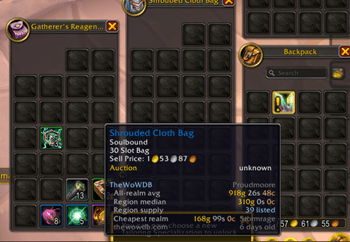
All-realm average, region median, region supply and the cheapest realm added to a Shrouded Cloth Bag tooltip from the packaged market snapshot.
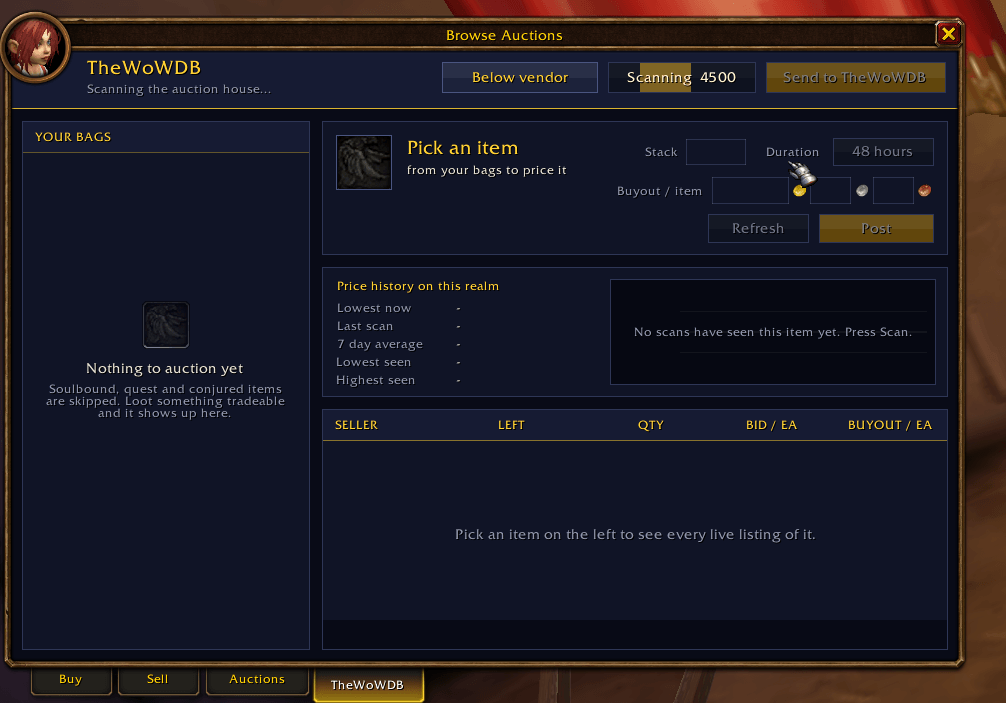
Real capture from the WoW Forever edition (TheWoWDB - Forever), 0.12.4. Scan AH greys out after one press and shows live progress behind its label; bags, price history and every live listing sit on one page.
Description
Auction house data, inside the game
TheWoWDB Companion is the in-game half of thewowdb.com. It puts real market data on your tooltips and gives you one panel inside the auction house to scan, post, and cancel.
What it does
- Cross-realm price tooltips. Item tooltips show what the item actually sells for, including the cheapest connected realm and the region-wide commodity price. The market data ships with the addon, so it works the moment you log in.
- Scan. A full auction house scan that builds your own price history over time.
- Post. Post at a price you choose, with your own undercut and floor rules, at full auction house width instead of a cramped sidebar.
- Cancel and undercut. See what got undercut and clear it in one pass.
- Saved shopping lists. Keep the searches you run every day.
- Bag value. What your bags and bank are worth at current prices.
- Patron crafting orders. Net profit estimates at the crafting bench (tip, minus the consortium cut, minus reagents at market) and a Fill button that claims and fulfils the best NPC order.
- Guild recruiting. A /who scan with one-click whisper and invite, plus an auto-welcome when someone joins.
Where it lives
One button in the top right of the auction house frame opens the panel, at full frame width. It opens itself with the auction house and with the crafting table, so there is nothing to remember. The /wgf command still works.
Keeping the prices fresh
WoW addons cannot make web requests, so packaged data is only ever as fresh as your last update. That is a limit every price addon shares. The optional desktop client at thewowdb.com refreshes the market data in the background and keeps the addon current. It is free, and the addon works fine without it.
House rules
- Free. No in-game ads, no donation prompts, no paid features.
- Visible source. Nothing obfuscated.
- No automation of protected actions. Every buy, post, and cancel is your own click.
Getting started
Install, restart the client fully (WoW reads new addon files at launch, not on /reload), and open the auction house. Type /wgf for the panel and /wgf help for the command list.
TheWoWDB Companion Team