Thespian
- By
The emote soundboard for your roleplay. One-click /me emotes, say lines and standard emotes, 70+ presets, a custom emote builder with %t target support, a minimap button and options. Retail, Foreverì and Classic.
Description
Thespian: the emote soundboard for your roleplay




Hit a button, play a beat.
Thespian turns your favourite roleplay lines and emotes into big, clickable buttons, like a soundboard for your character. Stop retyping /me strokes their chin thoughtfully. for the hundredth time: click once and stay in the scene.
What you get
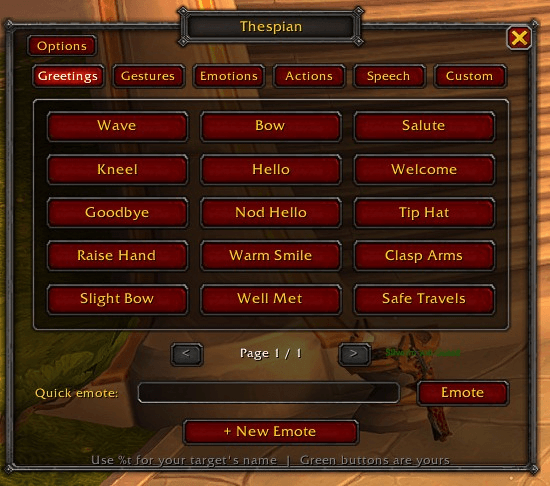
- 70+ ready-made emotes across five tabs: Greetings, Gestures, Emotions, Actions and Speech
- Your own buttons: build custom emotes with a label, a channel (Emote
/me, Say, Yell, Party or a standard emote likeWAVE) and a category - Target-aware: write
%tand Thespian swaps in your target's name - Live preview of the exact chat line, in the builder and when hovering any button
- Quick emote box for the line that doesn't deserve its own button
- Minimap button with a golden theatre mask (left-click to open, right-click for options, drag to move)
- Options panel in the game's own settings: scale, opacity, lock position, close-after-use, tooltips and more
- Blizzard-style look that fits right into the game
- No dependencies, no clutter: one small addon, and it never speaks unless you click
How it works
- Type
/thespianor click the minimap mask. - Pick a tab, click a button. You've emoted.
- Want something personal? Click + New Emote, write it, save it. Your buttons show up in green; right-click to edit or delete.
%t in action
| You write | You target | Chat shows |
|---|---|---|
nods in greeting to %t. |
Arthas | Uther nods in greeting to Arthas. |
glares at %t coldly. |
nobody | Uther glares at someone coldly. |
Commands
| Command | What it does |
|---|---|
/thespian (or /rpe) |
Open / close the soundboard |
/thespian options |
Open the options panel |
/thespian new |
Open the emote builder |
/thespian scale 0.5-1.5 |
Resize the window |
/thespian reset |
Reset window position |
/thespian minimap |
Show / hide the minimap button |
One download, every version
Works on Retail, Forever, Classic Era (including Hardcore and Seasonal), TBC Classic Anniversary and Mists of Pandaria Classic.
FAQ
Does it send anything on its own? No. Only when you click a button or press Enter.
Where are my custom emotes saved? Account-wide, so all your characters share them.
Does it replace Total RP 3 or other profile addons? No, they do different jobs.
Can I share my emotes? Not yet. Import/export is on the wishlist.
Feedback
Found a bug or have an idea (or a pack of tavern emotes you'd love to see)? Open an issue on GitHub. Please include your game version and any Lua error text.
Made for the people who play their characters rather than just their rotations.
Thespian Team