Text On Screen - Display Text On Screen
- By
This addon lets you display any text you want on the screen. Multi Text Lines, Colours, Sizes, etc
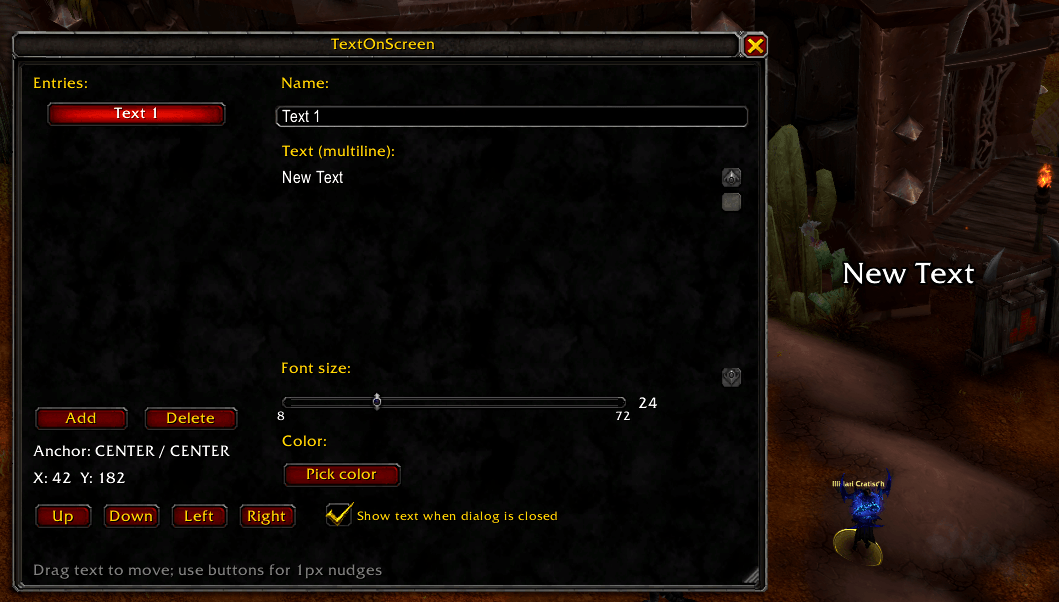
TextOnScreen.png
Description
TextOnScreen
TextOnScreen lets you place one or more pieces of custom text on your screen.
In game, type: /tos
You can:
- Create multiple text items
- Give each item a name (shown in the list)
- Use multiline text
- Change font size and color
- Choose whether each text stays visible when the settings window is closed
- Move text by dragging it with your mouse
- Fine-tune position with 1-pixel nudge buttons (Up/Down/Left/Right) and see the current anchor + X/Y coordinates
All settings are saved per character.
Create and Manage Text Items
- Add: Creates a new text item.
- Delete: Deletes the currently selected item.
- Click an item in the Entries list to select it.
Name
The Name field is what you’ll see in the list on the left.
Text (multiline)
The Text (multiline) field supports multiple lines. Newlines will show on the screen.
Change Appearance
- Font size: Use the slider.
- Color: Click Pick color.
Changes are previewed immediately.
Show/Hide When Closing the Window
Each text item has a checkbox:
Show text when dialog is closed
- Checked: the text stays visible after you close the settings window.
- Unchecked: the text hides when the settings window is closed.
While the settings window is open, texts are shown so you can position and preview them.
Move and Position Text
Drag with your mouse
Click and drag the on-screen text to move it.
Precise 1-pixel nudging
Use the Up / Down / Left / Right buttons to move the selected text by 1 pixel.
Coordinates
The window shows:
- Anchor (point / relative point)
- X / Y offsets
These update while you drag, and also when you use the nudge buttons.
Text On Screen - Display Text On Screen Team