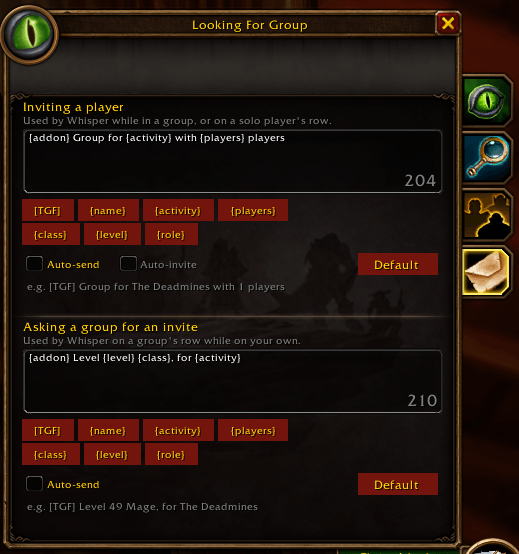
tgf_lfg_message_config.png
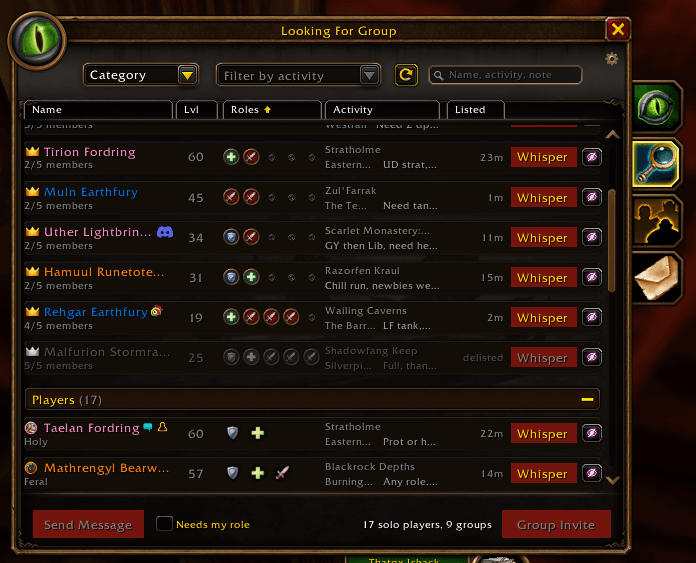
tgf_lfg_window.png
Description
TerribleGroupFinder
A group finder addon for WoW Forever. It improves the game's own group finder in place, keeping its look: the Browse tab becomes a sortable table of solo players and groups, and a new Messages tab holds whisper presets for contacting them in one click.
Features
- Results table - the Browse tab lists solo players and groups in the game's two collapsible sections (groups first while you're on your own, solo players first while you lead), with class-coloured names, level, roles (a group's open slots), activity, zone and how long they've been listed
- Sorting - click a column header to sort each section by roles, level, activity or listed time
- Player location - each row shows where the solo player or the group's leader is, and a group's tooltip shows each member's zone
- Nothing vanishes - hidden players (until they list again), delisted listings and, with Needs my role, listings with no slot for you are greyed and moved to the end of their section
- Search box for a name, an activity or a note
- Whisper presets - a Whisper button on every row sends a preset message:
- Inviting a player: used while you're in a group, or to a solo player
- Asking a group for an invite: used on a group's row while you're on your own
- Auto-send and Auto-invite - send the message at once instead of opening the whisper box, and invite the solo player right after; the contact buttons then rest for a second, so no one gets messaged twice
- Friend marks - Battle.net friends, friends, guildmates and recent allies are marked on names, as the game marks them
- Stock behaviour kept - your own listing first with its delist button, Send Message and Group Invite at the bottom, right-click a row for the game's own menu, and the game's row tooltip
Usage
Open the group finder as usual; the Browse tab shows the table after a search
Messages is the fourth tab on the side of the group finder. Edit the two presets there; the buttons under each box add a key, and Default restores the standard text
Keys a preset can hold:
Key Becomes [TGF]the addon's tag, always first {name}the player you whisper {activity}the first activity of their listing {players}your current group size, counting you {class}/{level}your class and level {role}the roles you can play /tgftoggles the table on Browse;/tgf previewswitches between your search results and sample listings;/tgf resetrestores the sample data;/tgf version
TerribleGroupFinder Team