TBCGearManager
- By
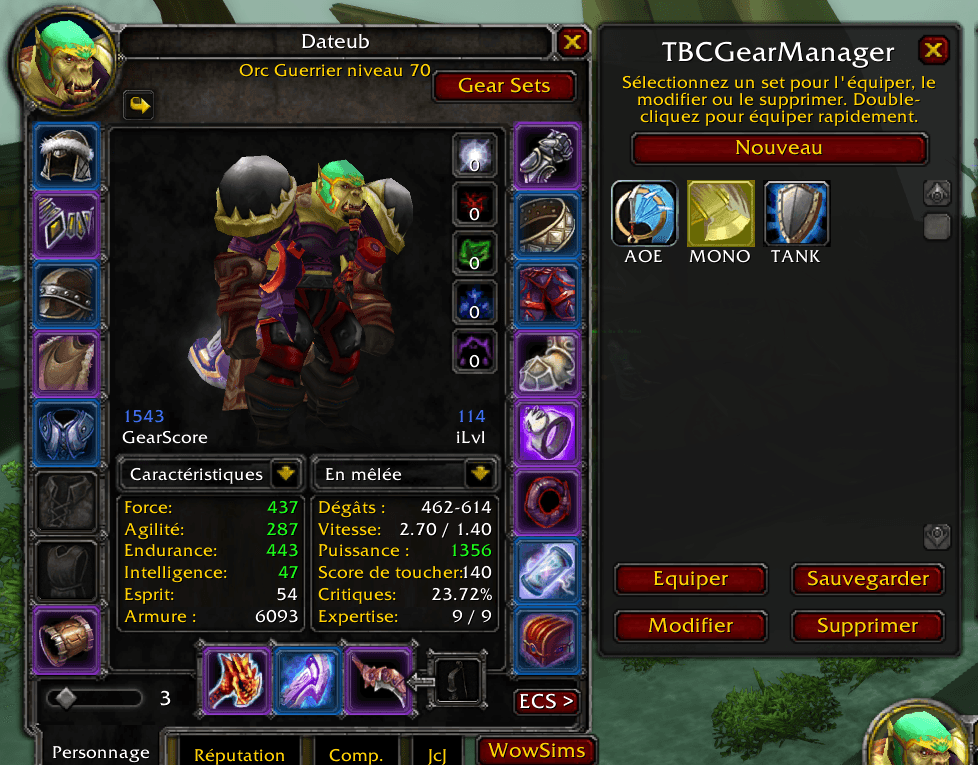
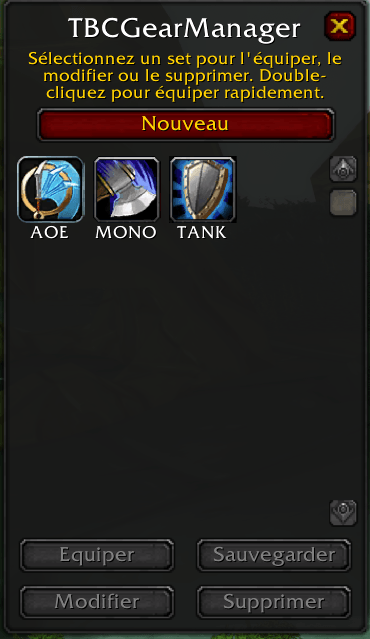
TBCGearManager is a World of Warcraft TBC Anniversary addon that brings back the WotLK-style Equipment Manager, letting you create, save, and quickly switch between gear sets directly from the UI or via hotkeys.
Media1.png
Media2.png
Description
TBCGearManager
TBCGearManager brings the Equipment Manager functionality to TBC Anniversary / Classic clients. It uses the native C_EquipmentSet WoW API for fast and reliable gear swapping.
Features
- Native API: Uses WoW's built-in
C_EquipmentSetengine for instantaneous gear equipping. - WotLK UI: Integrates a toggleable equipment grid next to the Character Frame.
- Action Bar Support: Drag and drop gear set icons directly onto action bars.
- Macro Support: Use
/equipset SetNamein standard macros. - Localization: Supports English, French, German, Spanish, Russian, Korean, Traditional Chinese, and Portuguese.
Installation
- Download the latest release.
- Extract the folder into your addons directory:
Interface/AddOns/ - Ensure the folder is named
TBCGearManager. - Enable the addon in-game.
Usage
- Open UI: Click the "Gear Sets" button in the top-right of your Character window (
C). - Create Set: Click "New Set", enter a name, pick an icon, and click "Validate".
- Equip Set: Double-click a set in the grid or select it and click "Equip".
- Modify: Select a set and click "Save" to update it with current gear, or "Modify" to change name/icon.
- Delete: Select a set and click "Delete".
Slash Commands
/tgm- Toggle the manager window./tgm import- Import existing gear sets from the WoW API (useful if you've used other manager addons).
Contributions
Open to suggestions, bug reports, and pull requests via issues or PRs.
TBCGearManager Team