TBC BattlePlates
- By
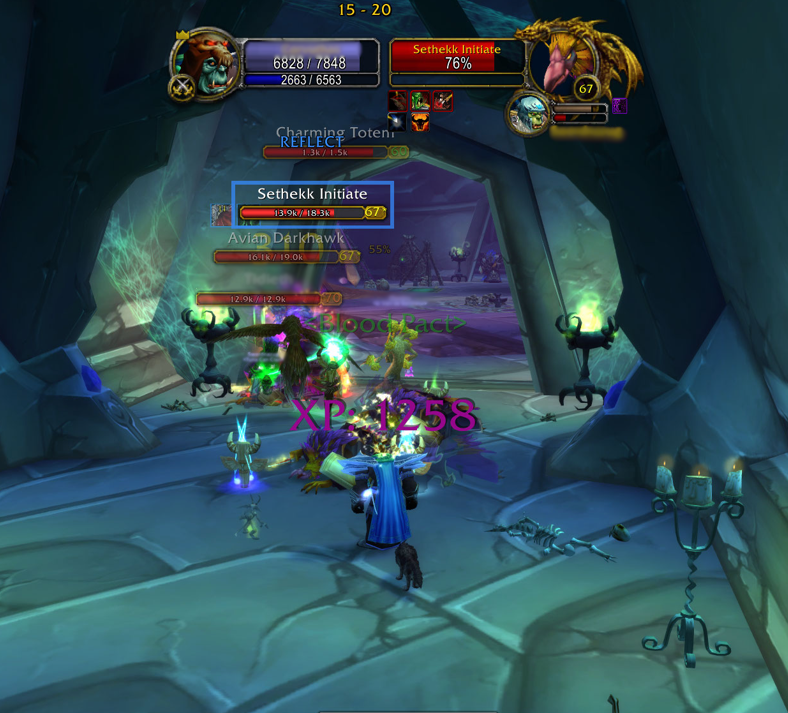
BattlePlates is a nameplates enhancement to track threat, debuffs, dots, health, and range. Includes enhanced Tank mode options as well
New Spell Reflect
Description
BattlePlates
World of Warcraft — The Burning Crusade 20th Anniversary Edition Version 1.2.1 | Interface 2.5.x
Nameplate enhancement addon providing threat tracking, cast bars, debuff icons, dispel awareness, tank/healer modes, elite/rare classification, and combat automation — all layered on top of Blizzard's native nameplates.
Features
| Feature | Description |
|---|---|
| Threat indicator | Smooth red↔green gradient showing your threat on every visible nameplate. Percentage shown to the right of each plate. In Tank Mode the % extends past 100 % to show your threat lead over second place. |
| Cast bar | Slim cast/channel bar below each nameplate. Gold = interruptible, blue = channel, grey + shield = uninterruptible. Red flash on interrupt, green on success. |
| Debuff icons | Your own debuffs shown as small icons above the nameplate, with stack count, duration, and color-coded border rings by debuff type. |
| Dispellable buff icons | Enemy buffs your class can dispel shown below the cast bar with a green border. |
| Tank Mode | Shows who is catching up to your threat lead or who currently holds aggro. Skull raid icon placed on your current target (visible to all party members). Skull behavior is configurable — see Skull Modes below. |
| Healer Mode | Mutually exclusive with Tank Mode. Places an X raid icon on the highest-priority enemy targeting the healer (visible to all party members). |
| Elite / Rare display | Elite and rare-elite enemies show a gold * next to their level. Rare/rare-elite enemies get a silver border ring. |
| Health bar | HP displayed as text on the health bar (14.2k / 18.5k). Bar height is 10 % taller than default. |
| Combat auto-toggle | BattlePlates extras appear on combat entry and hide on exit. |
| Auto nameplate distance | Sets nameplate visibility range to match your class's longest ranged ability, updated on talent changes. |
| Manual nameplate distance | Override the distance to any value from 1–41 yards. |
Threat color reference
| Situation | Color |
|---|---|
| Low threat (not tanking) | Green — safe |
| Gaining threat (not tanking) | Yellow→red — getting close |
| Pulling aggro (not tanking) | Red |
| Tanking — tied / danger | Red (100 %) |
| Tanking — healthy lead | Yellow (150 %) |
| Tanking — max lead | Green (200 %) |
Skull Modes (Tank Mode only)
| Mode | Behavior |
|---|---|
target |
Skull follows your active target (default) |
sticky |
Skull locks on the first enemy to hit 100 % threat; stays until that enemy dies |
weak |
Skull tracks the lowest-HP enemy where you hold 100 % threat; updates as health changes |
healer |
Skull marks the lowest-HP enemy currently casting a healing spell |
key |
Manual — use the "BattlePlates: Mark Skull" keybind to place skull on demand |
off |
Skull never applied |
Dispel types by class
| Class | Dispels |
|---|---|
| Priest | Magic, Disease |
| Paladin | Magic, Poison, Disease |
| Shaman | Poison, Disease |
| Mage | Curse |
| Druid | Curse, Poison |
| Warlock | Magic |
| All others | (none shown) |
Installation
- Download or copy the
BattlePlatesfolder. - Place it inside your WoW AddOns directory:
World of Warcraft\_classic_era_\Interface\AddOns\BattlePlates\The folder must contain BattlePlates.toc directly inside it.
- Launch WoW, log in, and verify the addon is enabled on the character-select screen under AddOns.
- You will see
[BattlePlates] v1.2.1 loaded. Type /bp for options.in chat when you enter the world.
In-Game Options Menu
Open the options panel from any of these places:
- ESC → Interface → AddOns → BattlePlates
- Type
/bpor/battleplatesin chat to see the command list
Options Panel
The panel is divided into two columns and a slider section.
Display column
| Option | Default | Description |
|---|---|---|
| Show Cast Bar | ON | Enemy cast/channel bars below each nameplate |
| Show Threat Indicator | ON | Gradient percentage text to the right of the plate |
| Show Your Debuff Icons | ON | Icons for your own debuffs on each target |
| Show Dispellable Enemy Buffs | ON | Icons for enemy buffs your class can dispel |
Behaviour column
| Option | Default | Description |
|---|---|---|
| Tank Mode | OFF | Threat overview + skull marking. Active skull mode shown inline: [skull: target]. Change mode with /bp skull <mode>. |
| Healer Mode | OFF | X marker on highest-aggro enemy (mutually exclusive with Tank Mode) |
| Auto-show plates in combat only | ON | Hide BattlePlates extras outside of combat |
| Auto nameplate distance | ON | Match plate visibility to your longest ranged ability |
Sliders
| Slider | Range | Default | Description |
|---|---|---|---|
| Nameplate Distance | 1–41 yd | 41 | Max yards at which nameplates are visible. Disabled while Auto Distance is ON. |
| Max Debuff Icons per plate | 1–10 | 5 | How many of your debuffs to show on a single target |
| Debuff Icon Size | 10–40 px | 20 | Pixel size of each debuff/dispel icon |
Reset to Defaults button restores every setting to its original value.
Chat Commands
All commands use /bp or /battleplates.
/bp                     — Show command list
/bp help                — Show command list
/bp tank                — Toggle Tank Mode on/off
/bp skull <mode>        — Set skull mode: off | target | sticky | weak | healer | key
/bp healer              — Toggle Healer Mode on/off
/bp castbar             — Toggle cast bar on/off
/bp threat              — Toggle threat display on/off
/bp debuffs             — Toggle your debuff icons on/off
/bp dispel              — Toggle dispellable buff icons on/off
/bp toggle              — Toggle combat auto-show/hide on/off
/bp autodist            — Toggle auto nameplate distance on/off
/bp distance N          — Set nameplate distance to N yards (1–41), disables auto
/bp reset               — Reset all settings to defaults
Skull mode examples
/bp skull target   — skull follows your active target (default)
/bp skull sticky   — mark the first enemy you pull and keep it marked
/bp skull weak     — always mark the lowest-health enemy you're holding
/bp skull healer   — mark enemies casting heals (great for interrupt priority)
/bp skull key      — manual; bind a key in Key Bindings → BattlePlates
/bp skull off      — no skull marking
Key Bindings
/bp skull key enables manual skull placement. Bind the key in:
ESC → Key Bindings → scroll to BattlePlates → "Mark Skull on Current Target"
File Structure
BattlePlates/
├── BattlePlates.toc   — Addon manifest (interface version, load order)
├── Bindings.xml       — Registers the skull keybind with WoW's Key Bindings UI
├── Core.lua           — Event handling, saved variable init, startup
├── Config.lua         — Defaults, settings loader, slash commands
├── Options.lua        — In-game Interface > AddOns options panel
├── Plates.lua         — Nameplate frame creation, aura icons, health text, classification
├── Threat.lua         — Threat coloring, skull/X markers, tank mode logic
├── CastBar.lua        — Cast/channel bar update loop
└── Utils.lua          — Shared helpers (print, CVar queue, class colors, ranges)
Saved Variables
| Variable | Scope | Description |
|---|---|---|
BattlePlatesDB |
Account-wide | All settings (shared across all characters on the account) |
BattlePlatesCharDB |
Per character | Reserved for future per-character overrides |
Settings are saved automatically when you log out and restored when you log in.
Compatibility Notes
- Requires TBC Classic / 20th Anniversary (Interface version
20501–20505). - Uses
C_NamePlate,UnitThreatSituation,UnitDetailedThreatSituation,UnitCastingInfo,UnitClassification, andSetRaidTarget— all available in TBC Classic. - Safe during combat: CVar changes are queued and applied on
PLAYER_REGEN_ENABLEDto avoid Lua combat lockdown errors. - Does not replace or taint Blizzard's default nameplate frames — all extras are layered on top.
Frequently Asked Questions
Q: The cast bars are not showing.
A: Make sure Show Cast Bar is enabled in the options panel. Also confirm that C_NamePlate returns a valid frame for the unit.
Q: Tank Mode shows nothing.
A: Tank Mode requires you to be in a group or raid. Trivial mobs below your level may return nil from the threat API.
Q: The skull isn't appearing on the right enemy.
A: Check your skull mode with /bp skull (no argument). For a static priority target, try sticky or weak. For fully manual control, use key and bind it in Key Bindings.
Q: Nameplates aren't appearing at range.
A: Check that Auto Distance is ON, or set it manually with /bp distance 41. BattlePlates re-applies the CVar on every PLAYER_ENTERING_WORLD.
Q: Icons appeared during combat but now they are gone.
A: Auto-show plates in combat only is ON by default. Toggle it off with /bp toggle if you want extras visible all the time.
Q: The threat % shows values above 100 %. A: This is intentional in Tank Mode. When you hold aggro, the display switches to a threat-lead scale: 100 % means second place is right behind you (danger), 200 % means you have the maximum possible lead. When not in Tank Mode, the scale is the standard 0–100 % (how close you are to pulling aggro).
License
Free to use, modify, and distribute for personal or community use.
TBC BattlePlates Team