TastyfishExtravaganza
- By
Single-keybind fishing with double-click cast, auto-recast, enhanced sounds, and a live bobber meter. Built-in Stranglethorn Fishing Extravaganza tracker with Tastyfish counter and rare fish tracking. Six themes, lure bar, and full options panel.
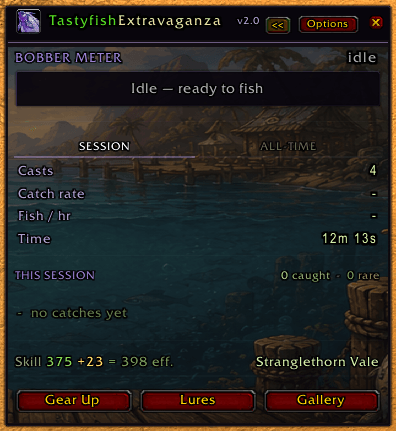
Main WIndow.png
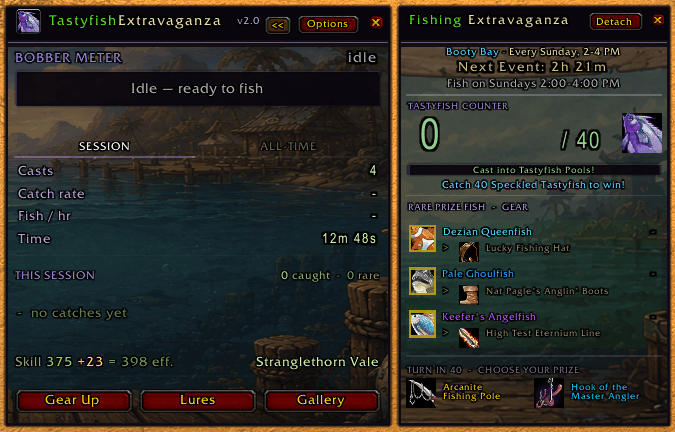
Main WIndow Expanded.png
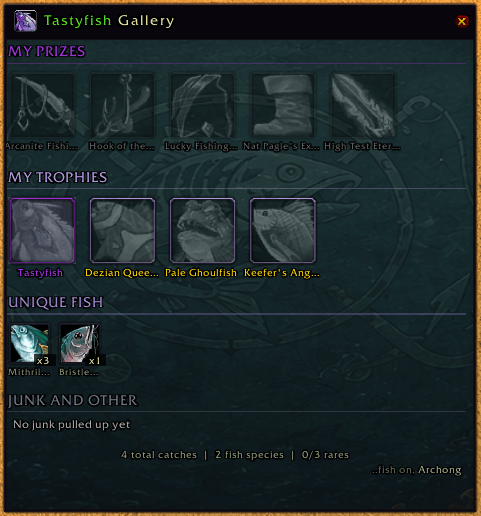
Gallery Window.png
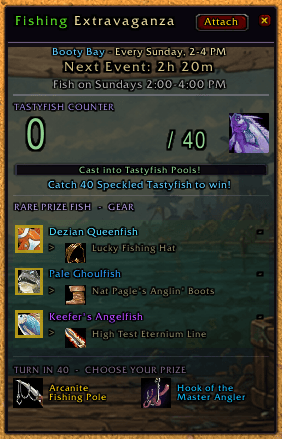
Event WIndow Detached.png
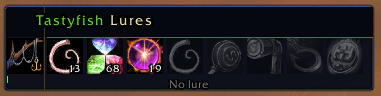
LureBar.png
Description
TastyfishExtravaganza
A lightweight, all-in-one fishing addon built for anglers who want clean automation and a dedicated Stranglethorn Fishing Extravaganza experience.
How It Works
Bind one key. That key casts, interacts with your bobber, and loots your catch. No macros, no extra setup. Double-click casting and auto-recast are available if you prefer mouse-only fishing. Enhanced fishing sounds can be toggled on with an adjustable volume slider so you never miss a bite.
The Main Window
A compact fishing HUD, now with custom painted backdrop art behind it, that stays out of your way:
- Bobber Meter — a live progress bar that tracks your cast from bobber splash to bite, with a persistent average marker showing your rolling catch time across the session
- Session & All-Time Stats — catches, casts, gold earned, and catch rate in a clean two-column layout
- Caught Fish — icon row showing everything you've pulled up this session
- Gear Up — one click to equip your best fishing pole from bags
- Lure Bar — a separate toolbar for quick lure application with skill bonus tooltips and an active lure timer
The Extravaganza Window
Hit the expand button and the event panel opens alongside your main window, purpose-built for the Sunday Stranglethorn Fishing Extravaganza in Booty Bay (2-4 PM server time):
- Tastyfish Counter — live count toward the 40 Speckled Tastyfish goal with a winner alert when you hit it
- Rare Prize Fish — tracks Keefer's Angelfish, Brownell's Blue Striped Racer, and Dezian Queenfish with catch counts and reward gear details
- Grand Prizes — Arcanite Fishing Pole and Hook of the Master Angler with full item tooltips on hover
- Detach anytime — pop the panel free of the main window and move it wherever you like. A detached panel keeps tracking live even if you close the main window entirely, and remembers where you left it next time you log in
The Gallery
Your lifetime fishing record, all in one scrollable window:
- My Prizes — all 5 Extravaganza gear rewards, with won items detected automatically from your bags or gear and tracked forever
- My Trophies — every Speckled Tastyfish and rare prize fish you've ever caught, with uncaught rares shown dimmed so you can see what's left
- Unique Fish — every fish species you've caught, sorted by count
- Junk & Other — everything non-fish that's come up in your fishing loot, kept separate from the catch stats
Gallery data is permanent — it survives /reload and Reset Session, so your collection only ever grows.
Customization
- 6 Themes — Forest, Ocean, Ember, Oak, Midnight, and Silver. Each one fully re-skins every window (fonts, borders, dividers, the lure bar) the instant you switch.
- Background Art & Opacity — every window (Main, Extravaganza, Options, Gallery) has its own painted backdrop, with a live +/- opacity control so you can dial the art up or down to taste
- Window Scaling — independent +/- controls, in clean 5% steps, for the main window, lure bar, options panel, and gallery
- Full WoW Options Panel — all automation and alert settings live under AddOns > TastyfishExtravaganza, organized into Alerts and Automation sections with sliders for sound volume and double-click speed
- Reset Session or Reset All — clear just the current session for a fresh event start, or do a full factory reset (catch history, trophies, prizes, window positions, theme - everything) if you ever want a completely clean slate. Reset All is confirmation-protected so it can't happen by accident.
Slash Commands
/tfeor/tastyfish— show, hide, or open settings/tfesettingsor/tfeoptions— jump straight to the AddOns settings panel
Setup
- Extract the folder into
Interface/AddOns - Bind your key: Esc > Key Bindings > TastyfishExtravaganza
- Type
/tfeand start fishing
Recommended WoW Settings: Enable Tips, turn on Interact on Left Click, and check Sound in Background so you hear bites while tabbed out.
Compatibility
Works across Classic Era, Burning Crusade, Wrath, Cataclysm, Mists of Pandaria Classic, and Retail with a single install. No need to update the interface number each patch - the multi-version TOC handles it automatically. If a new patch bumps past the listed versions, just check "Load out of date AddOns" on the character select screen.
TastyfishExtravaganza Team