


TargetCopy
Quickly copy target names, generate target commands, assign raid markers, and create per-target macros.
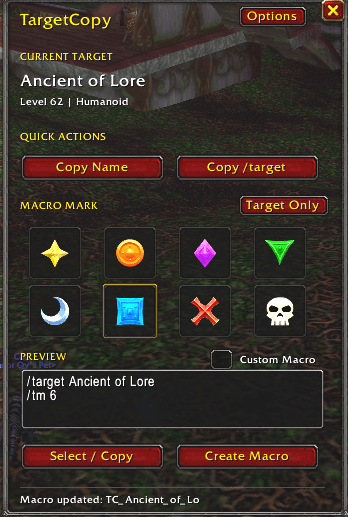
TargetCopy v1.0.0-beta.4 main interface
Description
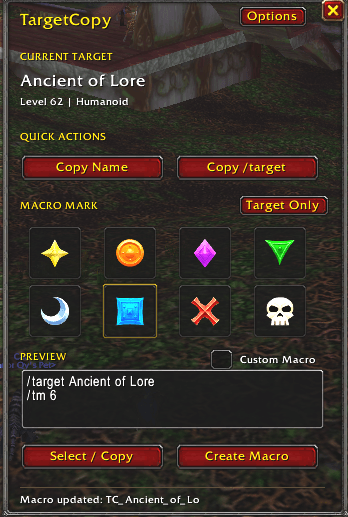
TargetCopy
TargetCopy helps you quickly work with your current target in World of Warcraft Forever.
Select a target, then use TargetCopy to copy its name, create a
/target command, or make a ready-to-use macro with an optional raid
marker.
Features
- Copy Name — copy your current target's name.
- Copy /target — quickly copy a
/targetcommand for your current target. - Raid Markers — choose a raid marker to include in your generated macro.
- Target Only — create a target macro without a raid marker.
- Create Macro — create or update a macro for your current target.
- Custom Macro — add extra commands such as
/petattackto the generated macro. - Quick Copy — use a keybind for quick target copying.
- Floating Button — optional small button for quick access.
How to Use
- Select a target.
- Open TargetCopy with
/tc. - Choose Target Only or a raid marker.
- Click Create Macro.
Example:
/target Ancient of Lore
/tm 6
You can also enable Custom Macro to add your own commands:
/target Ancient of Lore
/tm 6
/petattack
Commands
/tc--- open TargetCopy./tc settings--- open settings./tc debug--- troubleshooting information./tc help--- show available commands.
Compatibility
Designed and tested for World of Warcraft Forever 1.60.1.
Raid markers are added through the generated macro using /tm.
Status
TargetCopy is currently in beta.
Feedback and bug reports are welcome.
TargetCopy Team
