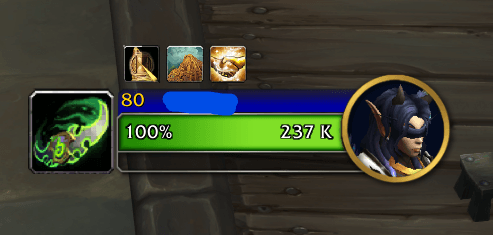
Block icon moved to the left of the target frame
Description
TargetClassIcon - About
TargetClassIcon enhances the default Blizzard target frame by displaying a player target’s class icon beside it. The addon updates automatically when you change targets and hides itself when the target is not a player or when no target is selected.
Customization Options
- Toggle between round and block class icons
- Adjustable icon size via slash command or mouse wheel
- Draggable icon positioning
- Locking system to prevent accidental movement or resizing
Slash Commands
All commands use the /tci prefix.
Position and Locking
| Command | Description |
|---|---|
/tci unlock |
Unlocks the icon so it can be moved and resized |
/tci lock |
Locks the icon in its current position and size |
/tci reset |
Resets all settings to default values |
Icon Shape
| Command | Description |
|---|---|
/tci shape |
Toggles between round and block class icons |
/tci round |
Forces round class icons |
/tci block |
Forces block class icons |
Icon Size
| Command | Description |
|---|---|
/tci size |
Displays the current icon size |
/tci size <number> |
Sets the icon size (example: /tci size 24) |
NOTE: While unlocked, the icon can also be resized using the mouse wheel while hovering over it.
Status
| Command | Description |
|---|---|
/tci status |
Displays the current icon shape, size, lock state, and position |
TargetClassIcon Team