Target Marker Icon Party - quickly put icons on all party members
- By
Apply target marker icons to party members that don't have them.
Major Change:
I just added the ability to put icons on only the tank and healer.
As you may know, the 12.0.0 release of retail has broken a huge number of addons. Target Marker Icon Party was also broken. Setting raid icons in lua code used SetRaidTarget which has now become a protected function that cannot be used by addon developers. I can still do this, but the only possible way is to use SecureAction buttons to run macros. Consequently, Target Marker Icon Party now uses a new small frame that has 3 buttons on it. The new usage description is now below.
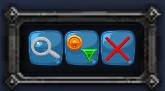
This addon adds a small frame with three buttons that will allow you to apply raid icons to party members that don't have them. It will leave unchanged any raid icons that are already assigned to your party. To do this:
While out of combat, click the left button with a magnifier glass to find which players need which icons. This will generate the macros that the other two buttons use. SecureAction buttons cannot have their macro text changed while in combat so this button can only be pressed outside of combat.
To apply icons, click the middle button that has raid icons on it. This can be done in or out of combat. (If you click this a second time it would try to re-apply the icons which would actually remove the icons. Don't use this button to remove icons because if someone manually removed their icon, clicking this a second time would re-apply the icon they had just removed.)
To remove icons, click the right button with the red x on it. This can be done in or out of combat. This will remove only the icons that you applied. If someone already had an icon before you applied icons, their icon will be left alone.
If you want to hide the small frame, issue the command:
/tmip
To show the small frame after it is hidden, simply type /tmip again.
The state of hide/show will be remembered and persist from game to game so you can leave this hidden and only show it when you need it if you want.
Target Marker Icon Party will assign the following icons in this order: circle, then triangle, then diamond, then square, then star.
You can move the small Target Marker Icon Party frame by dragging the outside of the frame containing the buttons. This addon will remember where you dragged the frame to and put it there again when you reenter the game.
If you want to put icons on only the tank and healer, then type /tmip th
Make sure you hit the magnifier glass icon after you enter the dungeon and before you enter combat because the tank and healer roles might not be set correctly until you're actually in the dungeon.
if you want to change it back to putting icons on all party members, then type /tmip norm or /tmip normal
This setting will be remembered when you reenter the game.
Quite often people in dungeons only want icons on the tank and healer because they want to easily see where the tank is because they're following the tank and they want to easily see where the healer is because they want to make sure the healer can heal them.
I've been in parties where we all knew each other and we all liked icons on all of us so we could locate each other easier. This may be especially useful when one of your party members is a newbie. In mythic dungeons with pick up groups where you're all strangers, this is meant as a temporary assignment that you can remove later. Why would you want to remove them? Some people prefer to not have target marker icons. If you randomly assign target marker icons to your whole party without good reason, your teammates might be unhappy with you.
Advanced Usage:
If you want some other icons assigned in some other order, simply give this addon a 5 digit number that gives the icons you want to use in the order you want to use them. For example:
/tmip 24358
will assign circle, then triangle, then diamond, then moon, then skull when you next use the magnifier button.
This program will remember your new settings.
The order of assignment is player, party1, party2, party3, party4
--1 Star
--2 Circle
--3 Diamond
--4 Triangle
--5 Moon
--6 Square
--7 Cross (X)
--8 Skull
Target Marker Icon Party - quickly put icons on all party members Team