
Target Crosshair
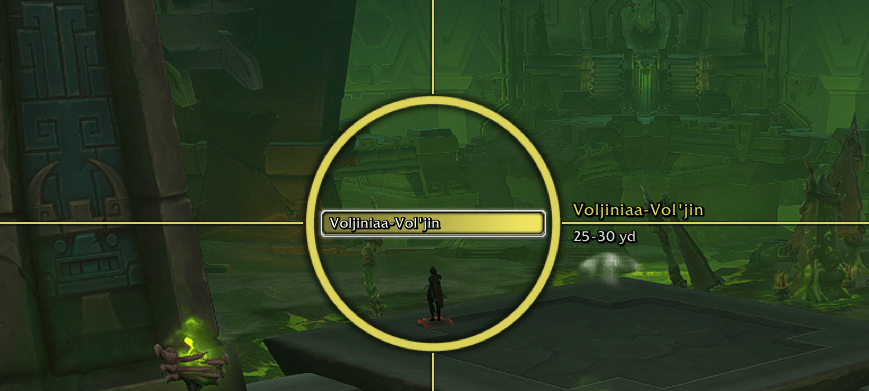
Sample 1.png
Description
Never lose your target in a crowd again. Target Crosshair draws a clear marker on the nameplate of your current target and a second, differently shaped marker on your focus. A small list shows every enemy player around you, and one click targets them. It is a lightweight replacement for Spy, built for Midnight.
It was written for world PvP, where the default target highlight is easy to miss, but it works anywhere you want your target to stand out.
Crosshair on target and focus
- Target marker: a ring in the target's class color, with thin lines running from the ring to all four edges of the screen. Even at the edge of your view you can see at a glance where your target is.
- Focus marker: a diamond in a color of your choice, with double lines. It stays on your focus when you select someone else, so you can follow two enemies at once and tell them apart instantly.
- Name and distance: the unit's name and an estimated distance are shown next to the marker.
- "Behind you" hint: when the unit is behind the camera, the marker says so instead of pointing at the wrong spot.
- Filter: mark enemy players only (default), all enemies, or all units.
- Follows your target, however you picked it: clicking, tab targeting, macros, the nearby list or another addon.
List of nearby enemies (new in 1.2)
- Shows the enemy players around you: name in class color, level, and estimated distance.
- Left-click a name to target that player, right-click to target him and set him as focus. The crosshair jumps right onto him.
- A warning sound plays when an enemy shows up who was not seen in the last 5 minutes, and his row lights up briefly.
- Enemies who leave your sight are dimmed and show how long ago they were seen. After a while (2 minutes by default) they are removed.
- The row of your current target and focus is highlighted.
- The list only appears when enemies are around. Drag its top bar to move it.
- Works in the open world by default; battlegrounds and dungeons can be switched on.
Settings
Open the settings with /tc or under Options > AddOns > Target Crosshair.
- Turn the target marker, the focus marker and the screen lines on or off individually
- Size, opacity and line thickness
- Focus color
- Show or hide name and distance
- Nearby list: on/off, warning sound, number of rows, how long enemies are kept, show when empty, lock position, also in instances
- A preview button that shows both markers while you adjust how they look
Key bindings
Under Options > Keybindings > Target Crosshair you can bind:
- Mark target as focus: sets your current target as focus with one key press
- Toggle crosshair: hides or shows all markers
- Show / hide nearby enemies: hides or shows the list
Chat commands
/tcopens the settings (/crosshairworks too)/tc testshows or hides a preview of both markers/tc listshows or hides the list of nearby enemies (/tc list resetmoves it back to its default position,/tc list clearempties it)/tc statusexplains why a marker does or does not appear/tc helplists all commands
Good to know
- Markers and the nearby list rely on nameplates, so enemy nameplates must be enabled (Options > Nameplates). Since Midnight the game no longer gives addons the combat log, so enemies without a nameplate (roughly beyond 40-60 yards) cannot be detected. This is a limit of the game and applies to Spy as well. Your target, focus, mouseover and the targets of your group are also used.
- In combat Blizzard does not allow addons to change clickable buttons. Rows that were in the list before the fight stay clickable; enemies who show up during the fight are listed below and become clickable when the fight is over.
- The distance is an estimate shown as a range (for example 25-30 yd). The game does not provide exact distances to addons.
- Built for Midnight (12.1) and its addon restrictions. The addon only shows information and lets you target with a click; it does not automate anything.
- The interface is in English, with a German translation for German game clients.
Feedback
Found a bug or have an idea? Leave a comment on this page. If a marker does not show up, the output of /tc status helps a lot.
Credits and license
Target Crosshair is released under the MIT license. It bundles LibStub (public domain) and LibRangeCheck-3.0 (MIT license) for the distance estimate. Thanks to their authors.
Target Crosshair Team
