Target Class Icon Forever
- By
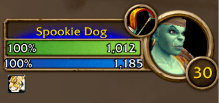
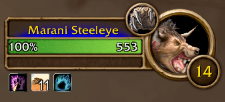
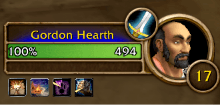
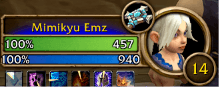
See your target's class at a glance: a round class icon on the target frame, in the same style as the level badge. Built for World of Warcraft: Forever.
Schermafbeelding 2026-10-18 120500.png
Schermafbeelding 2026-10-18 120443.png
Schermafbeelding 2026-10-18 120346.png
Schermafbeelding 2026-10-18 120328.png
Description
TargetClassIcon
See your target's class at a glance: a round class icon on the target frame, in the same style as the level badge. Built for World of Warcraft: Forever.
The default target frame tells you a player's name and level, but not their class. TargetClassIcon adds a small round badge to the top-left of the target's portrait with their class icon inside, so you know straight away whether you're looking at a Rogue or a Priest.
What you see
- A round badge at the top-left of the target portrait, opposite the level badge.
- It uses the same ring as the level badge. The addon copies the level badge's own textures in game, so the two always match, even if the client's art changes.
- Inside the ring: the target's class icon.
- It works on every player you target: yourself, friendly players, party members and enemy players.
- NPCs get no badge by default, since their class rarely means much. Type
/tci npcto show it for NPCs too.
The badge is part of the target frame. When you move or scale the target frame, the badge moves and scales with it, and it disappears when you have no target.
Commands
| Command | What it does |
|---|---|
/tci |
List the commands |
/tci npc |
Show the badge for NPCs too (on or off) |
/tci scale <n> |
Make the badge bigger or smaller (1 = same size as the level badge) |
/tci offset <x> <y> |
Move the badge a little (+ is right and up), for example /tci offset -4 2 |
/tci reset |
Put size and place back to the default |
/tci debug |
Show what the addon found on the target frame |
Your settings are saved per account.
Limits
- Only the target frame gets a badge, not the focus frame or party frames.
- If the level badge can't be found, a gold minimap-style ring is used instead.
Feedback
WoW Forever is in beta and its interface can still change. If the badge is missing or in the wrong place:
- Target a player and type
/tci debug. - Send a screenshot that shows the target frame and the chat output.
Target Class Icon Forever Team