Target Alert
- By
Snip_20261112_011419_443.jpg
Description
# TargetAlert
**Know the moment an enemy player picks you as their target, before they hit you.**
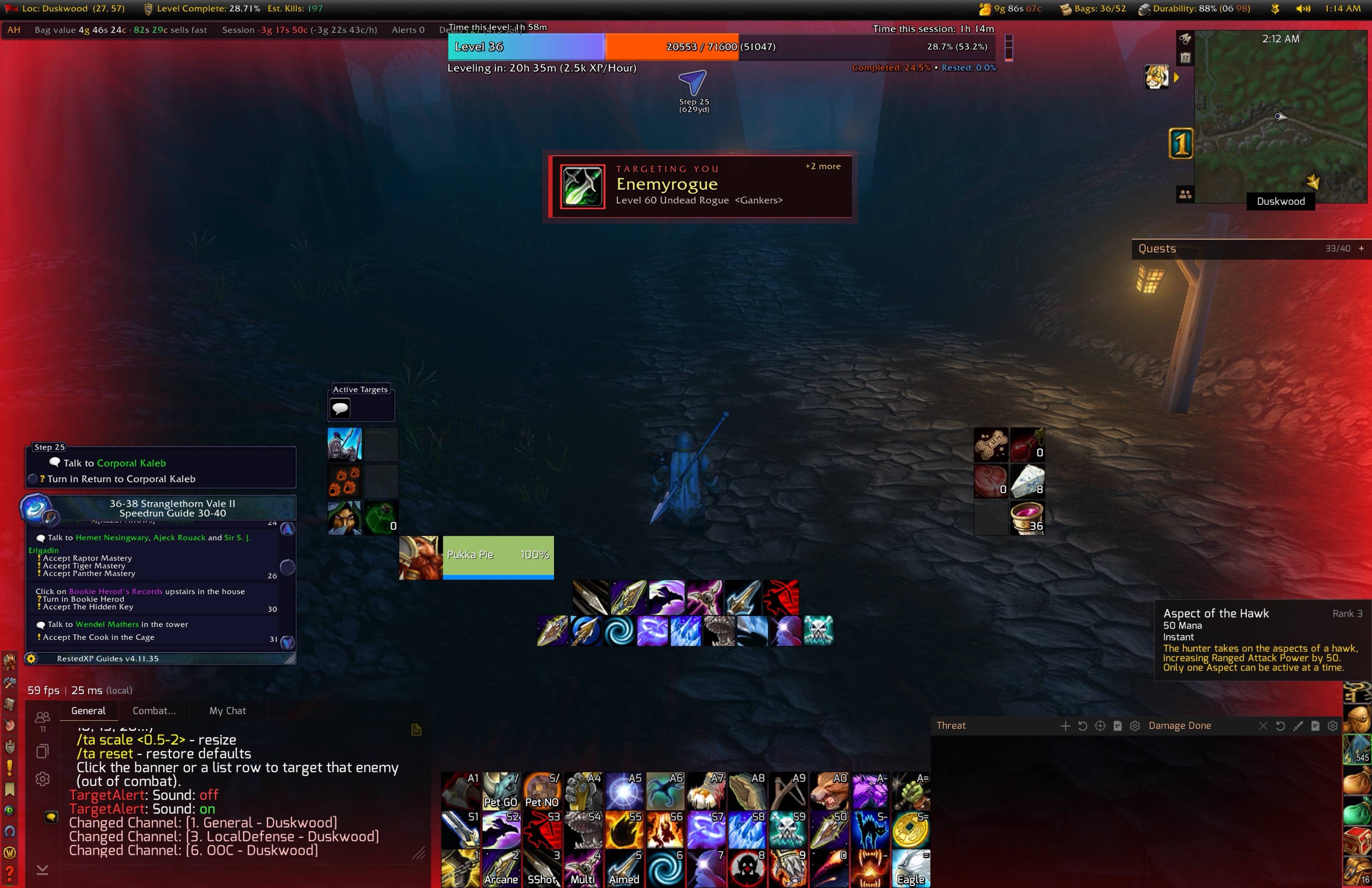
TargetAlert watches the hostile players around you and fires a clear on-screen alert the instant one of them targets you. You never have to target them first. Click the alert to target the attacker straight away.
Playing a Hunter, Warlock or anyone else with a pet? TargetAlert also gives you a smaller, calmer alert when an enemy player targets your **pet**.
## Features
- **Instant visual alert**: a banner slides in showing the attacker's class icon, name, guild, and level, race and class, with a pulsing red glow and border.
- **Pet alert**: a smaller amber alert appears when an enemy targets your pet. It has no screen flash, a softer sound and a shorter timer, because it's your pet and not you.
- **Screen flash and sound**: a red edge flash and a warning sound make sure you don't miss it, even mid-fight.
- **Works in and out of combat**: the alert always shows, even if you're already fighting something else.
- **Click to target**: click the banner, the pet alert or a row in the list to target that enemy (see the note on combat below).
- **"Hostiles on you" list**: everyone currently targeting you, with class icons and health bars. The row for your current target is highlighted.
- **Nameplate skull marker**: a pulsing skull appears above each attacker's nameplate, so you can spot them and click their nameplate, which works in combat.
- **Adjustable banner timer**: choose how long the banner stays on screen (5, 10, 15, 20 seconds or anything from 1 to 60).
- **Movable and resizable**: drag the banner, the pet alert and the list wherever you like and scale them to fit your UI.
- **Lightweight**: no libraries, no clutter, and no feature creep. It does one job.
## Commands
Type `/ta` (or `/targetalert`) in chat to see the command list.
| Command | What it does |
|---|---|
| `/ta` | Shows all commands and whether alerts are on or off |
| `/ta on` | Turns alerts on |
| `/ta off` | Turns alerts off. Scanning stops and any alert on screen is cleared |
| `/ta test` | Shows a preview alert so you can see how it looks and sounds |
| `/ta test pet` | Shows a preview of the smaller pet alert |
| `/ta pet` | Turns the pet alert on or off (on by default) |
| `/ta unlock` | Unlocks the banner, pet alert and list. Drag the green boxes to reposition them |
| `/ta lock` | Locks the frames in place and saves their position |
| `/ta timer <seconds>` | Sets how long the banner stays on screen, for example `/ta timer 10`. Accepts 1 to 60. The pet alert stays for 70% of this time |
| `/ta sound` | Toggles the alert sounds, including the pet alert sound |
| `/ta flash` | Toggles the red screen-edge flash |
| `/ta tracker` | Toggles the "Hostiles on you" list |
| `/ta marker` | Toggles the skull marker above attackers' nameplates |
| `/ta scale <0.5-2>` | Resizes the banner, pet alert and list, for example `/ta scale 1.2` |
| `/ta reset` | Resets all settings to default |
| `/ta debug` | Prints troubleshooting information to chat when you click an alert. Useful for bug reports |
Your settings are saved between sessions. `/ta unlock`, `/ta lock`, `/ta scale` and `/ta reset` can't be used in combat.
## How it works
TargetAlert checks the nameplates of nearby enemy players about ten times a second. If one of them is targeting you and you don't already have them targeted, it alerts you. If one is targeting your pet instead, you get the smaller pet alert. If you've already targeted them, it stays quiet. It switches on enemy nameplates at login, since it needs them to see who is nearby.
## Good to know
- **Clicking in combat:** WoW doesn't let addons change a clickable button's target during combat. If an enemy targets you or your pet *before* combat starts, the alert and list rows are clickable. If one starts targeting you *mid-fight*, you still get the full alert, sound and skull marker, but that alert can't be clicked until combat ends. In that case, click their nameplate. The skull shows you which one.
- **Range:** it can only see enemies who currently have a nameplate on screen, so about nameplate range. Stealthed players don't show nameplates and won't trigger alerts.
- **No auto-targeting:** TargetAlert alerts you, but you always choose whether to target. It never targets for you, and WoW doesn't allow addons to do that.
- **Pets:** the pet alert works with any class that has a pet, and only fires if you currently have a pet out.
- **Compatibility:** built for WoW Classic Era (interface 1.16.x) and tested alongside a third-party nameplate addon. If WoW says the addon is out of date after a patch, tick "Load out of date AddOns" and let the author know.
## Installation
1. Download and unzip.
2. Put the `TargetAlert` folder into `World of Warcraft/_classic_era_/Interface/AddOns/`.
3. Restart the game, then type `/ta test` to preview, or `/ta test pet` for the pet alert.
## Credits
Created by **Pukka Pie - RPPVP EU**, with development assistance from **Claude.ai** (Anthropic).
Target Alert Team