Tanksign
- By
One-click skull and X marking for WoW Forever: a panel of the mobs your tank is holding, with live health bars.
Description
# Tanksign
*Skull the right mob with one click.*
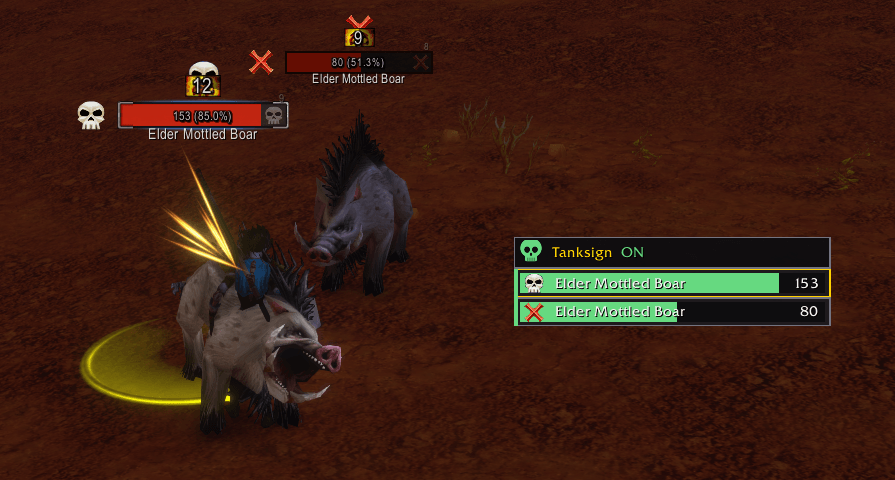
Tanksign puts a small panel next to your screen that lists the enemy mobs around you, each with a live health bar. It shows which mobs your tank is holding and which ones are loose, and lets you mark any of them without targeting it first:
- **Left-click** a mob in the panel: **skull** on it.
- **Right-click**: **red X** on it.
Both work in combat. The skull and X you placed also show on the mob's row and above its nameplate.
Built for **WoW Forever**.
## What you see
- **One row per enemy nameplate**, with the mob's name and health bar. The rows follow the fight: mobs appear when they get a nameplate and leave when they die or go out of view.
- **Bar colors:** green when a tank holds the mob, red when it is in combat and no tank holds it (loose), grey when it is not pulled yet.
- **Tags:** **E** elite, **R** rare, **B** boss, **C** caster.
- **Your target's row** has a gold border. Pets and totems are dimmed.
- **Marker icons:** the skull and X you placed, on the row and above the nameplate.
## Key bindings
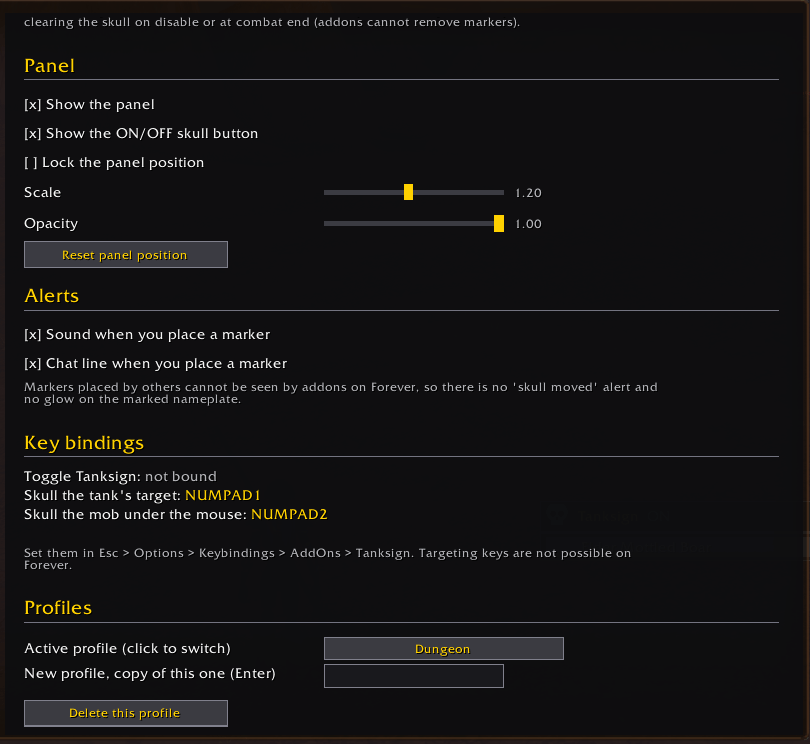
- **Skull the tank's target**: one key, in combat too.
- **Skull the mob under the mouse**
- **Toggle Tanksign**
Find them under Esc > Options > Keybindings > AddOns > Tanksign.
## Who is the tank
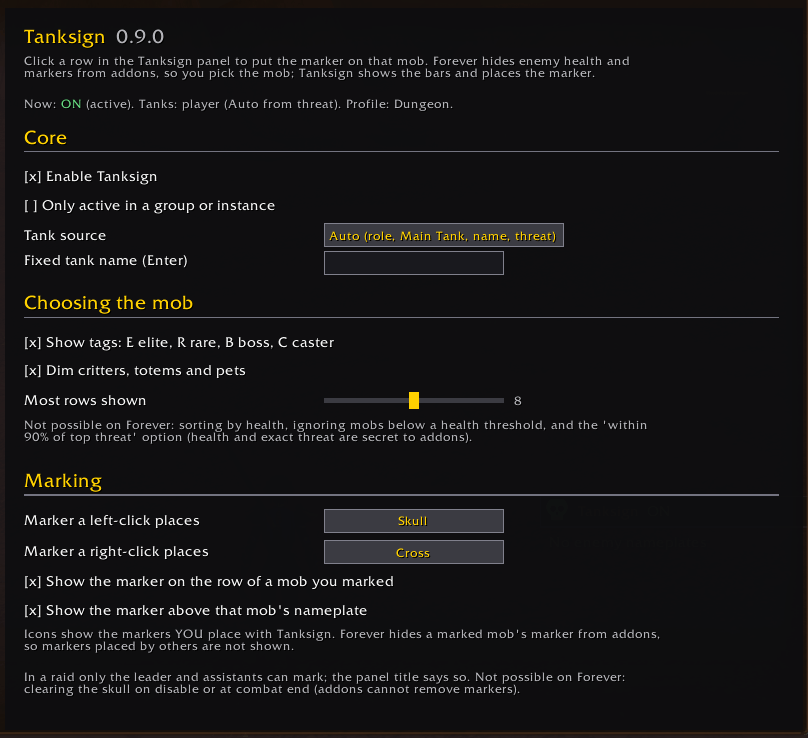
Tanksign finds the tank by role first, then the Main Tank assignment, then a name you set with **/ts tank Name**, and if none of those exist, whoever has top threat. With several tanks, a mob counts as held if any of them holds it.
## Options
Everything is on one page: Esc > Options > AddOns > Tanksign, or **/ts options**.
- Turn Tanksign on or off from the panel's skull button, a key, a command or the options page; they all stay in step.
- Only active in a group or instance.
- Which marker left-click and right-click place.
- Panel size, opacity, lock, number of rows.
- Optional sound or chat line when you place a marker.
- **Profiles**, for example "Dungeon" and "Raid", with automatic switching when you enter one.
## Why you pick the mob
WoW Forever hides enemy health and raid markers from addons, and does not let addons place markers or change your target on their own. Tanksign does not try to get around that. It shows the health bars so you can spot the lowest mob, and your click runs Blizzard's own marking code. That is why marking works in combat.
Known limits:
- Mobs without a nameplate have no row. Keep enemy nameplates on.
- Rows are not sorted by health, because addons cannot read it.
- Markers placed by other players are not shown on rows or nameplates.
- In a raid, only the leader and assistants can mark. The panel tells you when you can't.
- The panel cannot be moved or hidden mid-fight. Turning Tanksign off in combat fades it, and it hides when the fight ends.
## Commands
- **/ts**: list commands
- **/ts on**, **/ts off**: turn Tanksign on or off
- **/ts options**: open the options page
- **/ts tank Name**: set a fixed tank
- **/ts profile Name**: switch to (or create) a profile
Found a bug or have an idea? Open an issue on GitHub: https://github.com/TankerALane/tanksign/issues
Support: support@decoupledlane.com
*Tanksign is an addon for World of Warcraft by Decoupled Lane Studio. It is not affiliated with or endorsed by Blizzard Entertainment. MIT license.*
Tanksign Team