TALOD - WoW! That's a Lot of Data!
- By
That's a lot of Data! World PvP awareness, a player census, gear and economy logs, fishing, professions and guild tools for WoW Forever and Classic Era.
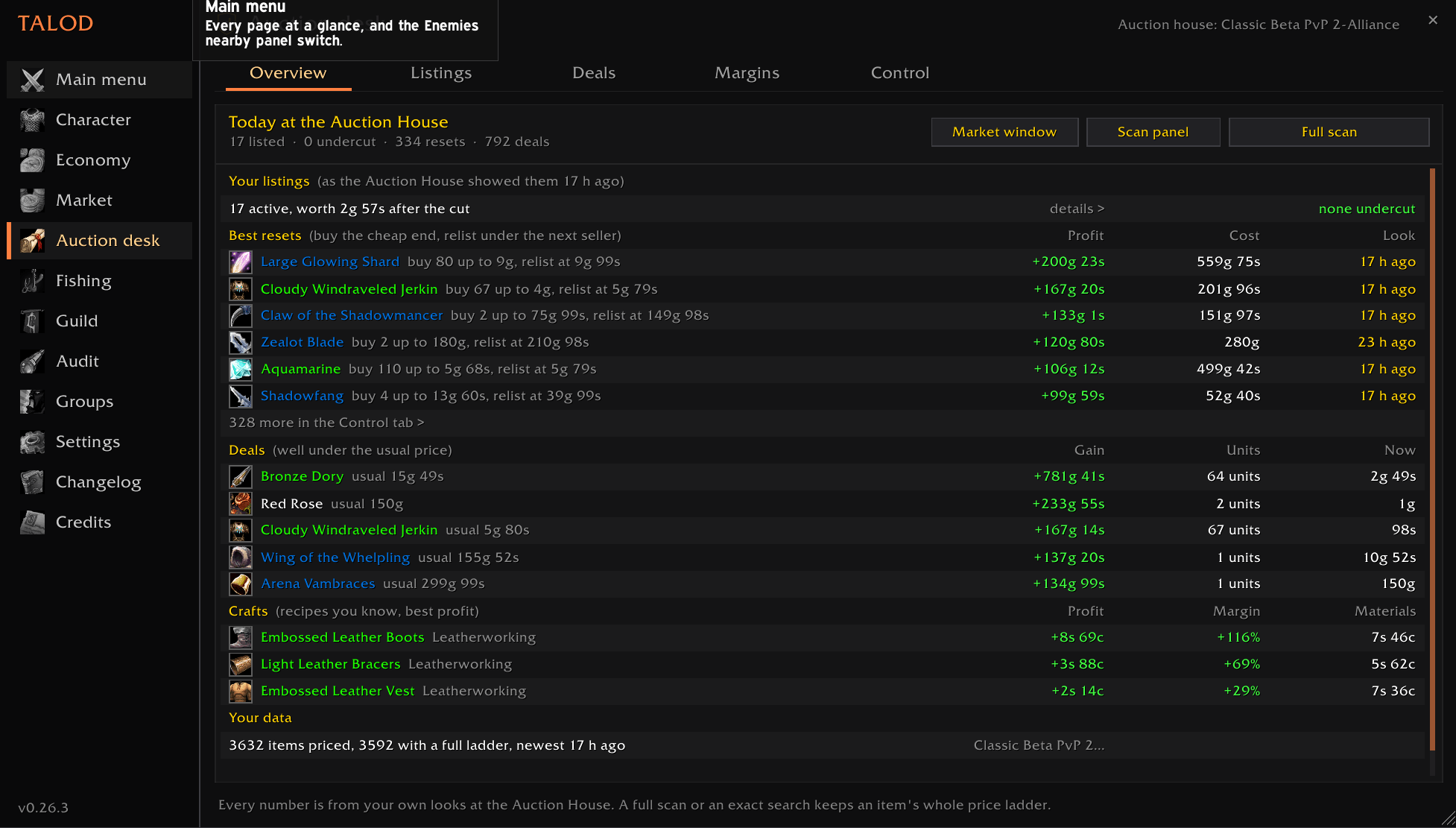
0.26.2-Auction Desk.png
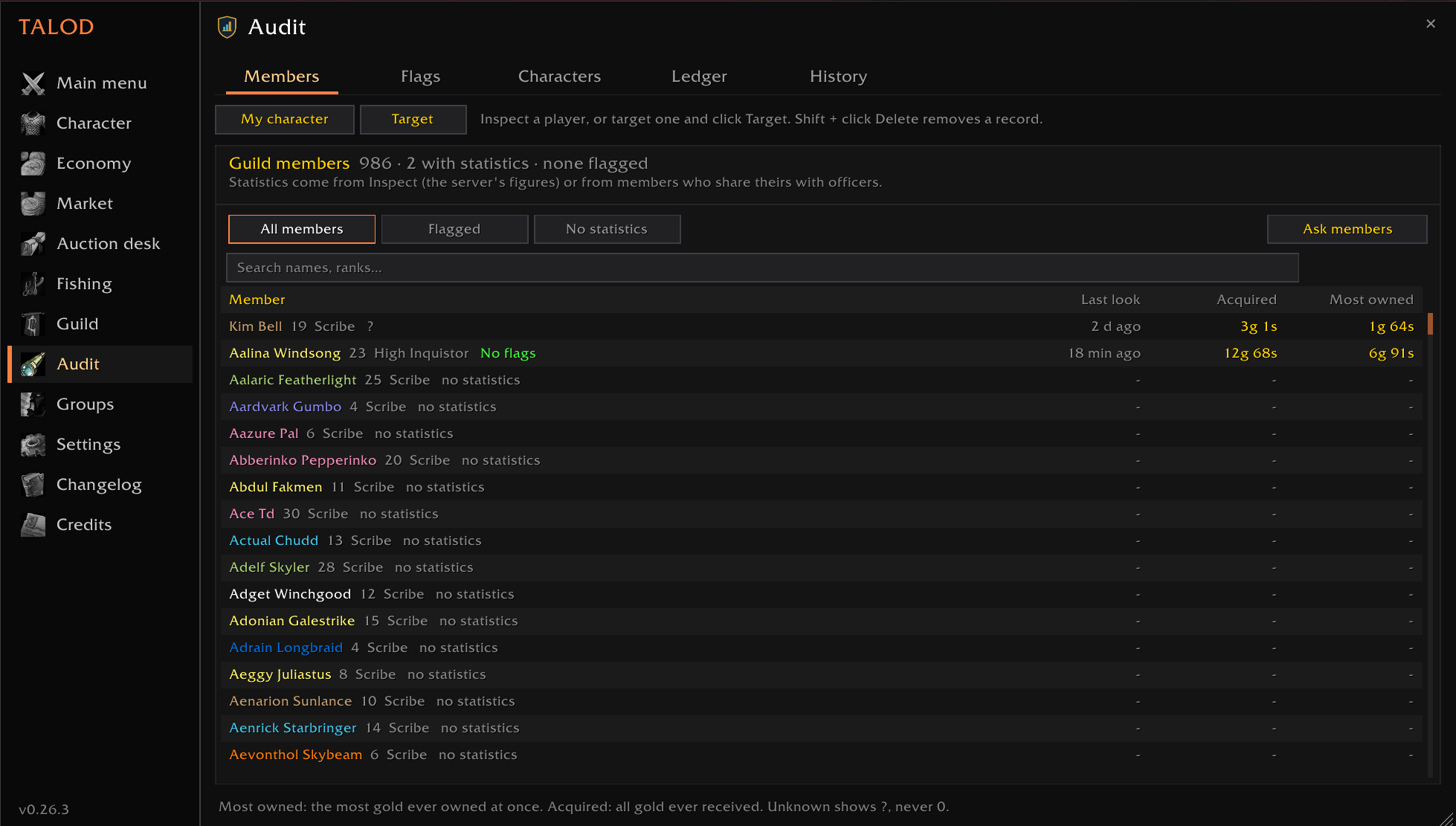
0.26.2-Audit.png
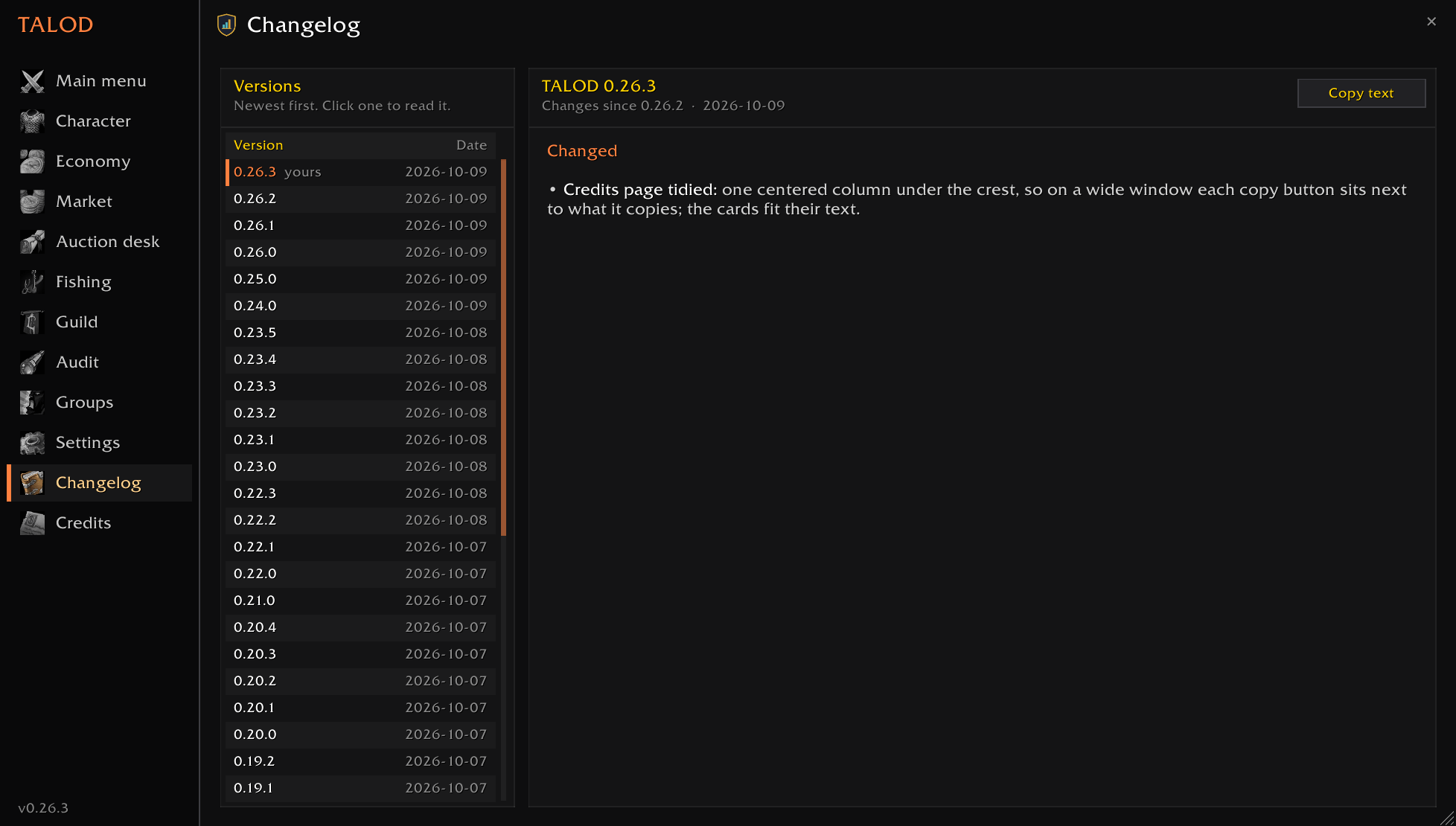
0.26.2-Changelog.png
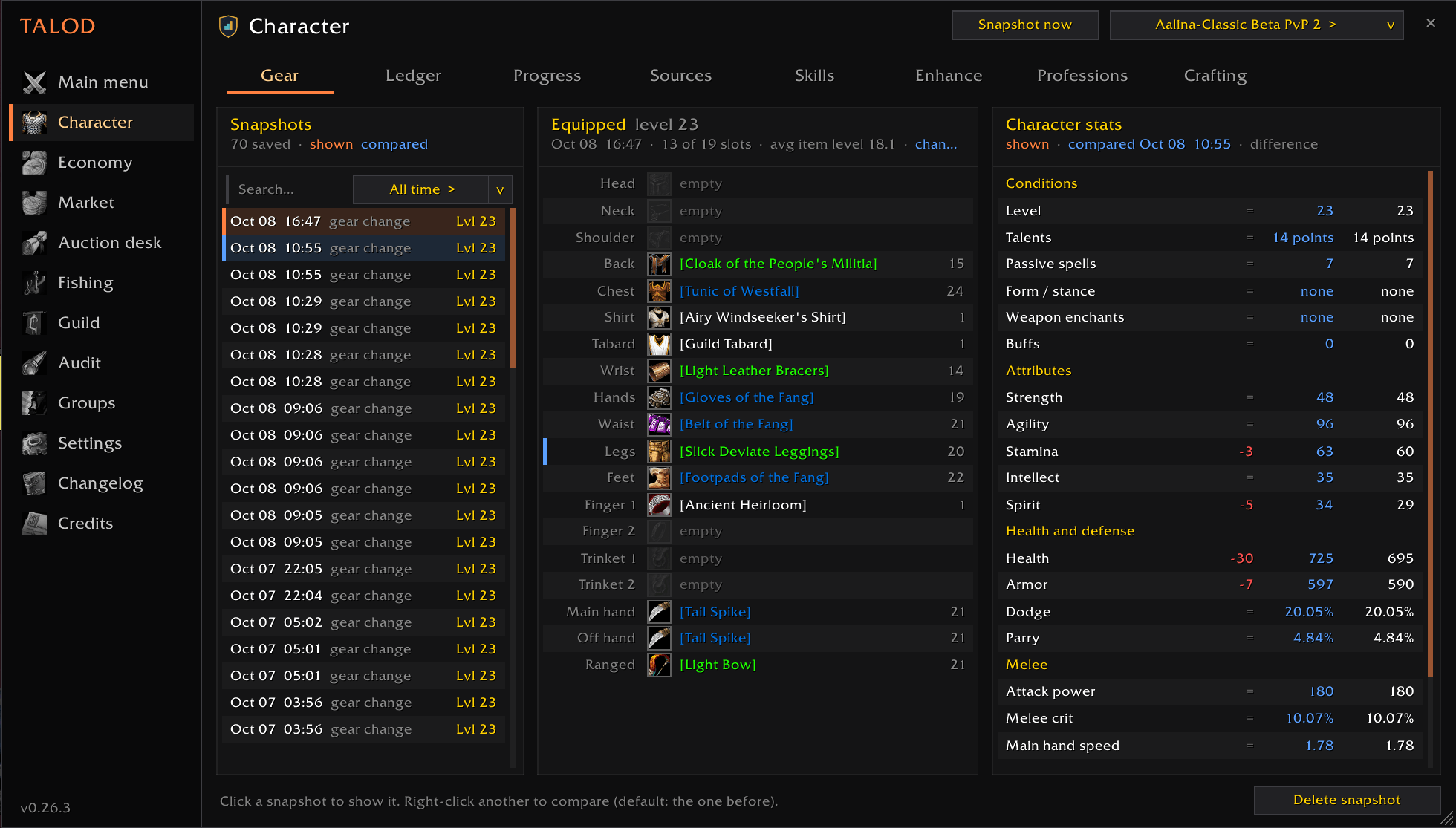
0.26.2-Character.png
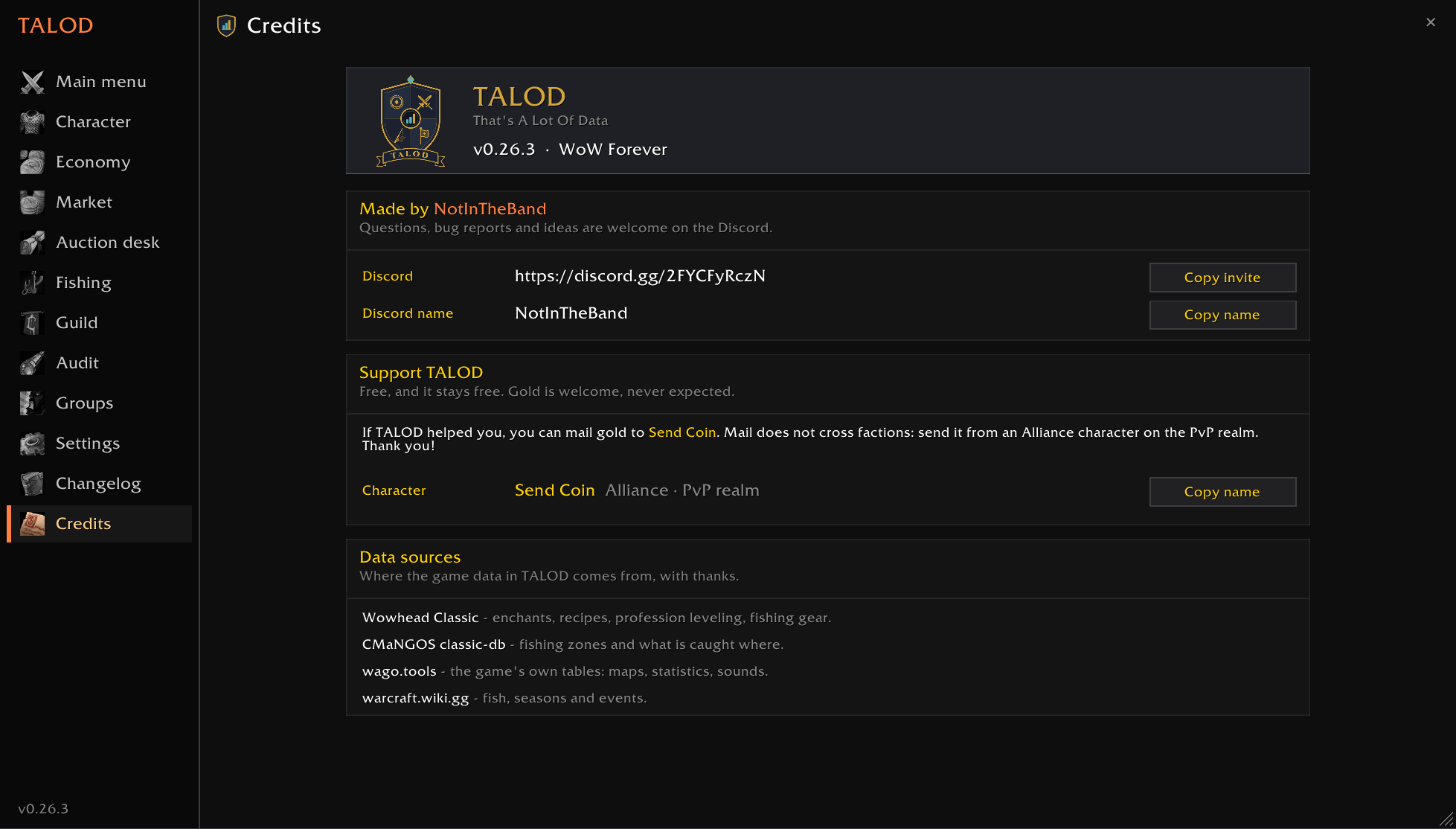
0.26.2-Credits.png
Description
# TALOD
**That's A Lot Of Data** (say *tah-lod*). One addon for the whole game.
A quality-of-life suite for **WoW Forever** and **Classic Era**, built with Hardcore players in
mind. It started as world PvP awareness and grew into everything around it: your gear, your
professions, your gold, the Auction House, fishing and your guild.
| | What it does for you |
|---|---|
| ⚔️ **Awareness** | Which enemy players are near, how dangerous they are, how far away |
| 💀 **Hardcore safety** | Your PvP flag at a glance, and a warning before you flag yourself |
| 📖 **Memory** | A journal of who you've met, kill-on-sight lists, heat maps of where players travel |
| 🧑 **Character** | A gear ledger that shows what each upgrade really changed, enchants that fit, a profession leveling planner |
| 💰 **Gold & Auction House** | Where every copper went, auction prices and trends, undercuts, deals, crafting profit |
| 🎣 **Fishing** | Catch rates and gold per hour by spot, rare-fish goals, a HUD, one-click lure and weapon swap |
| 🛡️ **Guild** | Find unguilded players, invite with your message, roster, promotion rules, join/leave log |
| 👥 **Groups & Audit** | A record of every party and raid, and the game's statistics for you and your guild |
Use the parts you want; the rest stays out of your way. You decide what
happens: the addon never targets, casts, moves, buys or posts on its own. Every action is one
click by you.
> ### 🛡️ Unknown is never shown as safe
> The game sometimes hides information from addons, especially in combat. TALOD never fills
> those gaps with a reassuring guess. A hidden PvP flag reads **`PvP: ?`**, never "off". A
> distance the game won't give reads **`? yd`**. A player whose level is hidden counts as an
> equal-level threat. If you see a `?`, it means *nobody knows*, not *you're fine*.
---
## ⚔️ Awareness
**Enemies nearby panel**
- Every enemy player in nameplate range, sorted by threat: level gap, your kill-on-sight list,
and how close they are.
- Distance brackets (e.g. `10–15 yd`), health, power, and tags: targeting **you**, PvP flagged,
casting, in combat.
- Their buffs and debuffs, with big cooldowns (Divine Shield, Evasion, Ice Block…) and crowd
control highlighted.
- Players who just left view stay listed for a minute, so you know someone was there.
- Click a row to target them (out of combat).
**Enemy spotted alerts**
- A center-screen line and a chat message when an enemy shows up. They can come from
nameplates, your target or your mouseover.
- **Loud alerts** (bigger text plus a sound) for your kill-on-sight list, skull-level (`??`)
players, enemies well above your level, and any classes you choose.
- Optional: a warning when a nearby rogue or druid's nameplate suddenly disappears (probably
stealth).
- **Mute them in one click** with the Battle Shout button in the panel's title bar (or the
*Enemy alerts* switch in settings, or `/talod alerts off`). The panel keeps listing every enemy,
just silently.
**Nameplates**
- A badge beside each enemy nameplate shows the level gap (`+3`, `??`) and KoS / avoid marks.
- Above your target's nameplate, a readout shows which of your key spells reach right now
(Charge, Polymorph, Kick, Hammer of Justice…).
## 💀 Hardcore safety
- **Your PvP flag, always visible**, with the countdown until it drops.
- **"This would flag you" warnings** the moment you target something that would flag you if you
attacked or helped it:
- an enemy player
- an enemy player's pet
- an enemy-faction guard or NPC
- a flagged friendly player you might heal or buff
- **A territory banner** when you enter contested or enemy land, with how many enemies you've
seen there in the last 24 hours.
## 📖 Memory
- **Journal**: who you've met, where and when. Keep kill-on-sight and avoid lists, write notes
on players, and look anyone up with `/talod who Name`. Outcomes record only what you could see
("they died while targeted"), never a guess at who killed whom.
- **Census**: a log of the players you see, of both factions, for heat maps of where each class,
level and faction travels, and at what time of day. Run the included
`tools/census_viewer.py` (Python 3) to turn it into a web page.
## 🧑 Your character (`/talod char`)
- **Gear ledger**: snapshots of your gear and stats, and what every upgrade actually changed on
your character sheet. Talents, forms and buffs are recorded so that comparisons stay fair.
It also notes where each item came from: loot, a quest, a vendor (with the price), crafting or
the auction house.
- **Enhance**: the enchants, armor kits, scopes, spikes and oils that fit each piece you wear,
the skill they need, and the materials you already have.
- **Professions planner**: the cheapest path from your skill to any target, for every crafting
profession plus First Aid and Cooking. It covers what to craft at each point (using the real
vanilla skill-up odds), when to train, a shopping list that subtracts what's in your bags and
bank, and what the leftovers sell for. One click on a step crafts it, just like the game's
Create button.
- **Skills**: every skill-up, training and new skill, with history.
## 💰 Gold and the Auction House
- **Economy** (`/talod economy`): every gold change, labeled with what you were doing at the time:
vendor, repairs, loot, quests, trades, mail, auctions, training or flights. It covers one
character or all of them. Gold moved between your own characters doesn't count as income.
Auctions are followed from posting to sold, expired or cancelled, with the profit.
- **Market** (`/talod price`):
- every auction price you've seen, with its usual price and trend
- what to sell where (auction house or vendor)
- which crafts make a profit
- **Bids:** auctions whose next bid is under the item's price, ending soonest first (bidding stays the
game's Bid button)
- deals listed well under the usual price
- your own sell-through rate, and your AH price on every item tooltip
- **Auction desk** (`/talod ah`): the trading view.
- your listings against the market: which are still the lowest, which are undercut (how many
units sit under yours) and the price to repost at
- deals, with how many units are listed at the deal price and what buying them all gains
- crafting margins (profit and profit / materials)
- what owning an item's market costs: buy every unit, or just the cheap end and relist under
the next seller ("resets"), with the deposit, the 5% cut and your own sell rate counted
- who holds the supply (when the auction house names the sellers), and the full price ladder
- a price graph with volume (units listed, units you sold), also under item tooltips at the
Auction House
- whether each item sells (moves fast, moves, slow, doesn't sell), from your own auctions and how
fast it leaves the AH between your looks, on every item tooltip too, and a list of what you
keep posting that doesn't sell
The desk works from your own looks: a full scan or an exact search keeps every auction of an
item. It never buys or posts anything.
- **Craft tracker**: double-click a recipe on the Market's Crafting tab and a small window follows it:
the cheapest route (buy each part, or make it when you can and that is cheaper), what is in your bags
and in the mailbox from the Auction House, what is left to buy, and the crafts in order. **Craft next**
starts the next step whose materials you have (one click, one step, with the profession window open).
The scan panel's search list starts with what the tracked craft still needs.
- **Scan panel** (opens beside the Auction House, or `/talod ah scan`): a full scan (every 15
minutes, as the server allows) and a "search next" list. Each click runs exactly one search,
so nothing is automated.
## 🎣 Fishing (`/talod fish`)
- Every cast is logged: where, your skill and lure, and what you caught.
- For each spot: catch rate and gold per hour **at your skill**, and how often NPCs or enemy
players attacked you there.
- A heat map of where each fish bites.
- A small HUD while your pole is equipped: session, gold per hour, next skill point, lure time,
bag space, enemies in view.
- Warnings when your lure runs out or your bags are nearly full.
- **Safety while you fish:** a loud warning when an enemy shows up while the pole is in your
hands, a one-click button to swap back to your weapon (works in combat once shown), a warning when
an enemy targets you, and the nearest enemy's range on the HUD.
- **Goals** tab: Nat Pagle's rare fish, the Stranglethorn Extravaganza fish and other notable
catches; the zone's fishing level and your hook chance; day/night and seasonal fish on the server clock.
- Your best fishing gear and lures, and a one-click "Apply lure" button. Click the HUD's Lure line to
put the same lure on again.
- "Got away" vs "missed" kept apart, so catch rates measure the water, not your clicking; a
"Skill-ups per hour" sort for leveling.
- Optional **auto loot** and **loud splash** while fishing. Loud splash turns sound effects up
and music off, and keeps sound on when the game is in the background. Your settings come back
as soon as you unequip the pole.
## 🛡️ Guild (`/talod guild`)
- **Recruit:** players of your faction without a guild show up in a list: from their nameplates,
your target and mouseover, and from `/who` searches (one per click, at most one every 5 seconds). A search covers your whole
level range; only when the game's answer is full (about 50 players) do the next clicks search smaller
level ranges to reach the rest. Levels go up to the top level the game reports (read live, so they follow when Forever raises its cap).
One click whispers your message and sends the guild invite. Right-click: never offer them again.
Filter by name, level range, class and name alphabet (hide names written in alphabets you can't
read). A **mini recruit window** with the same list can stay on
your screen while you play (off by default: turn it on from the Recruit tab or `/talod guild mini`).
- **Delayed invite** (on by default): the first click sends your message, the second click, once the
row turns red 10 seconds later, sends the invite, so they have read it first. Invites still owed wait
in one queue, oldest first; the **Next invite** button sends the next one.
- **Recruit key:** right-click Next invite (or `/talod guild key`) and press any key or mouse button.
One press = one step: the next queued invite, else a /who, else the next whisper.
- **Hands Free** (off by default): a click on the open world, or a press of your move and jump keys,
counts as one click on the list, at most one step a second and never in combat. The keys still move
you. `/talod guild handsfree why` shows what it did with your last clicks.
- Write your own whisper messages, or use the default. `{name}`, `{guild}`, `{class}`, `{level}`,
`{zone}` and `{me}` are filled in.
- **Invited:** who you invited and what happened: joined, declined, offline, already in a guild,
replied to your whisper. Nobody is offered twice within a week (you can change that).
- **Replies:** whispers with the players you invited, in one place, with a reply box. A small notice
shows when one answers. Your opening whispers, the "You have invited..." lines and answers you
haven't written back to stay out of your chat window, so mass recruiting doesn't flood it. Once you
write back, that conversation shows in chat as usual (a setting turns the hiding off). Each
conversation is tagged Joined, Declined, Invited or Blocked, a search box finds words said in them, and
buttons send a party invite, a Battle.net friend request or open the game's report window for that player.
- **Recruiters:** who invited whom, from the game's guild log: how many joined, are still here, left
within a week, or joined more than once. Hover a name for the list.
- **Roster:** members by rank with last online, and who has been offline long enough to count as inactive.
Right-click a member to move them to another rank (one pick, one change; a rank that gives new rights
says so in red).
- **Activity** (officers and guild master only): who talks in guild chat, who is online with you without
a word.
- **Promotions:** set rules per rank (level, days in the guild, online recently, recruits kept) and see who qualifies.
One click promotes one member.
- **Log:** joins, leaves, removals, promotions and demotions, with who did it when the game says so.
- **Sharing:** members choose, one Yes / No each, what their officers may see: who they recruited,
their other characters in the guild, level and professions, and play time. Nothing is sent before
a Yes, it goes only to the officer who asked, and a No later makes the officers' copies disappear.
Officers see it in the **Members** tab. Officers' promotion rules come back the other way:
members see in Promotions what the next rank needs and how close they are.
- Who counts as an officer follows the game's rank permissions; the guild master can pick the ranks.
- Recruit and Promotions only show to ranks with permission to invite or promote.
- Nothing is sent on its own: every whisper, invite and promotion is one click by you.
Mass whispers get reported as spam, so invite people you actually met.
---
## 🔎 Audit (`/talod audit`, WoW Forever)
- The game's statistics for you, players you inspect and guild members who share theirs: total gold
acquired, most gold ever owned, gold from loot, quests, vendors and auctions, auction counts,
quests, kills, dungeons, deaths and profession ranks. The last 20 looks of each are kept.
- **Members:** your roster with what is known of each member, flagged first. **Flags:** records whose
counters don't add up the way played gold does: peak gold above all recorded income, much of the
income from neither loot, quests, vendors nor auctions, sudden unexplained gold between two looks,
a lot of gold for the level, gold with little play. A flag is a reason to look, never proof:
auction players, bank alts and alts fed by a main can trip them too. Mark a record "Looked: fine"
(a new flag brings it back), put it on watch, add a note.
- Read a player with the **Audit** button on the Inspect window (or every Inspect, a setting), or
target them and click **Target**: one request per click, out of combat, player nearby.
- Members can share their own statistics with officers (Guild window, Sharing: "Gold and activity
statistics"). Inspected figures are the server's; shared ones come from the member's own addon.
- Unknown figures show `?`, never 0.
## 👥 Groups (`/talod groups`)
- **One record per party and per raid** (not per player): when, how long, where you went (time in each
zone and instance), who led, and the group's chat (party, raid, raid warnings, instance chat).
- **Everyone who was in it**, with what the game showed while you were grouped: class, race, level when
they joined and when they left, guild and guild rank, role, raid subgroup, leader / assist / master
looter, highest health and power, time grouped with you, time offline and AFK, deaths seen.
- **Now:** your current group, live: health, dead / offline / AFK, role and subgroup, time together and
deaths so far. Hover a member for everything known; click one with an Audit record to open it.
- **Parties** and **Raids:** every group, newest first. Search a name to find every group you shared
with that player. Open one for its **Members**, **Chat**, **Loot** (from the loot messages; the
quality to keep is a setting) and **Timeline** (joins, leaves, deaths, zones).
- A stray invite (under a minute, nothing said) isn't kept. A `/reload` keeps the same record going.
Unknown shows `?`: a member whose name the game hides isn't recorded, and a death counts only when
they were seen alive first.
---
## 📰 Updates, changelog and credits
- **Update notice:** TALOD tells you when a newer version is out, heard from other TALOD players on your
realm. Notes are signed, so nobody can fake one. A window with step-by-step update instructions opens
at login (never in combat); `/talod version` opens it any time, and the setting is under General.
- **Changelog** (`/talod changelog`, or Main menu): what changed in every version, with "Copy text" for
plain notes.
- **Credits** (`/talod credits`): who made it, the Discord invite and how to send gold.
---
## 🚀 Getting started
1. Install with the CurseForge app, or copy the `TALOD` and `TALOD_Archive` folders into
`World of Warcraft\<your game folder>\Interface\AddOns\` (side by side; the archive is
optional and only read when you open it).
2. **Restart the game** completely. A `/reload` isn't enough the first time.
3. Type **`/talod`** for settings, or click the minimap button:
- **Left-click**: main menu (every TALOD window)
- **Shift-click**: economy
- **Alt-click**: market
- **Ctrl-click**: Enemies nearby panel
- **Right-click**: settings
- **Shift + right-click**: guild
4. Enemies are spotted by their nameplates. For the earliest warning, type
**`/talod distance max`** to raise the nameplate range to the maximum (41 yards).
Everything is on by default, except the stealth heuristic, auto loot, session summaries, Hands Free and
the mini recruit window.
Every option is in the settings window; slash commands are a shortcut.
## ⌨️ Commands
`/talod` is the command.
| Command | What it does |
|---|---|
| `/talod` | Open the settings |
| `/talod help` | List every command |
| `/talod panel on\|off\|lock\|unlock\|reset` | Enemies nearby panel |
| `/talod alerts on\|off\|test` | Enemy spotted alerts (`test` shows a sample) |
| `/talod badges on\|off` | Nameplate badges |
| `/talod flag on\|off\|reset` | PvP flag indicator |
| `/talod kos <name>` · `/talod avoid <name>` | Add a player to a list (`target` works as a name) |
| `/talod unlist <name>` · `/talod note <name> <text>` | Remove from lists · write a note |
| `/talod who <name>` | Everything the journal knows about a player |
| `/talod journal` · `/talod lists` | Journal · your kill-on-sight and avoid lists |
| `/talod distance [max]` | Show the nameplate distance, or set it to the maximum |
| `/talod census [on\|off\|clear]` | Player census (`allies on\|off`, `friendly`) |
| `/talod char` · `/talod gear snap [name]` | Character window · take a named gear snapshot |
| `/talod enhance` · `/talod skills` · `/talod crafts` | Enhance, Skills and Crafting tabs |
| `/talod plan [profession] [skill]` | Leveling plan, e.g. `/talod plan tailoring 150` or `60-150` |
| `/talod economy` | Economy window |
| `/talod price [item]` | Market window, optionally searching for an item |
| `/talod ah [item]` | Auction desk, optionally on one item's market (its buyout cost in chat) |
| `/talod ah scan` · `/talod ah log` | Scan panel · history of full scans |
| `/talod fish [spots\|map\|log\|sessions\|stats]` | Fishing window, or this session in chat |
| `/talod fish hud` · `autoloot` · `splash` · `end` | Fishing HUD, auto loot, loud splash, end the session |
| `/talod fish goals` · `zone` · `gear` · `safety [on\|off]` | Goals tab, zone fishing level, your gear and lures, fishing safety |
| `/talod guild [recruit\|invited\|replies\|roster\|recruiters\|promote\|log\|members\|sharing]` | Guild window |
| `/talod guild mini` | Show / hide the mini recruit window |
| `/talod guild who` · `/talod guild invite [name]` | One /who search for players without a guild · whisper + invite one player (or your target) |
| `/talod guild next` · `/talod guild key` | One recruit step (for macros) · set your recruit key |
| `/talod guild handsfree [why]` | Hands Free on / off · what it did with your last clicks |
| `/talod guild check` · `/talod pace [reset]` | Your invites of the last hour · the whisper limit learned from the game |
| `/talod audit [me\|target\|members\|flags\|characters\|history\|status]` | Audit window · read yourself or your target |
| `/talod groups [now\|parties\|raids]` | Groups window: your current group, past parties and raids (`party` and `raid` work too) |
| `/talod menu` | Main menu: every TALOD window |
| `/talod version [status]` | Your version, whether a newer one is out, how to update |
| `/talod changelog [version]` | What changed in each version |
| `/talod credits` | Credits, Discord invite, how to send gold |
| `/talod minimap` | Show or hide the minimap button |
| `/talod archive [load\|move]` | Archive: state, load it, move what the cleanup rules would remove |
| `/talod clean [now\|auto on\|off]` · `/talod memory` | What the cleanup rules would remove, run them, daily cleanup on / off · memory used and the largest stores |
| `/talod data` | Your saved data by character |
| `/talod clear` | Empty the nearby list |
| `/talod reset` | Reset settings and positions (all your logged data is kept) |
| `/talod errors` · `/talod probe` · `/talod perf` | Error list · client capability report · slowest work this session, for bug reports |
## ❓ What it can't do, and why
WoW Forever runs vanilla content on the modern engine, and the modern addon rules apply there:
- **No combat log.** Addons can't read it, so there's no Spy-style detection from combat events
and no tracking of enemy cooldowns.
- **Hidden values.** The game hides a lot of unit information during combat. The panel is most
useful *before* the fight, and shows `?` for anything hidden.
- **No enemy positions and nothing drawn in the world.** Distances come from your own spell and
item ranges, and badges are attached to nameplates.
- **No automation.** Every action is one click by you: targeting, crafting, auction searches,
lures and weapon swaps, guild whispers, invites and promotions, statistics requests.
- **Statistics only where the game keeps them.** The Audit page reads WoW Forever's statistics;
Classic Era has none. Another player's gold on hand is never visible.
## 🔒 Your data
Everything stays on your computer, in your SavedVariables file. The one exception is guild
sharing: what you said Yes to on the Guild window's Sharing tab goes to the officer of your guild
who asks for it, and nothing else ever leaves your computer. Recruit whispers are kept so you can
read the conversation again. The Audit page keeps other players' statistics (names, gold figures)
in the same file.
The game loads that whole file into memory at login, so a big log costs memory and loading time.
Settings, **Data** has cleanup rules that remove what is old and no longer used (opening whispers
nobody answered, old price history, items not seen on the Auction House for months) and a memory
cap (150 MB by default) that warns you when it's passed. Cleanup runs once a day on its own for a
new install; if you updated from an older version it stays off until you turn it on, so nothing
you had is deleted without your say. `/talod clean` shows what each rule would remove.
Old entries can go to the **archive** instead of being deleted: the **TALOD_Archive** folder that
comes with TALOD is a second addon the game only reads when you open it (Settings, Data, Archive),
so what's in it costs no memory until then. Once opened it stays loaded until you /reload. Run
`python tools/data_report.py` to see what fills your saved data and what's in the archive
(`--export <folder>` writes the archive out as JSON).
The census and fishing logs contain other players' names, so think before you share those files
or the viewer pages made from them.
## 🐞 Found a bug?
Type `/talod errors` and copy the list into your report. If something was read wrong (a distance,
a flag, a level), also run `/talod probe` near an enemy player and include that. Reports go to
## 🛠️ For developers
The source, tests and data generators are in the
`pip install lupa`, then `python tests/run.py`. Release builds come from
`python tools/build_release.py --check`.
TALOD - WoW! That's a Lot of Data! Team