TalentGearSwap
Automatically change your equipment when switching talents.
TalentGearSwapScreen.png
Description
TalentGearSwap (TGS)
Forget about fighting a boss with your fishing pole or the wrong trinkets!
TalentGearSwap is a lightweight and efficient addon for World of Warcraft (Retail) that links your Talent Loadouts with your Equipment Sets and Cooldown Profiles. Change your talents, and your gear and UI will adapt instantly.
🌟 Key Features
⚡ Automatic Swapping: Switch your talent loadout, and your gear swaps automatically.
⏱️ Native Cooldown Manager Support (Midnight 12.0.1+): Fully integrated with Blizzard's new native Cooldown UI. Link your custom Cooldown Profiles to your talent loadouts, and TGS will swap both your gear and your cooldown layout at the exact same time!
🔗 Broker Support (LDB): Fully compatible with ElvUI, Titan Panel, ChocolateBar, and more. Monitor and control your gear directly from your favorite info bars.
🛡️ Combat Queue: If you swap talents while in combat, the addon waits and automatically swaps your gear the moment you leave combat.
📍 Smart Minimap Icon: A draggable, elegant icon.
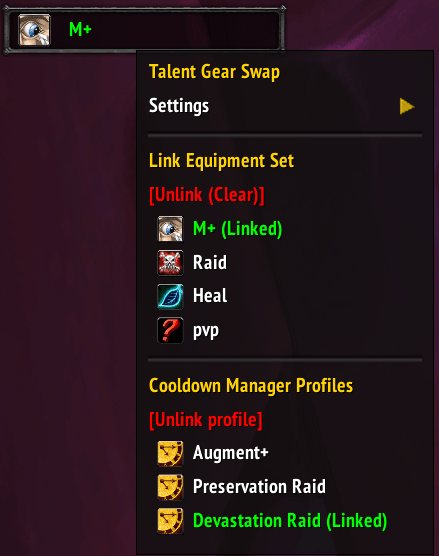
👀 Intelligent HUD & Menus: A movable floating button and right-click menu that shows your active status:
- Green Text: Correct set equipped / Profile actively linked.
- Red Text: Missing pieces or mismatched set.
- Orange Text: Swap pending (Combat Queue active).
🌍 Localization: Automatically detects English and Spanish.
🤝 Full Support for Talent Loadout Ex (TLE): You asked for it, and here it is! TGS is now 100% compatible with the popular Talent Loadout Ex addon. Link your equipment sets and Cooldown profiles directly to your custom TLE profiles natively.
👁️ New "Active Talents" Visual Indicator: A new section has been added to the main menu showing you at a glance which talent engine is currently in charge (Blizzard vs TLE). The active system will light up in green so you always stay in control and know exactly what is managing your gear.
⚙️ Settings Menu
We have centralized everything in a native Blizzard UI sub-menu using checkboxes:
- Lock Position: Keep your HUD exactly where you want it.
- Show HUD/Minimap: Choose exactly which UI elements you want to see.
- Language Selection: Manually switch between English and Spanish.
🛠️ How to Use
- Interact with the HUD Button, Minimap Icon, or your Broker Bar.
- Left-Click to open the link menu.
- Select the Equipment Set and the Cooldown Profile you want to associate with your current talent loadout.
- Done! From now on, TGS will handle your gear and UI every time you activate those talents.
🛠️ How to use TGS with Talent Loadout Ex (TLE)
- Enable Compatibility: Left-click the TGS HUD button or minimap icon to open the menu. Go to Settings and check the "Enable Talent Loadout Ex" option.
- Check Who's in Charge: In the main TGS menu, look at the Active Talents section. If everything is correct, the TLE line will light up in green showing the exact name of your active profile (e.g.
TLE: Heroic Raid). The Blizzard line will turn gray. - Link your Gear and CDs: Make sure you have the TLE profile you want to configure actively loaded. Then, open the TGS menu and select the Equipment Set and Cooldown Profile you want to link to it.
- Done! TGS will now use its own cache memory to safely remember your TLE profile. Swap talents using TLE and watch your gear and UI follow you instantly!
⌨️ Commands & Controls
- Left-Click: Open Menu / Options.
- Right-Click: Force equip the assigned gear set.
- /tgs showon: Makes the HUD button visible.
- /tgs showoff: Hides the HUD button.
- /tgs: Opens the configuration menu at your cursor's position.
Created to make life easier for hybrid classes and multi-spec players.
TalentGearSwap Team