
Talented
- By
Screenshot 2026-07-29 191923.png
Description
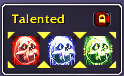
A small floating box for switching specializations at a glance. One button per available spec with its icon pulled straight from the game's own specialization data and the current spec marked by the same marching-ants ring the pet action bar uses for an active ability. Click a button to switch specs instantly (blocked in combat, same as the built-in specialization UI).
Features: one button per specialization, auto-sized to fit. Current spec highlighted with an animated glow that updates live on spec change. Draggable frame with a lock/unlock toggle in the corner. Icon size options (Small, Medium, Large) in Options > AddOns > Talented. Right clicking on a spec allows hot selection of a build.
Commands: /talented lock or /talented unlock to lock/unlock the frame for moving. /talented reset to reset the frame position. /talented size small, medium, or large to change icon size. /talented debug to print diagnostic info.
Talented Team
