TacoTip | GearScore & iLvL
- By
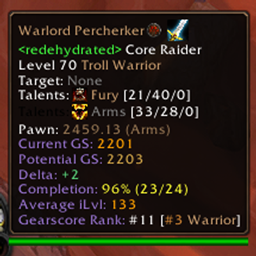
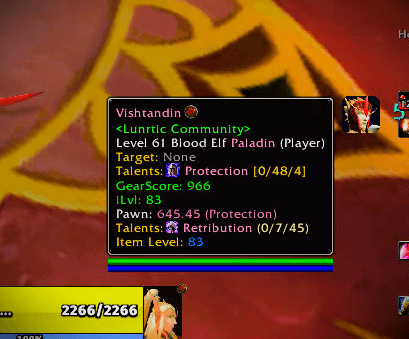
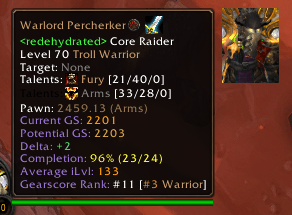
TacoTip is a character, item and guild tooltip enhancement that runs on every World of Warcraft engine family from one build — no per-client downloads, no "which version do I install" question. With many QoL updates that the prior was lacking.
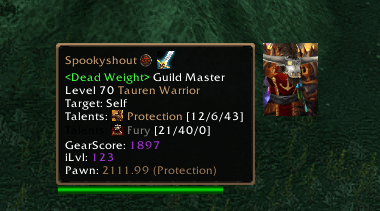
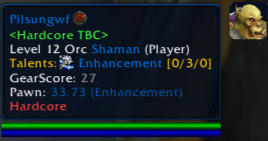
tacotip-tooltip.png
taco-tip2.png
Description
TacoTip | Gearscore & iLvL
TacoTip is a character, item and guild tooltip enhancement that runs on every World of Warcraft engine family from one build — no per-client downloads, no "which version do I install" question:
- CurseForge — https://www.curseforge.com/wow/addons/tacotip-gearscore (this add-on)
- Companion App — TacoTip Extras
| Client | Interface |
|---|---|
| Classic Era / Season of Discovery (SoD) | 11509 |
| The Burning Crusade Classic Anniversary | 20506 |
| WotLK Titanforge | 38002 |
| WoW Forever | 16001 |
| Retail / Live (Midnight) | 120100 |
This release replaces the previous Classic-only TacoTip. It is the same addon, continued — your existing configuration carries over, and the GearScore numbers you are used to are unchanged on the Classic clients. What is new is that the identical build now also works on WoW Forever and Retail.
What's New in 0.8.3
Proactive GearScore collection for everyone standing near you, the fix for the repeating "Not in Range" popup, and the portrait fix that only ever showed up on the Classic clients.
- The repeating "Not in Range" popup is addressed, on every client.
NotifyInspectis a server request, and a refused inspect puts the red text and sound up through the client's own UI error path. What the FrameXML mirror shows is that path —UIErrorsFrameconsumingUI_ERROR_MESSAGEand speaking it viaC_Sound.PlayVocalErrorSound— and it does not show which call produces it, so the fix covers both candidates rather than guessing. Four separate causes, each independently sufficient to keep it going: distance was measured withUnitDistance, which exists on none of the five supported clients, so the whole range-learning mechanism was unreachable code; the "don't re-ask" memory was a 10-second timer rather than a state, so a unit that stayed far was re-asked forever; Classic Era was misclassified as a modern client (below), which routed it into the one range policy that permits an out-of-range request; and a refusal no longer lifts just because the unit is merely still within 20 yards — it lifts when the unit has actually moved closer than it was at the refusal. On Classic Era the refusal is also swallowed inside a short window around the addon's own probes, recorded, and used to learn that client's real range — see the CHANGELOG for exactly what is verified and what is assumed. - Classic Era was being detected as a modern client. Detection required a build-major of
1, but Classic Era'sGetBuildInfo()putsnilin that slot and the build number in a later one, so Classic Era fell into the "either signal is enough" branch — the only policy that lets an out-of-range inspect through. Identity now comes fromWOW_PROJECT_IDalone, which is genuinely distinct per Classic client. - The 3D portrait no longer disappears and stays gone on the Classic clients. On a render where the tooltip could not resolve its unit, the portrait was hidden, re-anchored, and never restored — the branch that shows it again was never reached. The cause is structural: the Classic script hook discards its arguments, so the GUID fallback that rescues this case simply does not exist on that family. Retail and WoW Forever were never affected.
- Proximity world scan. Every ~2 seconds the library walks the visible nameplates, distance-gates each player with the rule that is correct for your client, and inspects the ones in range — so GearScore and item level for someone standing next to you are already cached when you hover them. One inspect request per tick, skipped in combat, and never re-requested while the data is still fresh.
- Correct range handling on all five clients. Classic Era / SoD / TBC / Titanforge require both
CanInspectandCheckInteractDistance(unit, 1); Retail and WoW Forever accept either. A single shared constant now drives the range index everywhere. - No more queue deadlocks. If an inspect request never comes back, a watchdog releases the pending slot after 3 seconds instead of stalling every other player behind it.
- Boundary flicker now costs a skipped inspect instead of an error popup. An earlier grace period that let a recently-inspected unit through a failed distance check was removed: it re-introduced the exact "Not in Range" it was meant to prevent.
- Cache timestamps come from
GetTime()(uptime) instead oftime()(wall clock), so a system clock change can no longer make fresh data look expired. The clock read is guarded so a missing API degrades instead of silently killing the inspect pipeline. - The unit
Levellabel is no longer hardcoded English on any client — it was the one label bypassing the locale system, so it readLevelin Korean, Russian and Chinese too. /tacotip diagnow reports the inspect engine: notify count, inspects completed, watchdog timeouts, refusals recorded, probe errors suppressed (and separately the spoken and sound halves of what the guard swallowed), the learned maximum range for this client, scan-enqueued, scan-via-fallback and scan-skipped-by-range, plus separate counters for portraitHide()calls versus full teardowns.
One correction worth reading. An earlier revision of this release added
CanInspect(unit, true)as a range gate, on the belief that the second argument was a range flag. It is not — it isshowError. That call was asking the engine to display a message, so the fix for the popup was itself a source of one. It has been reverted, and the full reasoning is in CHANGELOG.md rather than edited away.
Full detail, including the tests that were wrong rather than the addon, is in CHANGELOG.md.
What's New in 0.8.2
- Classic range gate restored: Classic Era / SoD / TBC / Titanforge require both
CanInspectandCheckInteractDistance(unit, 1); Retail / Forever still accept either. - GearScore / iLvl no longer vanish: gear-change events mark cached data stale rather than erasing it, so values stay on screen until fresh data replaces them.
- The tooltip name is 2pt larger than body text. Previously one size was applied to every line, which flattened the name — the player's on a unit tooltip, the item's on an item tooltip — to body size.
- Smaller 3D portrait: the base is now
66 x 88(was72 x 96). Still an exact 3:4 ratio, and still exact integers at every scale stop —33x44,66x88,99x132,132x176. - New
Invert portrait sideoption (default off) to pin the portrait to the other side of the tooltip.
What's New in 0.8.1
Inspection engine performance, proactive pre-caching, and remote inspect responsiveness. Full detail in CHANGELOG.md:
- Proactive Target Pre-caching (
PLAYER_TARGET_CHANGED): Selecting or tab-targeting any inspectable player immediately triggers background inspection, pre-caching their equipment, talents, specialization, and GearScore before you hover over their model or open the inspect window. - Eager Mouseover Triggering (
UPDATE_MOUSEOVER_UNIT): Sweeping over player models in the 3D game world begins the inspection query immediately without waiting for tooltip layout passes. - Group Member Roster Scanning (
GROUP_ROSTER_UPDATE): Party and raid member inspections are triggered dynamically on group roster updates. - Instant Unit Inventory Refresh (
UNIT_INVENTORY_CHANGED): When an inspected player swaps equipment, their cache entry is invalidated and re-inspected immediately. - Optimized Throttling & Adaptive Queue Timer:
INSPECT_DELAYis0.4son Retail / WoW Forever and1.0son the Classic family. The queue ticker runs at0.5sand dispatches the next item promptly onINSPECT_READY, so an idle queue does not wait a full tick. - Target Prioritization in Queue: Actively targeted players are prioritized ahead of background group polling.
- Range handling that matches each client: the Classic family (Classic Era / SoD / TBC Anniversary / Titanforge) requires both
CanInspectandCheckInteractDistance(unit, 1), and reads the distance signal first so a unit the cheap gate rejects is never asked about; Retail and WoW Forever accept either signal. The index is a single shared constant, and the yardage is not hardcoded — it is learned from the client's own refusals (/tacotip diag→learned max range). - "Scanning Equipment…" Deadlock Resolution: Corrected
LibForeverInspectorINVENTORY_READYcallback dispatch to pass(guid, true, unit), resolved non-targeted unit tokens viaInspectFrame.unit, and safely parsed item IDs from links whenGetInventoryItemIDreturns nil on remote items.
What's New in 0.8.0
GearScore correctness. This is the first release whose test suite asserts a GearScore value rather than only that scoring does not throw — which is precisely why both bugs below shipped green in 0.7.9. Full detail in CHANGELOG.md:
- Two-handed weapon math & Titan's Grip correctness. Standalone 2H weapons (
INVTYPE_2HWEAPON) occupy slot 16 with slot 17 empty and retain full 2.0x weight (SlotMOD = 2.0) so weapon gear budget balances with 1H + Shield wielders (3625vs3624total at ilvl 200). Titan's Grip dampening (0.5) is strictly applied when dual-wielding alongside an offhand weapon or shield (mainHandLink and offHandLink), maintaining exact balance for dual 2H Fury Warriors. - Asynchronous item loading resilience & nil-safety.
GetItemInfois guarded against nil arguments, and uncached items cleanly return zeroed scalar scores while triggeringC_Item.RequestLoadItemDataByIDwithout arithmetic or indexing errors. - Hunter weapon scaling parity. Unified Hunter melee (
0.3164x) and ranged (5.3224x) multipliers between character total scoring and single-item tooltip evaluation. - An item's tooltip colour now matches the GearScore printed beside it. The colour band was computed from the slot-mod-free base while the displayed score included the slot modifier, so a 2H and a head of identical item level wore the same colour while showing different numbers. The band is now a pure function of the score shown. This is the only user-visible colour change in 0.8.0. Low-slot-mod items shift band: trinket / neck / finger / wrist / cloak (0.5625), shoulder / waist / feet / hands (0.75) and ranged / thrown (0.3164) now colour like the slot they occupy instead of like a head.
- New
Tests/harness/gearscore_test.lua, the first harness to assert numeric scores: per-item score literals, solo 2H full weight, Titan's Grip dual 2H half-weight, an exhaustive enumeration of reachable weapon states, item colour-band consistency across slots and item levels, and Hunter weapon scaling.
What's New in 0.7.9
Portrait, inspect, unit-frame hover, and border correctness across all five client families. Full detail in CHANGELOG.md:
- Stationary hover on PlayerFrame & TargetFrame no longer flickers or destroys on Retail. In modern Blizzard FrameXML,
UnitFrame_UpdateTooltiprefreshes every 0.2s by callingSetOwnerandClearLines. TacoTip previously treated these transient internal 200ms refreshes as genuine tooltip dismissals, tearing down and rebuilding the 3D portrait, power bar, and border overlay 5 times per second. Fixed withisUnitFramePeriodicUpdate, keeping stationary unit-frame hovers completely stable with zero model reloads, zero un-anchoring, and zero flicker. - Right-click inspect no longer strips gear from the paperdoll on Retail and WoW Forever.
LibForeverInspectorpreviously calledClearInspectPlayer()insideINSPECT_READY, which purged the inspected unit before Blizzard'sInspectPaperDollItemSlotButton_Updatecould read equipment links. Fixed by deferring clear untilInspectFrame_OnHide, adding party/raid member fallback resolution, and protectingInspectGuildFrame_Updatefrom crashing on guildless inspected players. - The 3D portrait stopped strobing on Retail and WoW Forever. The modern client fires tooltip post-calls before its own
Show(), which caused the frame to run against unrendered dimensions and re-anchor on every tick. The portrait now anchors once per hover epoch, survives item load callbacks, and smoothly flips between screen edges when near display boundaries. - Default border set to official Blizzard tooltip border (
Interface\Tooltips\UI-Tooltip-Border). Replaces previous unverified defaults and ensures native Blizzard appearance across all clients. Expanded the border options with verified native Blizzard FrameXML borders (UI-DialogBox-Border,UI-DialogBox-Gold-Border,UI-Achievement-WoodBorder,UI-Party-Border,UI-Toast-Border,TextPanel-Border,UI-SliderBar-Border,UI-Arena-Border,UI-TutorialFrame-CalloutGlow), and removed the non-texture placeholderNone. /tt diagreports problems an error handler cannot see. BugSack and BugGrabber only see raised errors. The costliest defects here were the opposite: no error, a plausible tooltip, and a feature quietly absent or pointed at the wrong thing. It now lists those — ambiguous client detection, a border setting that matches nothing, a feature enabled with its backing API missing, no delivery path hooked — plus event counters for call frequency.- 100% Localization parity across all 11 languages. All 11 shipped locales (
enUS,deDE,esES,esMX,frFR,itIT,koKR,ptBR,ruRU,zhCN,zhTW) contain 100% key coverage (239/239 keys) with verified syntax and matching%s/%dformat tokens. - The power bar is off by default. Enable it in settings; its colours are correct for mana, rage, energy and every other power type on all five clients.
Supported clients:
- Classic Era / Season of Discovery (SoD): Interface
11509 - The Burning Crusade (TBC) Classic Anniversary: Interface
20506 - WotLK Titanforge: Interface
38002 - WoW Forever: Interface
16001 - Retail / Live (The War Within & Midnight): Interfaces
110002,110100,110200,120000,120100
Key Features & Architecture
Multi-Engine Client Detection:
- Powered by
LibForeverInspectorwith runtime client gates:IsClassic(),IsTBC(),IsWotlk(),IsForever(), andIsRetail(), plusIsUnknown(). - Identity is resolved from
WOW_PROJECT_ID(distinct per Classic client) with the interface version used only to separate WoW Forever from Retail, which shareWOW_PROJECT_MAINLINE. - The interface number is read from whichever
GetBuildInfo()return slot is numeric, so detection does not depend on the return layout, which is only documented for Retail and Forever. - Exposes
CI.family(classicEra/tbc/titanforge/forever/retail/unknown) and aCI.capscapability snapshot. - An unrecognised client resolves to
family == "unknown"rather than silently inheriting a default. - Backward-compatible alias
LibStub("LibClassicInspector")provided for existing modules, registered with a minor version.
- Powered by
Adaptive GearScore & Item Level Engine:
- Client-aware quality bracket sizing: 200 for Classic Era and WoW Forever, 400 for TBC, 1000 for Titanforge and Retail.
- WoW Forever is a Classic-like client (level cap 60, no level scaling) and previously inherited the 1000 default, which inflated every score 5x and collapsed the colour ramp into a single band.
- The bracket is a pure mapping:
GS_Qualityis keyed offBRACKET_SIZEat load and item level passes through raw, so each client gets the correct colour ramp with no formula change. - Dynamic
C_Item.GetItemInfoandGetItemInforesolution with instant caching. - Support for Retail / Live stat calculations and item comparison.
Pawn Integration:
- The scale library is resolved per client, never hardcoded. Pawn's
Pawn.tocgates its two providers by game type —AskMrRobot.luais[AllowLoadGameType mainline]("MrRobot", Retail + WoW Forever) andClassicHawsJon.luais[AllowLoadGameType classic]("Classic", Vanilla/TBC/Wrath) — so exactly one exists per client and the correct prefix differs between them. - Resolution reads Pawn's own globals,
PawnScaleProvidersandPawnCommon.Scales, and is completely silent. Pawn's own API cannot be asked:PawnIsScaleVisibleandPawnGetScaleColorreport an unknown name throughVgerCore.Fail, which does not raise a Lua error but writes straight toDEFAULT_CHAT_FRAME, sopcallcannot suppress it.PawnGetScaleColoris therefore only ever called with a name already proven to exist inPawnCommon.Scales; when none matches, the colour is skipped. - Score lookups go through
PawnGetSingleValueFromItem, which answers0for an unknown name and never callsVgerCore.Fail, so both libraries are tried and the score works on every client. - Version detection supporting modern
PawnLastUpdatedVersionand legacyPawnClassicLastUpdatedVersion.
- The scale library is resolved per client, never hardcoded. Pawn's
Zero-Allocation Tooltip Pipeline:
- Static pooled record buffers (
pooledLinesToAdd,pooledTooltipText,pooledPlayerText) eliminating garbage collection pressure on high-frequency mouseovers. - Integer-floored color formatting (
makeColorCode) strictly preventing Lua 5.3+ float representation errors. - Dynamic visual clearing (
clearTooltipVisuals) isolating non-unit tooltips (items, spells, map POIs) from stale unit overlays. - Tooltip hooking selects on whether the tooltip actually runs the data pipeline (probing
IsTooltipType/GetPrimaryTooltipData, which come fromTooltipDataHandlerMixin), not on whetherTooltipDataProcessormerely exists. TBC Anniversary and Titanforge define the processor but do not mix in the handler, so a presence-only test registered a callback that never fired and both clients showed stock Blizzard tooltips. - Both hook paths are registered as insurance; the duplicate is inert because Blizzard's pipeline-client tooltips do not fire
OnTooltipSetUnit/OnTooltipSetItem. tooltip_max_widthis implemented by capping the lineFontStringwidths, sinceGameTooltiphas noSetMaximumWidthon any supported client.
- Static pooled record buffers (
Universal Options UI:
- Supports modern
Settings.RegisterCanvasLayoutCategoryand legacyInterfaceOptions_AddCategory. - Client-adaptive toggles (e.g. Achievement Points toggle dynamically enabled on Titanforge, Retail, and Forever; cleanly hidden on Classic Era / TBC).
- Supports modern
Talents & Specializations:
- Per-client talent data that does not depend on the
loadDeprecationFallbacksCVar:- Classic Era / TBC Anniversary / Titanforge — points are the sum of each talent's
rankwithin a tab, read viaC_SpecializationInfo.GetTalentInfo(query formspecializationIndex+talentIndex, which is whatVanilla\TalentFrameBase.luauses on all three). This is the algorithm from the known-good Classic addon. - WoW Forever / Retail — per-specialization
pointsSpent+previewPointsSpentfromC_SpecializationInfo.GetSpecializationInfo, which has an identical 7-argument signature and 10-value return on all five clients.
- Classic Era / TBC Anniversary / Titanforge — points are the sum of each talent's
- Dual specialization is gated by
hasDualSpec, which isisClassic or isTBC or isWotlk— a family test, so it is true on Classic Era, TBC Anniversary and Titanforge and false on WoW Forever and Retail by construction. (An earlier four-term predicate,(isWotlk or isTBC or (C_SpecializationInfo ~= nil) or (_G.GetNumTalentGroups ~= nil)), was true on every client and so offered dual-spec readout where none exists. That over-claim is the one that shipped.) - Per-group data throughout:
GetTalentPoints/GetSpecializationaccept a group, the inspect cache holdstalentPoints[group][tab]andspecIndexByGroup[group], and the modern resolver usesGetSpecialization(isInspect, isPet, groupIndex, 1)— the only group-aware form, sinceGetInspectSpecialization(unit)takes just a unit and cannot tell group 1 from group 2. GetActiveTalentGroupresolves the real active group for self and inspected units, so the greyed specialization is always the inactive one.GetSpecializationreturns a 1-based index, not a specID. The modern clients previously returnedGetSpecialization()(an ID such as72), which madespec_table[class][72]nil and removed the entire specialization line on Retail and Forever.- Icons resolve per client. On Classic they come from a static talent table ported verbatim from
LibClassicInspector(~1840 records) as numeric fileIDs, inlined withtostring()because a|Tescape accepts a fileID as well as a texture path. Each expansion selects its own set: Classic Era 18 talents in Warrior tab 1 (Vanilla), TBC Anniversary 23 (TBC), Titanforge 31 (WotLK, Death Knight included). On Retail/Forever they come fromGetTalentInfousing the tier/column query form[Family]\TalentFrameBase.luauses, drawn with aTextureoverlay since a fileID cannot go in a|Tescape.
- Per-client talent data that does not depend on the
Localization:
- Every
Locale/*.luaregisters its table intoTACOTIP_LOCALESunder its own code;enUS.luais the single selector and exposesTacoTipApplyLocale(). - Resolution order:
TacoTipConfig.locale_override(always wins) → WotLK Titanforge, pinned tozhCN→ the client language when a table ships for it → English. Titanforge is the Chinese build of WotLK, so it is pinned rather than trustingGetLocale(). English is both the default and the per-key fallback every other language layers over. - Selection is re-applied on
ADDON_LOADED, because addon files run before WoW populatesSavedVariables, soTacoTipConfig.locale_overrideis unreadable during file execution. TacoTipApplyLocalemutatesTACOTIP_LOCALEin place so thelocal Lbindings inmain.lua/gearscore.lua/options.luaobserve the override.enGBmaps ontoenUS. Per-client font filtering hides CJK fonts on non-CJK clients and drops third-party Details fonts.- Specialization names come from the library's built-in table on the Classic family, and from the client's own localized
GetSpecializationInfoon Retail and Forever. The previous per-localeTACOTIP_SPEC_NAMES/TACOTIP_SPEC_ICONSlookups were removed: nothing ever wrote those globals, so they were always nil and the comments claiming they honoured the language override were false.
- Every
Directory Structure
TacoTip_Forever/
├── Libs/
│   ├── LibStub/
│   ├── CallbackHandler-1.0/
│   ├── LibForeverInspector/
│   └── LibDetours-1.0/
├── Locale/
│   ├── enUS.lua (Source of Truth)
│   ├── deDE.lua, esES.lua, esMX.lua, frFR.lua, itIT.lua,
│   └── koKR.lua, ptBR.lua, ruRU.lua, zhCN.lua, zhTW.lua
├── textures.lua
├── gearscore.lua
├── pawn.lua
├── options.lua
├── main.lua
├── TacoTip.toc
└── Tests/                     (not shipped — opt-in)
    ├── TacoTip_Forever_Tests.lua
    ├── TacoTipTests.toc
    └── harness/               plain-Lua verification, no game client needed
        ├── detect_test.lua, locale_test.lua, font_test.lua,
        ├── load_test.lua, options_test.lua, tooltip_test.lua,
        └── talent_check.lua
The .toc filename must match the addon folder name — that is a hard requirement of the loader, not a convention. This addon is shipped as TacoTip/TacoTip.toc, replacing the previous Classic-only TacoTip. Nothing in the code depends on the name: main.lua takes its table from _G[addOnName] (...), so the folder name only ever has to match the .toc.
Only TacoTip.toc is shipped, and there must be exactly one. An earlier revision carried a second, byte-identical .toc; because WoW loads every .toc in an addon folder, that executed the whole addon twice on every client and registered the tooltip hooks twice.
Troubleshooting
If something looks inert, run this first:
/tacotip diagIt reports the version, whether main.lua finished loading, the last load stage reached, the detected client family and interface, the type of each key global (TacoTip_CustomPosEnable, TT.ApplyTooltipAppearance, TT.OpenOptionsPanel, TT.RefreshOptionsUI, TT.SyncTooltipMover), the GearScore bracket and the active locale.
load OK: NO means main.lua raised an error while loading. main.lua is the last file in the toc and defines the tooltip mover at its very end, so a partial load leaves the options frame fully working while the mover, the tooltip pipeline and the overlays are all silently missing. The reported stage names the region to look at. A reload does not fix this — install a Lua error handler (BugSack or Swatter) and read the error it captures.
Other slash commands: /tacotip opens the options, /tacotip custom shows the tooltip mover, /tacotip save saves the current mover position, /tacotip default clears the custom position, /tacotip anchor <corner> sets the anchor.
Verification & Testing
- Luacheck Static Analysis:
  luacheck TacoTip_Forever/
  # Result: 0 warnings / 0 errors
Note this is a weak gate for cross-client work: read_globals pre-declares the API surface, so luacheck is structurally incapable of detecting an API that is missing on a given client.
- Offline harness (no game client required). Loads the real addon files against a mocked WoW environment — see
Tests/harness/README.md:
  lua5.1 Tests/harness/detect_test.lua   # client detection, all 5 families
  lua5.1 Tests/harness/locale_test.lua   # locale registry, selection, override, Titanforge pin
  lua5.1 Tests/harness/font_test.lua     # per-client font filtering
  lua5.1 Tests/harness/load_test.lua 2 11509 slot4 classicEra 200 ERA

  lua5.1 Tests/harness/options_test.lua 2 11509 ERA
  lua5.1 Tests/harness/settings_test.lua 2 11509 CLASSIC_ERA legacy settings pawn
  lua5.1 Tests/harness/tooltip_test.lua 2 11509 CLASSIC_ERA
  lua5.1 Tests/harness/tooltip_test.lua 1 120100 RETAIL pipeline
  lua5.1 Tests/harness/talent_check.lua 11 38002 TITANFORGE
The load harness runs each client under both plausible GetBuildInfo() return layouts, so nothing depends on which slot carries the interface number on the Classic clients — a question the Blizzard source does not settle.
To run the whole matrix (54 invocations across all five clients, both registration paths and both Pawn states):
bash TacoTip_Forever/Tests/harness/run_all.shoptions_test builds all four options pages on every client and under every capability permutation (no Settings namespace, no ColorPickerFrame, no LibSharedMedia, and all three missing at once), which is what covers the legacy InterfaceOptions_AddCategory path and optional-dependency degradation. tooltip_test asserts the enhancement pipeline actually emits GearScore / iLvl / specialization lines, through both the script hooks used on the Classic family and the TooltipDataProcessor post-calls used on Retail and WoW Forever, and asserts the dual-spec readout per group with inline |T talent icons and correct active/inactive colouring. talent_check verifies the ported static talent table resolves real icons for each expansion.
On mock-derived assertions. A mock cannot settle Blizzard's exact shim return shapes, so asserting numbers the mock itself invented only proves the mock agrees with itself. The talent tests therefore assert the version-independent invariant instead: ranks are small integers, icon values are 6-digit fileIDs, and the rendered readout must be the former and never the latter. That is precisely the bug this release fixes, and it is now caught by a check that cannot be satisfied by a self-consistent mock.
- WoWUnit In-Game Test Suite (opt-in). Copy
Tests/toInterface/AddOns/TacoTipTests/, enable it alongside the addon, then type/tttest. 11 suites:TacoTip-CoreTacoTip-ConfigTacoTip-BordersTacoTip-PortraitTacoTip-GuildTacoTip-StatsTacoTip-MoverTacoTip-ModulesTacoTip-MinimapAndAnchorTacoTip-LifecycleTacoTip-Client(detection, alias, locale registry, override including the TitanforgezhCNpin, font filter, and cross-engine talent point / spec index / active-group invariants)
License and credits
TacoTip is licensed under the MIT License. The full text ships in LICENSE.
Bundled libraries under Libs/ keep their own licenses and are not covered by TacoTip's MIT terms — MIT permission does not extend to them:
| Library | License | Author |
|---|---|---|
LibStub |
Public Domain | Kaelten, Cladhaire, ckknight, Mikk, Ammo, Nevcairiel, joshborke |
CallbackHandler-1.0 |
MIT | Icedragon and contributors |
LibDetours-1.0 |
MIT | kebabstorm |
LibForeverInspector |
MIT | AcidBomb (part of this project) |
Every one of them is permissive and MIT-compatible. Full attribution is in THIRD_PARTY_NOTICES.md.
GearScore scoring behavior derives from GearScoreTBCClassic; see the notices in TacoTip Extras' THIRD_PARTY_NOTICES.md for the retained attribution and required license text.
Author and maintainer: AcidBomb (Pilsung).
TacoTip | GearScore & iLvL Team

Owner