TacoTip | GearScore & iLvL
- By
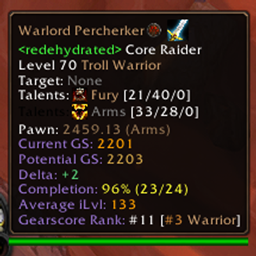
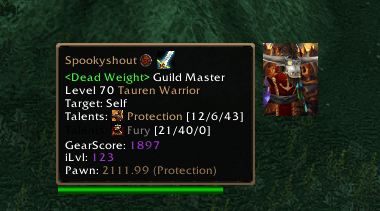
TacoTip is a character, item and guild tooltip enhancement that runs on every World of Warcraft engine family from one build — no per-client downloads, no "which version do I install" question. With many QoL updates that the prior was lacking.
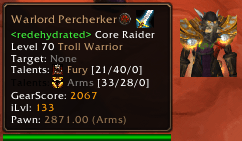
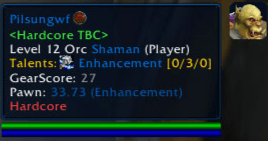
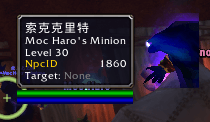
tacotip-tooltip.png
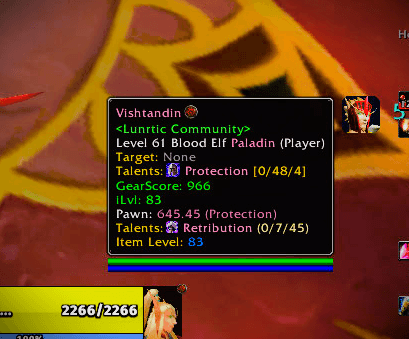
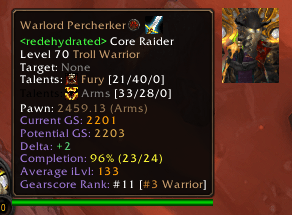
taco-tip2.png
Description
⚡ TacoTip ⚡











🏆 350,000+ Downloads Milestone & Community Celebration
A monumental thank you to over 350,000 World of Warcraft players and guild leaders worldwide! Your passionate feedback, bug reports, and community support have powered TacoTip from a Classic tooltip tweak into the definitive cross-engine tooltip suite. Join our official Discord community to share your ideas, get instant support, and shape the next generation of features!
TacoTip is the premier, all-in-one tooltip enhancement suite for World of Warcraft. Built with a unified dual-engine architecture, a single installation runs seamlessly across every World of Warcraft client family — from Classic Era and Season of Discovery to The Burning Crusade Anniversary, WotLK Titanforge, WoW Forever, and Retail Live:
💬 Official Discord Community — https://discord.gg/JuVJBwXqv
📦 CurseForge Page — https://www.curseforge.com/wow/addons/tacotip-gearscore
🙏 Original TacoTip Credit — Based on TacoTip (GearScore & Talents & Item Level) by kebabstorm
🌟 Companion Addon (TacoTip Extras) — TacoTip Extras on CurseForge (Server leaderboard, guild rank browser & peer-to-peer gear sync)
| Client Family | Supported Interface | Client Status | Architectural World |
|---|---|---|---|
| Classic Era / Season of Discovery (SoD) | 11509 |
Active | Classic Talent API (GetTalentTabInfo) |
| The Burning Crusade Classic Anniversary | 20506 |
Active | Classic Talent API (GetTalentTabInfo) |
| WotLK Titanforge | 38002 |
Active | Classic Talent API (GetTalentTabInfo) |
| WoW Forever (Camelot) | 16001 |
Active | Mainline Trait API (C_Traits + C_SpecializationInfo) |
| Retail / Live (Midnight) | 120105 |
Active | Mainline Family (C_SpecializationInfo) |
Interface tokens: the root
TacoTip.tocdeclares exactly these five (11509,20506,38002,16001,120105). The companionTacoTip_Extras.tocadditionally lists120107; that asymmetry is deliberate in the two TOCs and is not something this README can change. Seamless 1:1 Migration: This universal release replaces all previous single-client TacoTip builds. Your configuration carries over automatically, and Classic Era / TBC GearScore numbers remain byte-identical.
⚡ Key Feature Matrix
| Feature | Classic Era / TBC / Titanforge | WoW Forever (Camelot) | Retail Live |
|---|---|---|---|
| Classic GearScore & Average iLvl | ✅ Fully Supported | ✅ Fully Supported | ✅ Fully Supported |
| Personal Progression & Gear Leveling | ✅ Level 1-60+ & Trophies | ✅ Level 1-60+ & Trophies | ✅ Level 1-60+ & Trophies |
| Equipment Upgrade Chronicle | ✅ 500-Item History | ✅ 500-Item History | ✅ 500-Item History |
| Pawn Dual-Spec Pre-Calculation | ✅ Instant Spec Switching | ✅ Instant Spec Switching | ✅ Instant Spec Switching |
| Specialization & Talents Breakdown | ✅ [p1/p2/p3] Trees + Icons |
✅ Dual-Spec Trait Trees | ✅ Modern Spec & Icon |
| 3D Character Model Portraits | ✅ Fully Stabilized | ✅ Fully Stabilized | ✅ Fully Stabilized |
| Smooth Unit Power & Health Bars | ✅ Smooth Fade-Out | ✅ Untainted Secret Values | ✅ AllowedWhenTainted |
| Group Role-Priority Inspects | ✅ Tank > Healer > DPS | ✅ Tank > Healer > DPS | ✅ Tank > Healer > DPS |
| Dynamic Zone Tracking | ✅ Native C_Map Readout |
✅ Native C_Map Readout |
✅ Native C_Map Readout |
Enterprise Dashboard (/tt) |
✅ 1000×600 Slate & Lime |
✅ 1000×600 Slate & Lime |
✅ 1000×600 Slate & Lime |
| Directly Embedded Leaderboard | ✅ Realm Rankings from peer sync | ✅ Realm Rankings from peer sync | ✅ Realm Rankings from peer sync |
| 1-Click Markdown Diagnostic Export | ✅ /tt report |
✅ /tt report |
✅ /tt report |
🚀 Quick Slash Commands
| Command | Action |
|---|---|
/tt or /tacotip |
Toggle the modern 1000×600 Enterprise Settings Dashboard |
/tt report or /tt export |
Generate a 1-click Markdown Diagnostic Report ready to paste into Discord or GitHub |
/tt diag |
Print the real-time Diagnostic Report to chat (yardage, cache status, inspect queue depth) |
/tt diag ui or /tt diagui |
Open the dashboard's Diagnostics tab — the interactive panel (copy button, live refresh, trace toggle, log clear) |
/tt custom |
Show the draggable green anchor button to set custom tooltip position |
/tt minimap or /tt icon |
Toggle the LibDBIcon minimap launcher button |
/tt default |
Reset tooltip placement back to stock game default |
/tt help |
Display full in-game command reference |
What's New in v1.1.1
🌍 The Zone: row now works on every client, not just WoW Forever (main.lua): Bumped TacoTip to 1.1.1. Hover a player, target, party or raid unit frame and the tooltip gains a Zone: line showing where that character stands — Elwynn Forest, Orgrimmar, wherever the client can place them. Until now the row was switched on for WoW Forever only, so Classic Era, TBC Anniversary, WotLK Titanforge and Retail never showed it, even though the client has exposed the same map API on all five. It is now drawn everywhere, and the only things that take it away are combat and instance encounters — exactly as it should be. The label is the game's own localized ZONE string, so it is already translated in every language TacoTip supports. If the client cannot say where a unit is (for example a target who is not in your group), the row is simply left out rather than guessed. Hover in game with /tt diag open and the new zone row line tells you the owner unit, whether it is eligible, and the zone it resolved.
🩺 Enterprise diagnostics — /tt diag now tells you everything needed to explain a bug (diagnostics.lua): The report grew five new sections, and every one of them is read-only:
- Session & identity — a session id, uptime, character-realm, client build/version/toc and client locale, so a pasted report can be matched to a specific load.
- Client capabilities — which of 24 client APIs this client actually exposes, with the missing ones listed by name. On a five-client addon, that is the first question every bug report starts with.
- Integrations — Pawn, TacoTip Extras (version and whether its report API is present), FojjiCore, BetterBlizzFrames and its suppression state, and the six libraries, each present or absent.
- Effective configuration — the settings that actually drive what you see (layout, border, background, portrait, row toggles), grouped and de-duplicated, so a report reproduces your rendering.
- Saved variables — config key count and version, inspect-cache size, progression history against its cap, and the Extras database row counts when Extras is loaded. That separates "my settings reset" from "my settings never saved". On top of that, six self-checks run at report time (GearScore module, bracket sanity, config version, tooltip hook, counters, identity) and any failure becomes a real problem in the verdict rather than a silent pass. The report is also available as JSON with a schema version, and both the JSON and the markdown export can be redacted — your character name, realm and GUIDs are scrubbed, so a report can be shared without leaking identity. In the
/ttdashboard, Export Markdown copies the human-readable report — Shift-click the same button for the JSON form.
- Item tooltips too. The post-call payload can itself be a secret table, and indexing one raises — so
issecretvalueis the wrong test for it. Everydata.<field>read (item hyperlink/guid, unit guid) is now gated on the documentedcanaccesstable, which answers exactly "may this function index this table?". A payload that cannot be read draws no row instead of erroring. Verify it yourself, solo, with no group and no instance — the client can force the restrictions anywhere:
/console addonEncounterRestrictionsForced 1
/console addonCombatRestrictionsForced 1
Hover players in a city and watch for errors; set them back to
0afterwards (they do not persist across a restart).
🌐 Universal Engine Integrity: Complete zero-regression parity across Classic Era (11509), TBC Anniversary (20506), WotLK Titanforge (38002), WoW Forever (16001), and Retail (120105).
⌨️ Slash Commands
Configure TacoTip quickly from your chat bar using /tt, /tacotip, /tip, or /gearscore:
| Command | Action |
|---|---|
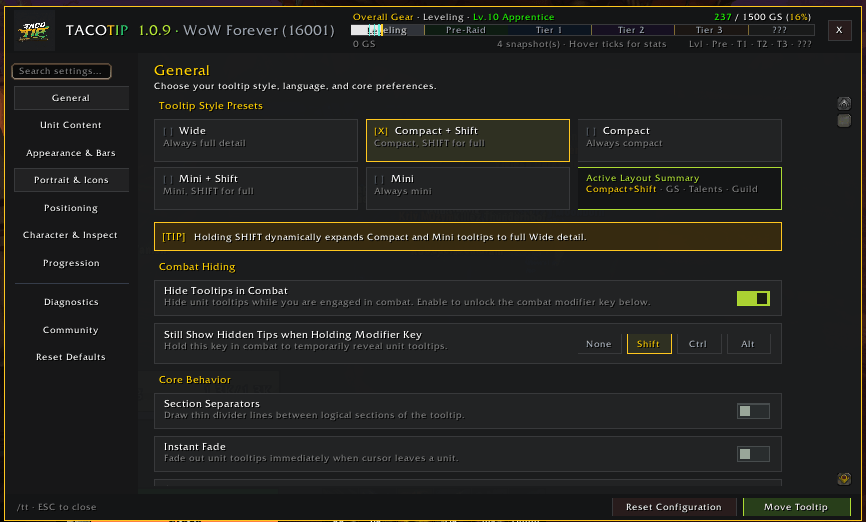
| /tt or /tacotip | Opens the modern standalone dark-mode dashboard (with real-time search, pill toggles, and live presets). |
| /tt discord or /tt community | Opens the Community hub with our direct Discord invite link. |
| /tt custom | Shows the draggable visual mover to place your tooltips anywhere on screen. |
| /tt save | Saves the current position of the tooltip mover. |
| /tt default | Disables custom positioning and restores Blizzard's default tooltip anchor. |
| /tt anchor <point> | Sets custom anchor point (topleft, topright, bottomleft, bottomright). |
| /tt reset | Restores all configuration settings to their factory defaults. |
| /tt diag | Prints the live diagnostic telemetry to chat: target range, inspect flags, queue depth, and addon health. |
| /tt diag ui | Opens the dashboard's interactive Diagnostics tab (copy button, live refresh, error/warning trace toggle). |
⚙️ Configuration Guide
Access settings at any time by pressing Esc → Options → AddOns → TacoTip or by typing /tt.
- Root Page (TacoTip):
- Quick Actions: Open the visual tooltip mover or restore factory settings.
- Language Selector: Override the addon language to any of the 11 supported locales.
- Combat Suppression: Automatically hides heavy inspection overlays while engaged in combat.
- Status Summary: Live overview of your current tooltip anchor mode, active language, and overlay states.
- Tooltips Page (/tt → Tooltips):
- Scaling & Presets: Global tooltip scale (50%–200%), Portrait scale (50%–200%), style presets, font selection, and max width limiter.
- Player & Unit Content: Toggle player titles, guild names, guild ranks, realm, talents, targets, role icons, and faction/PvP badges.
- Character Portrait: Enable 3D or 2D portraits, adjust portrait zoom, and flip portrait docking side.
- Bars & Visual Styling: Health and power bars, class-colored borders, custom background tints, border thickness, and SharedMedia textures.
- Positioning Page (/tt → Positioning):
- Fine-tune exact X/Y coordinate sliders for tooltips and character frame overlays.
- Enable or disable mouse cursor anchoring for world units and action spells.
- Character & Inspect Page (/tt → Character / Inspect):
- Toggle GearScore and average item level text badges on your character paperdoll and inspection window.
- Unlock info positions to drag overlays to custom locations on character frames.
❓ Frequently Asked Questions (FAQ)
Q: Why doesn't a player's GearScore show immediately when I hover them? A: World of Warcraft limits gear inspection to players within inspect range (approx. 20–30 yards depending on client version). When a player is in range, TacoTip queries their equipment and caches the result for 5 minutes. If a player is out of range, TacoTip smoothly falls back to showing their name, guild, and level without lagging your game.
Q: How do I change the size of my tooltips? A: Open settings (/tt), click Tooltips on the left menu, and use the Global tooltip scale slider at the top of the page. You can adjust the scale anywhere from 50% to 200%.
Q: Can I move where tooltips appear? A: Yes! Type /tt custom in chat. A green anchor button will appear on your screen. Drag it to your desired location and click Save. To reset back to default placement, type /tt default.
Q: Something seems off with an inspection. How can I check what is happening? A: Target or hover the unit and type /tt diag. TacoTip prints real-time yardage, inspect capability flags (CanInspect, CheckInteractDistance), cache status, inspect queue depth, and any recent error history to chat. Add ui (/tt diag ui) to read the same telemetry in the dashboard's interactive Diagnostics tab.
🩺 Troubleshooting & Diagnostics
If something looks inert or an inspection fails to appear, run this command first:
/tacotip diagIt prints TacoTip's comprehensive live telemetry to the chat frame (use /tt diag ui for the interactive Diagnostics tab):
- Active Unit Context: Real-time inspect flags (
CanInspect,CheckInteractDistance), live yardage, cache status, and in-flight queue state for your target or mouseover unit. - Error History Ring Buffer: Records the last 15 caught errors across all subsystems with relative timestamps.
- Inspect Engine Health: Displays queue depth, pending duration, cache size, timeouts, and recent refusal reasons.
- Load Status: Verifies that all modules loaded cleanly without raising Lua errors.
🌍 Localization
TacoTip ships with localized translations for all 11 official World of Warcraft languages:
- English (
enUS/enGB) - German (
deDE) - Spanish (
esES&esMX) - French (
frFR) - Italian (
itIT) - Korean (
koKR) - Brazilian Portuguese (
ptBR) - Russian (
ruRU) - Simplified Chinese (
zhCN) - Traditional Chinese (
zhTW)
📜 Credits & License
TacoTip is distributed under the MIT License. The full text ships in LICENSE.
Upstream & Original Author Credit
TacoTip is based on and derived from the original TacoTip (GearScore & Talents & Item Level) by kebabstorm (anzz1). Full credit goes to kebabstorm for the original addon architecture, GearScore module (gearscore.lua, originally based on GearScoreLite by Mirrikat45 & others), Pawn integration (pawn.lua), LibDetours-1.0, and LibClassicInspector (from which LibForeverInspector is derived).
- Original TacoTip Project: https://www.curseforge.com/wow/addons/tacotip-gearscore-talents (kebabstorm)
- Current Author & Cross-Engine Maintainer: AcidBomb (Pilsung)
Bundled third-party libraries under Libs/ keep their own licenses and are not covered by TacoTip's MIT terms:
| Library | License | Author |
|---|---|---|
LibStub |
Public Domain | Kaelten, Cladhaire, ckknight, Mikk, Ammo, Nevcairiel, joshborke |
CallbackHandler-1.0 |
MIT | Icedragon and contributors |
LibDetours-1.0 |
MIT | kebabstorm |
LibDataBroker-1.1 |
Public Domain | Tekkub and contributors |
LibDBIcon-1.0 |
Public Domain | Rabbit, funkehdude and contributors |
LibForeverInspector |
MIT | Derived from LibClassicInspector by kebabstorm; extended by AcidBomb |
The three bundled fonts under Media/Fonts/ keep their own licenses, shipped beside each file: Noto Sans (SIL OFL 1.1), NanumGothic (SIL OFL 1.1) and WenQuanYi Micro Hei (Apache 2.0). They are used for player names and guild names in another script, never as a replacement for the client's own UI face.
Full attribution and license notices are available in THIRD_PARTY_NOTICES.md. GearScore calculation behavior derives from GearScoreLite (Mirrikat45 & others) and GearScoreTBCClassic; see THIRD_PARTY_NOTICES.md and LICENSE.
TacoTip | GearScore & iLvL Team
Owner