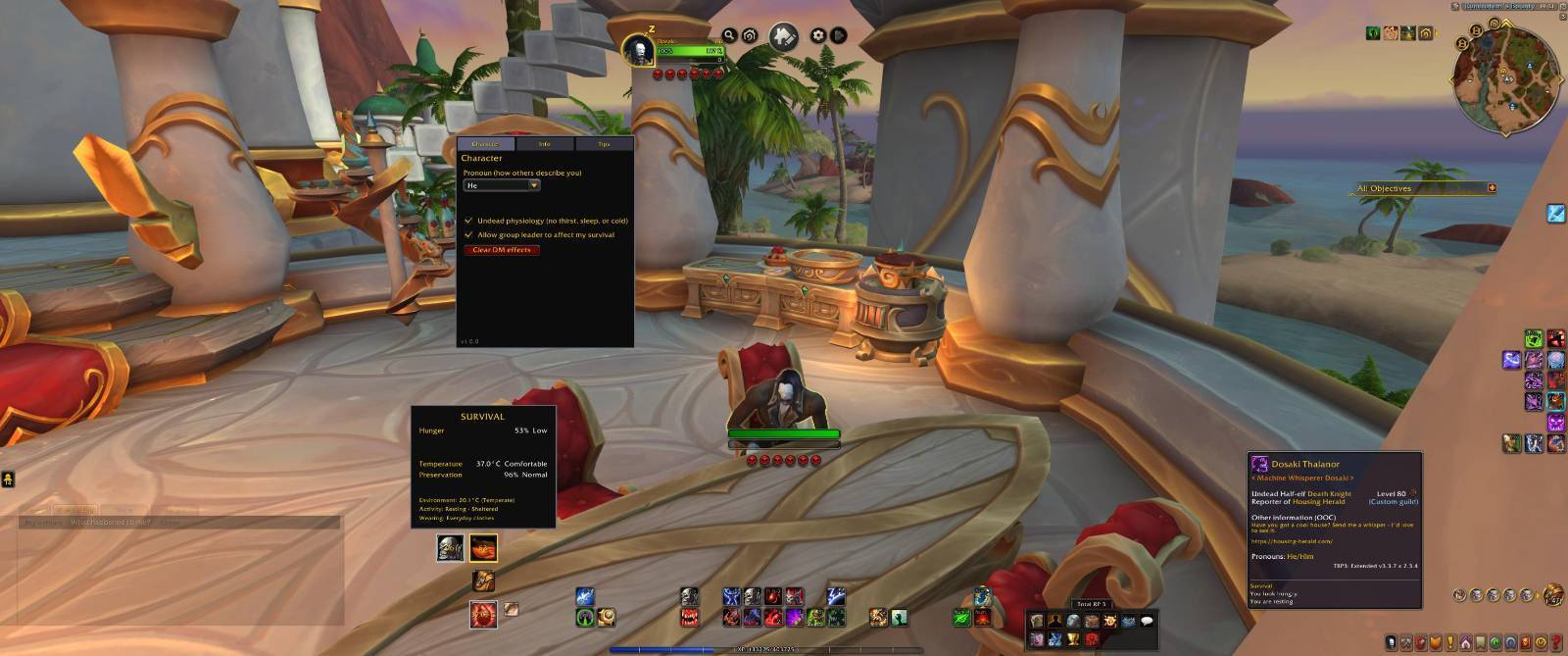
Full Interface
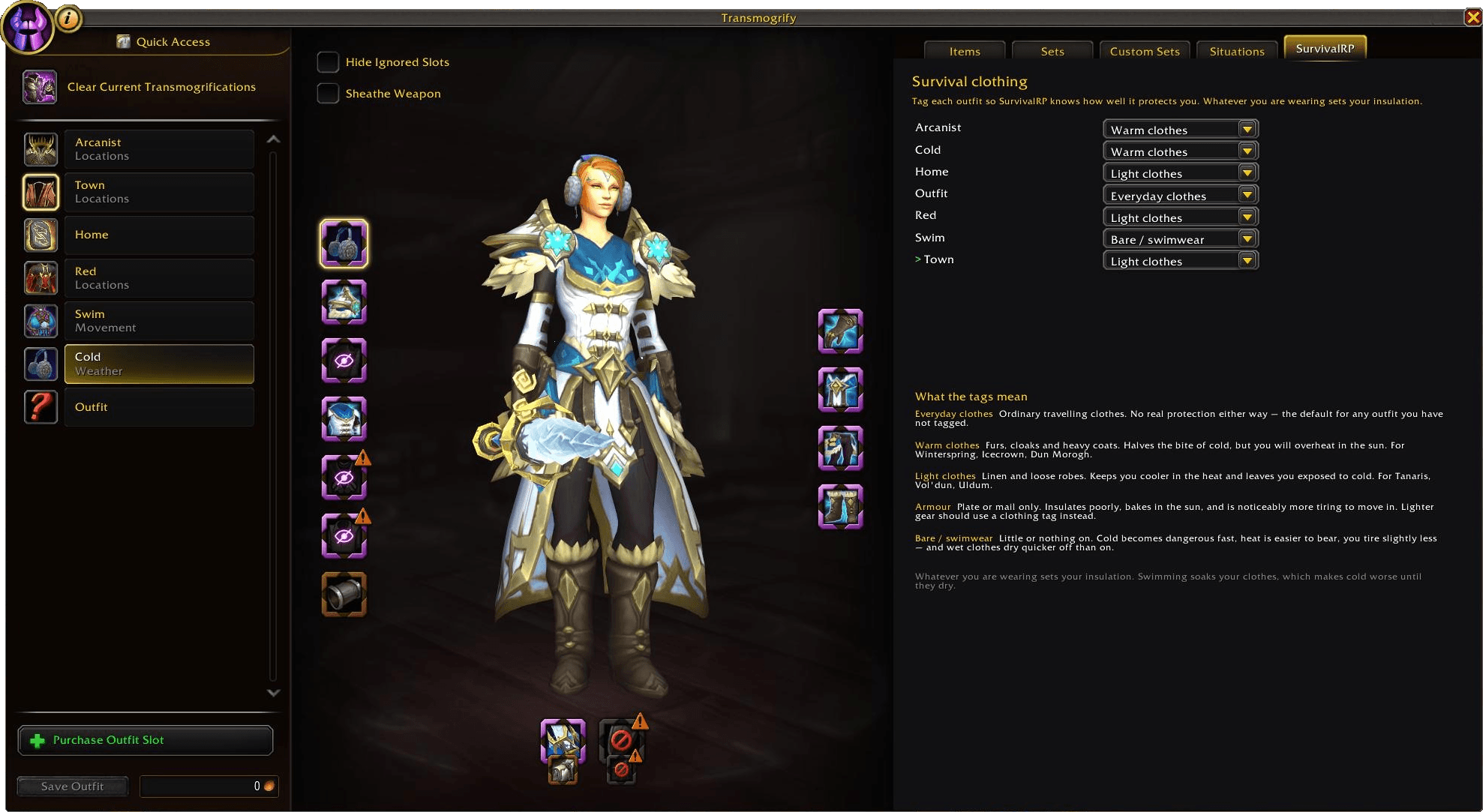
Transmog Screen's Survival RP tab

tab-dm.png

tab-advanced.png
Description
SurvivalRP
Optional survival mechanics for World of Warcraft role-play: your character gets hungry, thirsty, tired, and feels the weather.
None of it affects real gameplay, but the addon is affected by real gameplay.
SurvivalRP never affects your health, movement, combat, stats, or any protected action. If your character starves, nothing happens mechanically - you simply look starving to other people running the addon.
What it does

- Hunger and thirst drain slowly and recover when you eat or drink - real food and drink.
- Fatigue responds to what you are doing:
- Running, swimming and fighting tire you faster;
- Cities and inns slow it down;
- Sitting or
/sleeplets you recover - and you rest poorly while cold, hot, starving or parched.
- Temperature is modelled in real degrees (Celsius or Fahrenheit).
- Every zone has its own climate, some with warmer or cooler subzones, and deserts swing hard between a scorching afternoon and a cold night.
- Your body drifts toward what you are exposed to - and you can do something about it
Choose between 3 styles for your HUD:
Radial:

Bars:

Ring:

You can see the detail when hovering over the central icon:

| Clothing | Tag your transmog outfits as warm, light, armour or bare. What you wear changes how much the weather reaches you. (taking all armour off is the same as "bare") |
| Wetness | Swimming soaks your clothes. They take hours to dry - faster in the heat, faster still if you take them off. Armour never gets past damp, and dries twice as fast. |
| Condition and grime | Time spent fighting wears your gear down; a damp set of armour rusts even packed away. Time outdoors leaves it grimy - much less so in a city or an inn. Wash grime out with soap (never consumed); repair at any vendor mends condition (never grime). |
| Fire and shelter | Campfires warm you; buildings and inns shelter you. A fire in Dun Morogh is a great idea, but not quite so in Tanaris. |
You may tag your outfits right in the transmog window:

Each outfit's wet / condition / grime is broken out in its own Outfits tab in the character window - your own exact percentages, since that rule (never quantified) only governs what you see of other people. Clothes that fall apart from neglect stop insulating and read as bare, but are still described as ragged rather than naked. Click an outfit's name to switch straight to it; the list scrolls once you have more outfits saved than fit the window.
Your race, class and forms matter.
Each race has its own rates and comfortable temperature band.
Some race/classes may have different needs entirely:
- The undead (Forsaken & Death Knights) never thirst or tire and only feed by Cannibalize
- Earthen neither eat nor drink
- Forsaken slowly rot and preserve themselves with Embalming Fluid
- Blood, Night and Void Elves and Death Knights can opt into Vampyr physiology (Character tab, off by default): hunger and thirst are replaced by a single Blood-thirst, fed by troll's blood elixirs, blood sausages, blood trinkets, Vampiric Embrace, Vampiric Blood or Cannibalize. Vampyr are comfortable in the cold and suffer in the heat, and the living among them tire faster by day than by night.
Worgen, Dracthyr and Druid forms retune survival and are tracked automatically.
Tooltips
Other people running SurvivalRP can see how your character is doing:
They look hungry.
They are shivering.

Total RP 3 Tooltips
If TRP3 is installed, survival lines appear beneath its character tooltip (TRP3 hides Blizzard's, which would otherwise take our lines with it).

DM control - run survival in your stories
If you are the party leader, raid leader, or a raid assistant, a DM tab appears in your character window.

From it you can, for one member or everyone:
- Set a value - make someone parched, freezing, or soaked instantly.
- Rate × - dial a need's drain. E.g.:
3thrice as fast0.5half as fast-2twice as fast, in reverse.
- Lock a need so it stops changing at all
- Weather and body temperature - impose a preset.
DM authority is checked against the live in-game group roster and every member can always opt out in their own Character tab.
Adjust your needs to your… needs

Switch on or off which needs apply to your character. Adjust the drain rate for each one.
Tweak the minimum and maximum temperature tollerances.
Limitations
/sit, sitting keybind and clicking on a chair is impossible to detect so there's a toggle so you can inform the addon that you're sitting- Weather effects (rain/snow) can't be detected (though I'm seeing if I can hijack the Situations transmog events to do it… but it will require some setup)
The character window
Left-click the HUD bag brings up a tabbed window.
Character - configure your pronoun (He / She / They) and per-character options.

Info - see each need with how fast it is changing and how long until empty, plus the survival rules for your race, class and forms.

Tips - general survival advice and tips specific to your kind.

Outfits - every saved outfit (plus "Untransmogged gear", for what you are wearing when no outfit is applied), each with its own wet / condition / grime, the worn one highlighted. Click a name to switch straight to it, scrolling if you have more outfits than fit the window, or wash a set clean from here if you are carrying soap.

Addon settings
Control the HUD, units, which needs are tracked, how and if you get alerted, and what you share with others.


Installing
- Download the latest release
- Extract into
World of Warcraft/_retail_/Interface/AddOns/ /reloador restart
Using it
A small radial HUD shows your four needs. Left-click the centre for the character window, right-click for options, hover for a quick summary, or drag it anywhere after /survivalrp unlock.
/survivalrp help lists everything. The ones you will actually use:
| Command | |
|---|---|
/survivalrp |
your current status |
/survivalrp who [name] |
see another player (or just target them) |
/survivalrp wear <tag> |
tag the outfit you are wearing (just tags, it doesn't change the transmog) |
/survivalrp rest / wake |
start or stop resting |
/survivalrp share on / off |
control what you share |
Tag your outfits in the SurvivalRP tab of the transmog window. If you use Blizzard's outfit Situations, your character dresses for the weather on its own - and the addon notices within a second.
Not detecting some food or drink? Run /survivalrp debug auras while consuming it and tell me about it with the output; it is a one-line data fix. No GitHub account needed.
Found a fire that doesn't warm you? Campfires announce themselves, but a fixed fire - an inn's hearth, a brazier, a forge - can only be known if somebody has stood next to it. Stand at it and run /survivalrp fire the fire is here, describing it in your own words; gather as many as you like, then /survivalrp fire dump and open an issue with the window. Your description travels with the coordinates.
Privacy
Sharing is on by default and easy to narrow:
- Share exact values - turn it off and only broad labels leave your client. Your numbers are never transmitted, not merely hidden at the far end.
- Sharing mode - everyone, only players you have interacted with, or nobody.
- Block list -
/survivalrp block <name>, or manage it in the options.
Everything received is validated and read-only. Nothing another player sends can change your values, and SurvivalRP never executes anything it receives.
The one exception - a DM adjusting your survival - is verified against the group roster and gated by your own opt-in, which you control.
If you cannot reach someone: sharing works over party, raid, instance and guild, plus direct whispers. WoW has a long-standing issue delivering addon whispers between some connected realms, so if a player on another realm never appears, grouping with them will work. The addon tells you when the game refuses a message rather than leaving you guessing.
Version compatibility: 1.1 bumped the sharing protocol to carry garment condition and grime, and 1.2 bumped it again to carry Blood-thirst. A partner on an older protocol version simply sees no survival data from you until both update - nothing breaks, but nothing is exchanged either.
Reporting a problem
Run /survivalrp bugreport, copy the window, and
send it to me. It
includes your version, settings, state and any recorded errors - everything
needed to diagnose the problem without a back-and-forth. No GitHub account
needed - reports are filed for you.
You can also suggest a feature or offer a translation.
Translating
SurvivalRP follows your WoW client's language and ships translations for every
locale the client supports (machine-generated for now - native polish is very
welcome). To help, copy src/Locales/enUS.lua to your locale and translate the
values; missing keys fall back to English, so even a partial pass is useful. See
docs/TRANSLATION.md, or
offer to help and
say which locale you would take on.
Thanks
Players whose feedback helped SurvivalRP, be it by discussing new features or continually reporting bugs:
- geniedumal
- songofthevoid
- ForteofSable
- Origame
- swanlakeswan
Survival RP Team