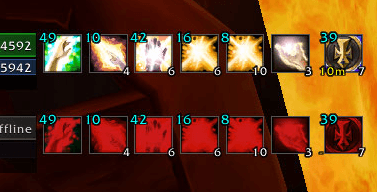
SUB in Action
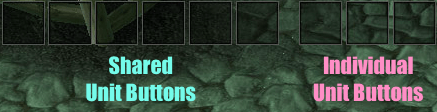
There are two bars, a shared one and a Individual one
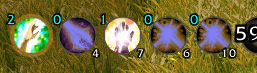
Description
SupportUnitButtons




A World of Warcraft addon that adds a dedicated action bar for each party member, letting you cast spells or use items directly on any group member with a single click, including configurable dispel and resurrection status alerts.
Compatible with Classic, TBC Classic, Classic MoP
Features
- Per-member action bars — one bar per party member, with an optional player bar
- Shared + individual sections — configure up to 12 shared buttons and 6 per-member buttons per bar
- Direct drag-and-drop setup — drag spells or items straight onto buttons; dragging off can require a configurable modifier
- Flexible positioning — move bars freely, anchor them as a vertical or horizontal group, or anchor them next to ShadowedUnitFrames party frames
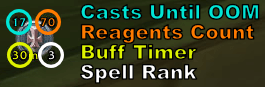
- Button overlays — optional overlays for spell rank, reagent count, cast count or item count, and buff status
- Buff status tracking — shows remaining buff time on active buffs, configurable low-time warning color, and
-for known inactive buffs - Dispel alert — pulsing border for dispellable debuffs with preview mode, square or circle shape, pulse tuning, optional per-debuff-type colors, and optional sound alert
- Resurrection alert — status border for resurrection-capable buttons with configurable dead/casting/pending colors, preview mode, square or circle shape, pulse tuning, and periodic resync
- Masque support — skin buttons with any Masque theme
- Profiles — full AceDB profile support
- Localisation — enUS, deDE, frFR, esES, itIT, koKR, ptBR, zhCN, zhTW
Usage
Drag spells or items from your spellbook or bags onto any button. Clicking a button casts the spell — or uses the item — on that bar's unit.
To drag a spell off a button, hold the modifier key (default: Shift) while dragging. Dropping a new spell/item onto a button never requires a modifier.
Commands
| Command | Description |
|---|---|
/sub |
Open the options panel |
/SupportUnitButtons |
Open the options panel |
The options panel is also accessible via Interface → AddOns → SupportUnitButtons.
Options
Bar tab
- Show or hide the player bar
- Set button size, spacing, and the number of shared and individual buttons
- Keep labels or empty buttons visible
- Choose drag-off modifier
- Position bars freely, as one anchored group, or next to ShadowedUnitFrames party frames
- Open Masque skin options when Masque is installed
Button Overlays tab
- Spell Rank — toggle and style the rank label with font, size, outline, corner, offset, and color
- Cast Count / Item Count — toggle and style the OOM counter or bag item count with separate spell and item colors
- Reagent Count — toggle and style the reagent-based cast counter with font, size, outline, corner, offset, and color
- Buff Status — toggle and style the buff duration indicator with font, size, outline, position, offsets, normal color, low-time color, and threshold in seconds
Dispel tab
- Enable the dispel alert border and adjust its look
- Use one shared color or separate colors for Magic, Curse, Poison, and Disease
- Optionally add a sound alert and choose the audio channel
Resurrection tab
- Enable the resurrection alert border and adjust its look
- Configure separate colors for dead (no incoming rez), casting resurrection, and resurrection pending
- Preview all resurrection states and configure periodic resync behavior
Profiles tab
- Standard AceDB profile management for per-character and shared setups
Installation
- Download and unzip into your
Interface/AddOns/folder. - The folder must be named
SupportUnitButtons. - Restart the game or reload the UI (
/reload).
Author
chr1st0ph3rGG — v1.0.0
Support Unit Buttons Team