Stylish Notifications
- By
Cinematic, customizable notifications for level-ups, achievements, bosses, quests, world quests, scenarios and delves.
Description
StylishNotifications adds cinematic, customizable notifications to World of Warcraft while keeping the interface clean and unobtrusive.
Discord Community
The addon displays stylish on-screen messages for important gameplay events such as level-ups, achievements, boss messages, quests, world quests, scenarios and delves.
Features
- Cinematic notifications for important gameplay events
- Level-up notifications with a special green sparkle effect
- Zoom animation for level-ups, achievements and boss messages
- Subtle animations for regular notifications
- Notifications for:
- Level-ups
- Achievements
- Boss messages
- Quest accepted
- Quest progress
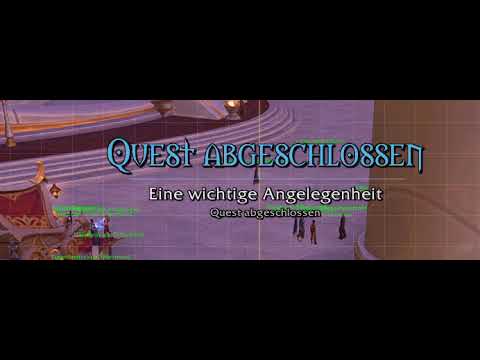
- Quest completed
- World quests
- Scenario and delve starts
- Objective updates
- Scenario and delve completion
- Fully customizable:
- Screen position
- Scale
- Title font and size
- Subtitle font and size
- Detail text font and size
- Fade-in speed
- Display duration
- Fade-out speed
- Drag-and-drop positioning directly on screen
- Optional alignment grid while configuring the addon
- Built-in preview rotation for all notification types
- Automatic localization based on your WoW client language
- No external libraries required
- Standalone addon with no dependency on Stylish Zone Text
Commands
/sn or /sn config
Opens the settings.
/sn test
Runs the notification preview.
/sn reset
Resets the settings to default.
StylishNotifications is designed for players who want important game events to feel a little more cinematic without turning the UI into a fireworks factory.
StylishNotifications bringt cineastische und frei anpassbare Benachrichtigungen in World of Warcraft, ohne das Interface unnötig zu überladen.
Das Addon zeigt wichtige Ereignisse als stilvolle Bildschirmmeldungen an, zum Beispiel Stufenaufstiege, Erfolge, Bossmeldungen, Quests, Weltquests, Szenarien und Tiefen.
Funktionen
- Cineastische Benachrichtigungen für wichtige Spielereignisse
- Stufenaufstiege mit einem besonderen grünen Funken-Effekt
- Zoom-Animation für Stufenaufstiege, Erfolge und Bossmeldungen
- Dezente Animationen für normale Meldungen
- Meldungen für:
- Stufenaufstiege
- Erfolge
- Bossmeldungen
- Quest angenommen
- Questfortschritt
- Quest abgeschlossen
- Weltquests
- Start von Szenarien und Tiefen
- Zielupdates
- Abschluss von Szenarien und Tiefen
- Frei anpassbar:
- Bildschirmposition
- Skalierung
- Schriftart und Größe des Titels
- Schriftart und Größe des Untertitels
- Schriftart und Größe der Detailzeile
- Einblendgeschwindigkeit
- Anzeigedauer
- Ausblendgeschwindigkeit
- Positionierung direkt per Drag & Drop
- Hilfsraster während der Konfiguration
- Eingebaute Vorschau-Rotation für alle Meldungstypen
- Automatische Sprache passend zum WoW-Client
- Keine externen Bibliotheken nötig
- Eigenständiges Addon ohne Abhängigkeit von Stylish Zone Text
Befehle
/sn oder /sn config
Öffnet die Einstellungen.
/sn test
Startet die Vorschau aller Meldungstypen.
/sn reset
Setzt die Einstellungen auf Standard zurück.
StylishNotifications ist für Spieler gedacht, die wichtigen Ereignissen etwas mehr Bühne geben möchten, ohne dass das Interface plötzlich zum Jahrmarkt wird.
Stylish Notifications Team