• Browse
    Browse all (125)
    • iconMinecraft
    • iconThe Sims 4
    • iconWorld of Warcraft
    • iconMinecraft Bedrock
    • iconArk Survival Ascended
    • iconHytale
    • iconinZOI
    • iconStarCraft II
    • iconKerbal Space Program
    • iconStardew Valley
    • iconAmerican Truck Simulator
    • iconHogwarts Legacy
    • iconTerraria
    • iconWildStar
    • iconPalworld
    • iconWorld of Tanks
    • iconRunes of Magic
    • iconRift
    Introducing CurseForge Legends
  • Create
    MOD AUTHORS
    • Become an Author
    • Start a Project
    • Project Submission Guide
    MODDING TOOL DEVELOPERS
    • Apply for an API Key
    • Documentation
    • Terms & Conditions
    SOCIAL
    • Join Our Discord!
    • Authors Discord
    Introducing CurseForge Legends
  • Studios
    GAME DEVELOPERS
    • Unlock Modding for Your Game
    • Documentation
    Introducing CurseForge Legends
  • Help Center
  • Our Blog
  • Follow Us
    • Discord
    • Instagram
    • Reddit
    • TikTok
    • Twitter / X
    • YouTube
  • Surprise Me
  • Legacy
  • Go Premium
  • Get CurseForge App
Fairy firmware
DiscoverBrowse All
  • World of Warcraft
  • Addons
Streamline Bar logo

Streamline Bar

Abandoned
  • By
    TacticaTTacticaT
Remove clutter from your main action bar by hiding textures and optionally mini-buttons.
Total Downloads
1.6K
Last Update
Dec 23, 2010

Streamline Bar

Details

Downloads
1,600
Created
1 decade ago
Updated
1 decade ago
Project ID
21796
License
All Rights Reserved

Flavors

  • Retail

Class & Categories

  • Addons
  • Action Bars

informative placeholder

Game Versions

    4.0.3

Links

Localization

Main File

4.0.3

StreamlineBar v1.1
Latest release
  • R
  • Retail
  • Dec 23, 2010

Recent FilesView all

WoW Retail

StreamlineBar v1.1
Latest release
  • R
  • Retail
  • Dec 23, 2010

  • Description
  • Comments (1)
  • Files
  • Gallery (2)
  • Relations
  • Issues
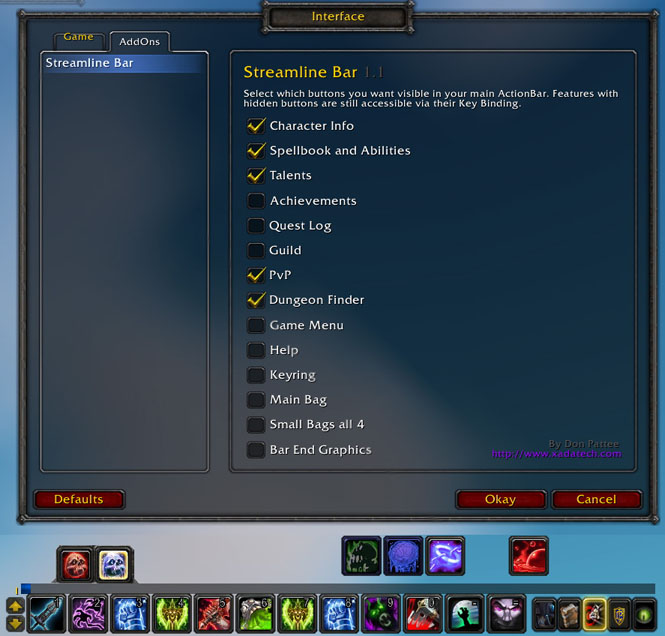
  • Thumbnail <p>Shows the configuration panel and a main action bar with a subset of the extra buttons displayed.</p>

    Shows the configuration panel and a main action bar with a subset of the extra buttons displayed.
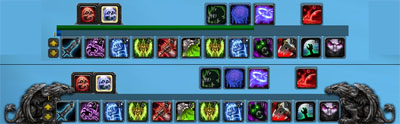
  • Thumbnail <p>Top half shows the main action bar with all extra buttons hidden, XP and Reputation bar shown.<br>
Bottom half shows the bar with all the extra buttons hidden, the XP bar shown, and the Griffon end caps shown.</p>

    Top half shows the main action bar with all extra buttons hidden, XP and Reputation bar shown.
    Bottom half shows the bar with all the extra buttons hidden, the XP bar shown, and the Griffon end caps shown.

World of WarcraftDiscoverBrowse
CurseForge - a world of endless gaming possibilities for modders and gamers alike.
Download the best mods and addons!
  • Games
    • All games
    • Minecraft
    • World of Warcraft
    • The Sims 4
    • Starcraft II
    • Kerbal Space Program
    • Minecraft Dungeons
    • World of Tanks
  • Create
    • Start a project
    • Project submission guide
    • Author Rewards Program
    • Apply for an API Key
    • 3rd Party API T&C
  • Community
    • Join Our Discord!
    • Ideas Portal
    • CF blog
    • Newsletter
    • Roadmap
    • Bukkit forums
    • CurseForge Servers
  • Support
    • Knowledge base
    • Troubleshooting
    • Contact us
  • Companions
    • Overwolf
    • CurseForge for Studios
    • Tebex
    • Nitro
  • Terms of Service
  • Privacy Policy
  • Licenses
  • Mod Author Terms
© 2026 Overwolf. All rights reserved.