
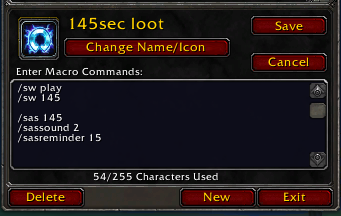
Macro for loot warning after 1m 45 seconds with 15 second reminder
Description
Welcome to Stopwatch Alert
Primary Audience: Gold Farmers who use the stopwatch to keep track of when they should be looting
Sound: The sound uses your Master volume slider in game, so if you want to adjust its sound you must use that slider
Youtube Guide: https://www.youtube.com/watch?v=xPesfEx1zgA
How to Use:
Create a macro in game and put this inside:
/sw play
/sw 105
/sas 105
/sassound 2
/sasreminder 15
Breakdown:
/sw play - Starts the stopwatch
/sw 105 - Sets the stopwatch timer to 1 minute and 45 seconds, it then starts to count down because the stopwatch has started playing
/sas 105 - Starts the addon alert timer to match 1 minute 45 seconds on the stopwatch
/sassound 2 - Sets the sound effect to be played to the 2nd one in the list, see the list down below
/sasreminder 15 - Chat messages and goblin reminder telling you to start your timer 15 seconds after the timer has stopped
Syntax:
/sas <number of seconds>
/sassound <number between 1 and 10>
/sasreminder <number of seconds>
List of Sound Effects:
1 - The Legend of Zelda: The Wind Waker, Chest opening
2 - The Legend of Zelda: Navi saying hey listen
3 - Mario coin
4 - Mario: here we go!
5 - Mario power up
6 - Crash Bandicoot Aku Aku
7 - Capcom intro
8 - Duck hunt kill
9 - Overwatch: Its High noon
10 - Half life: Wake up Mr freeman
If you dont choose what sound to play, the default is the 1st one in the list, also I am willing to take sound effects requests. But that doesn't mean ill just add anything, it has to fit what I am going for.
Stopwatch Alert Team
