


Sticky Custom Channels
- By
minimap-tooltip.png
settings-empty.png
settings-with-command.png

chat-prefilled.png
Description
Sticky Custom Channels
Built for WoW Forever (1.60.1).
Addons that add their own chat "channels" usually do it with a slash command. WoW only remembers its built-in chat types like /p, /g and /raid, so after you send a message with an addon's command, the chat box forgets it and you have to type it again every time.
Sticky Custom Channels fixes that. Add the command once, and after you chat in it, pressing Enter opens chat with the command already typed.
Features
- Sticky addon commands: the last custom command you chatted in is filled in when you open chat, and it's remembered across reloads and relogs.
- Gets out of your way: start typing another command (/p, /w Name, /dance…) and the custom one is removed. Send a normal message in a built-in channel and it switches off, just like moving from /p to /g.
- Doesn't touch other chat: whisper replies and anything else that opens chat with text already in it are left alone.
- Your list, your commands: nothing is sticky by default. Add exactly the commands you want.
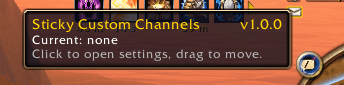
- Minimap button: click to open settings, drag to move it. The tooltip shows which command is currently sticky.
- Lightweight: no libraries. It only hooks the chat box and never replaces Blizzard's chat code or other addons' commands.
How to use
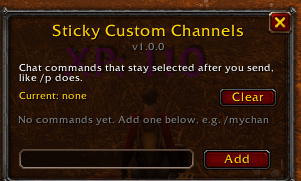
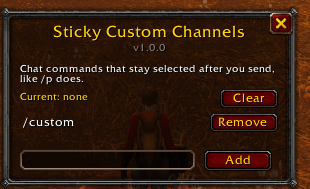
- Click the minimap button (or type /scc).
- Type the command you want to keep, e.g.
/mychan, and click Add. - Chat with that command once. From then on, it stays selected.
Commands
- /scc opens or closes the settings window
- /scc minimap hides or shows the minimap button
Good to know
The command is typed into the chat box as text, so you'll see /mychan in the input instead of a coloured channel label like the built-in channels have.
Source and bug reports
The code is on GitHub: github.com/Snugglife/StickyCustomChannels
License
Free to use, change and share for noncommercial purposes under the PolyForm Noncommercial 1.0.0 license. It may not be sold.
Sticky Custom Channels Team
