Stealth Alert
- By
Addon for Rogues (and Druids) in PvP. Warns you when nearby enemies have stealth detection abilities active.
SA Windows
Description
StealthAlert
A discreet threat alert addon for Rogues (and Druids) in PvP. Warns you when nearby enemies have stealth detection abilities active — Perception, Felhunter, Catseye Elixir, or Track Hidden.
Know when it's safe to engage and when to stay hidden.
Detected Threats
Perception | Red | Human racial — Highest danger
Felhunter | Orange | Warlock pet with Paranoia aura
Catseye Elixir | Orange | Consumable
Track Hidden | Yellow | Hunter ability
How It Works
StealthAlert scans every 0.3 seconds for threats on nearby enemy units :
- Target, Focus, and their targets
- Arena units (1-5) and their pets
- All visible nameplates (1-40)
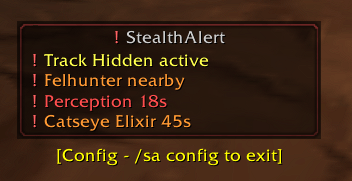
When a threat is found, a small alert frame appears showing :
- The threat name with color-coded severity
- Remaining duration (for Perception and Catseye Elixir)
- An optional sound alert (with 3-second cooldown to prevent spam)
The frame automatically hides when all threats are gone.
Features
- 4 threat types detected: Perception, Felhunter, Catseye Elixir, Track Hidden
- 5 sound options : Raid Warning (loud), PvP Flag (medium), Map Ping (soft), Tell Message (soft), None (mute)
- Movable frame : drag to position, lock in place
- Config mode : shows sample threats so you can position the frame perfectly
- Options panel : standalone popup with checkboxes, sound selector, and config mode button
- Localization : English, French, German
- Minimal footprint : discreet frame, only visible when threats are active
- Closes with Escape : options panel added to `UISpecialFrames`
Slash Commands
| Command | Description |
|-------------|-------------|
| `/sa` or `/sa toggle` | Enable / Disable the addon |
| `/sa sound` | Toggle alert sound on/off |
| `/sa sound <1-5>` | Change alert sound (1=loud, 5=mute) |
| `/sa lock` | Lock / Unlock frame position |
| `/sa config` | Enter / Exit config mode (shows sample threats for positioning) |
| `/sa options` | Open the options panel |
| `/sa status` | Show current settings |
Available Sounds
| # | Sound | Level |
|---|--------|-------|
| 1 | Raid Warning | Loud |
| 2 | PvP Flag Captured | Medium |
| 3 | Map Ping (default) | Soft |
| 4 | Tell Message | Soft | (<- best choice imo)
| 5 | None | Mute |
Config Mode
To position the alert frame :
1. Type `/sa config` (or click "Position Frame" in the options panel)
2. The frame appears with sample threats so you can see its size
3. Drag the frame where you want it
4. Type `/sa config` again to save and exit
The position is saved between sessions.
Options Panel
Open with `/sa options` or `/sa settings` :
- Enable/Disable toggle
- Sound on/off toggle
- Sound selector with `<` `>` buttons (previews each sound)
- Lock frame position checkbox
- Position Frame / Test Sound buttons
- Threat descriptions and slash command reference
Installation
1. Download and extract the addon
2. Copy the `StealthAlert` folder to your `Interface/AddOns/` directory:
- TBC Classic Anniversary : `World of Warcraft/_anniversary_/Interface/AddOns/`
- Classic Era : `World of Warcraft/_classic_era_/Interface/AddOns/`
3. Make sure the folder is named `StealthAlert` (not `StealthAlert-master` or similar)
4. Restart WoW or type `/reload`
Compatibility
- WoW TBC Classic Anniversary (2.5.5) — primary target
- WoW Classic Era (1.x)
Credits
Zerka
https://buymeacoffee.com/zerka
💬 Custom addon commissions : https://discord.com/invite/s3bqxyn2ce
Stealth Alert Team