StatsPin
- By
A small on-screen block with the stats you pick, for World of Warcraft retail. Drag it once and it stays where you put it.
Screenshot 2026-11-29 002212.png
Screenshot 2026-11-29 002444.png
Screenshot 2026-11-29 002319.png
Screenshot 2026-11-29 002343.png
Screenshot 2026-11-29 002249.png
Screenshot 2026-11-29 002256.png
Description
StatPin
A small on-screen block with the stats you pick, for World of Warcraft retail (Midnight, 12.1.5). Drag it once and it stays where you put it.
What it shows
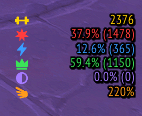
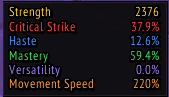
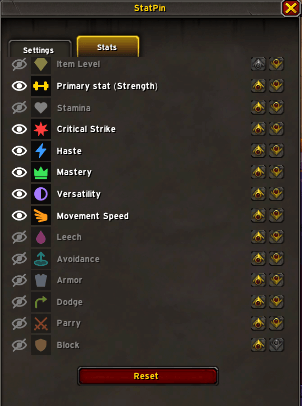
- Your spec's primary stat (Strength, Agility or Intellect), Crit, Haste, Mastery and Versatility by default.
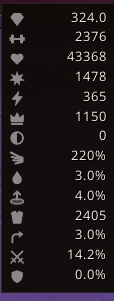
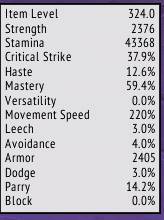
- Also available: Stamina, Leech, Avoidance, Speed, Item level (equipped), Armor, Dodge, Parry and Block.
- The numbers come from the game's own stat functions. In combat, keystones and PvP the game hides stat values from addon code (Midnight "secret values"); StatPin passes them straight to the screen, so the block shows the same numbers there as anywhere else.
How to use it
- Move: drag the block with the left mouse button. It keeps its place after
/reload, relog, and UI scale or resolution changes, and is never left off screen. - Settings: right-click the block and choose "Settings...", or type
/statpin. One small window holds every option and applies changes at once. - Stats tab: an eye shows or hides each stat, arrows change the order, "Reset" restores the defaults.
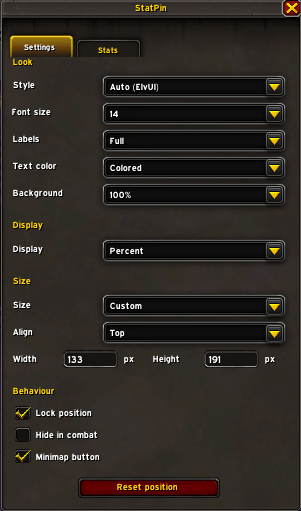
- Look: Style (Auto, Classic, ElvUI, EllesmereUI), Background opacity, Text color, Font size and Labels (Short, Full, One letter, Icons).
- Display: Crit, Haste, Mastery and Versatility as Percent, Rating or Mixed.
- Size: as big as the rows, or a custom width and height, set in the window or with a drag handle on the block.
- Behaviour: Lock position, Hide in combat (off by default) and a minimap button (can be hidden).
/statpin resetputs the block back at the default place (top left).
Settings are shared by all characters on the account. Labels follow the game client's language: English and Russian, Blizzard's own stat names in other languages.
Notes
StatPin only displays stats. It never acts for you
StatsPin Team