Stat Priority Deluxe
- By
Stat Priority Deluxe shows clear stat priorities and caps for every class and specialization across Classic Era, TBC Classic, Mists of Pandaria Classic, and Retail, including Raid and Mythic+ profiles where relevant.
01_retail.jpg
02_retail.jpg
03_retail.jpg
04_retail.jpg
05_retail.jpg
06_retail.jpg
07_vanilla.jpg
08_vanilla.jpg
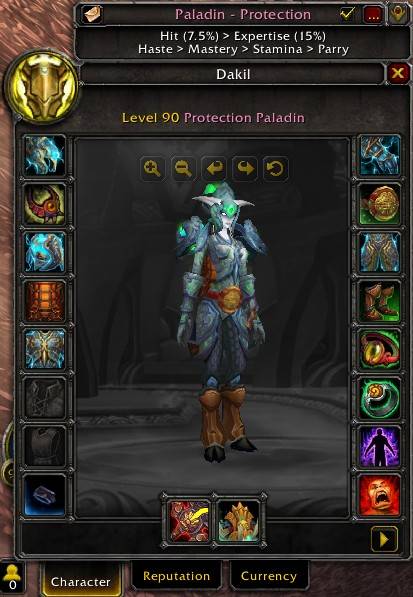
09_mists.jpg
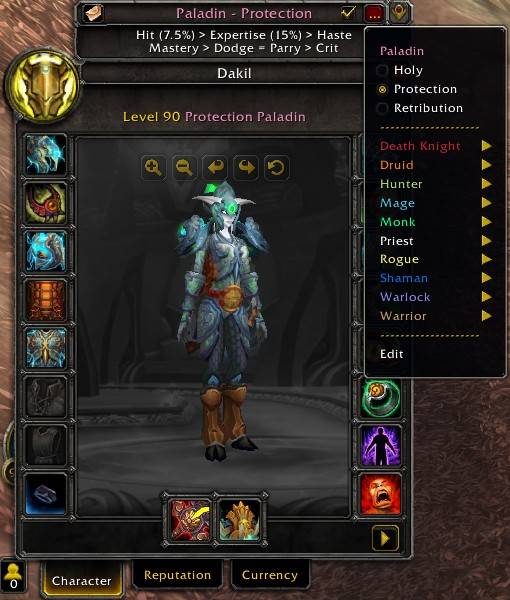
10_mists.jpg
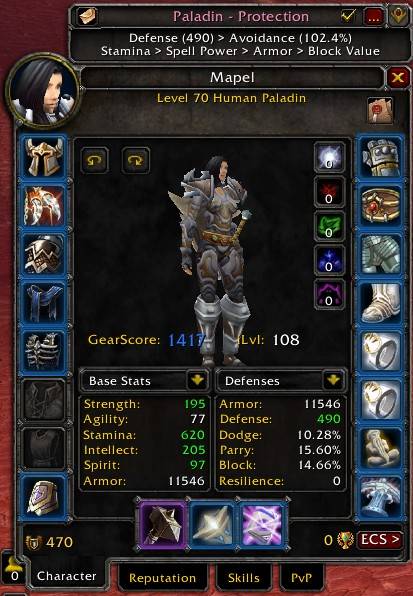
11_tbc.jpg
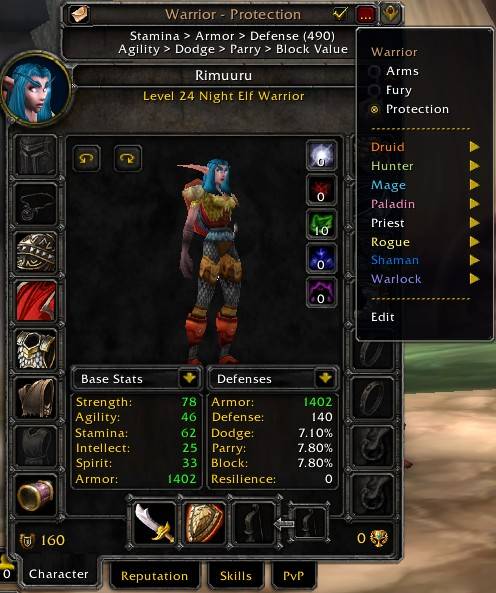
12_tbc.jpg
Description
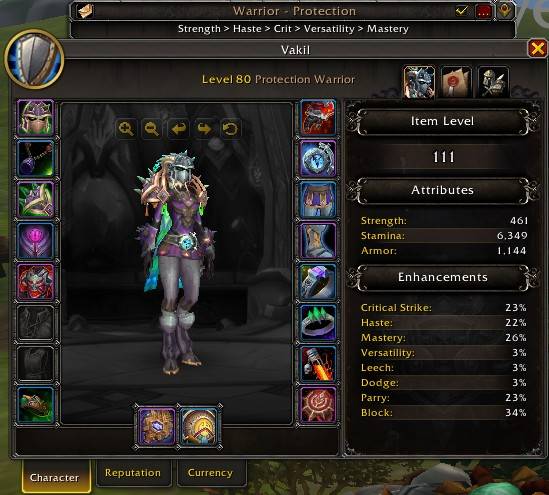
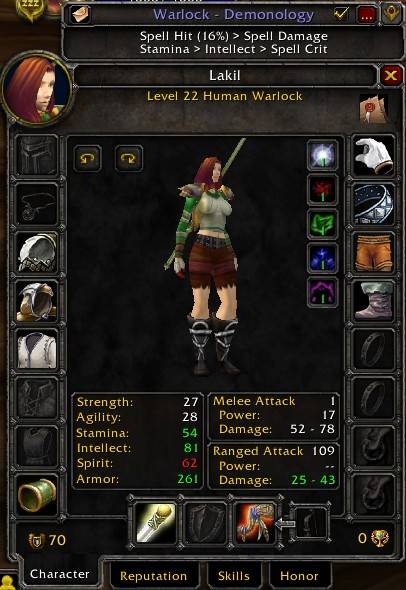
**Stat Priority Deluxe** shows the recommended **stat priority for your class and specialization** directly in the character window. It also displays important stat caps, helping you quickly see which stats matter most for your character.
## Quick Overview
- Automatic class and specialization detection
- Stat priorities for all classes and specializations
- Edit Stat Strings: Customize stat priorities and save your changes account-wide.
- Support for Vanilla, TBC Classic, Mists of Pandaria Classic, and Retail
- Display of important stat caps
- Vanilla: Extended value Box
- Separate Raid and Mythic+ priorities in Retail
- Manual class and specialization selection
- Collapsible window attached directly to the character window
- Report function for sharing stat priorities
- Multilingual user interface
Detailed Overview
## Automatic Detection
Stat Priority Deluxe automatically detects your current **class and specialization** and immediately displays the matching stat priority. In most cases, no setup is required, and you can see the recommended stats for your character as soon as you open the character window.
## Stat Priorities for All Classes and Specializations
Stat Priority Deluxe includes dedicated stat priorities for every class and specialization available in the respective game client. This makes it easy to see which stats are most important for your current character and the order in which they should generally be prioritized.
## Edit Stat Strings
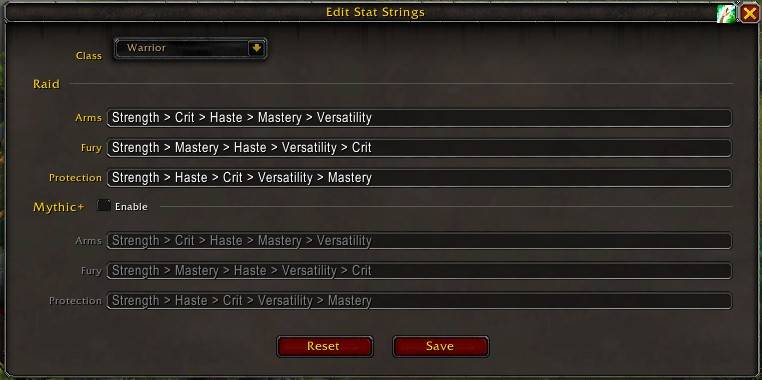
The built-in editor lets you customize the stat priorities for every class and specialization. Your changes are saved account-wide and automatically used in the character window and when sending reports. In Retail, Raid and Mythic+ priorities can be edited separately, and Mythic+ can be enabled or disabled as needed. The reset options let you restore individual classes or all customized stat strings to the default values included with the addon at any time.
## Support for Multiple WoW Versions
Stat Priority Deluxe supports **Classic (Vanilla)**, **The Burning Crusade Classic**, **Mists of Pandaria Classic**, and **Retail**. The displayed stats and available classes and specializations are automatically adapted to the WoW version you are playing.
## Stat Caps
In addition to the general stat order, Stat Priority Deluxe displays important **caps and target values** where relevant for a specialization. This lets you see at a glance whether a stat should simply be increased as much as possible or whether there is an important target value to reach.
## Raid and Mythic+ in Retail
In Retail, the optimal stat priority can vary depending on the type of content. If a specialization has different recommendations for **Raid** and **Mythic+**, you can switch between both profiles directly in the Stat Priority Deluxe window.
The switch is only shown when the stored priorities actually differ. Your selection is saved and automatically restored the next time you play.
## Manual Selection
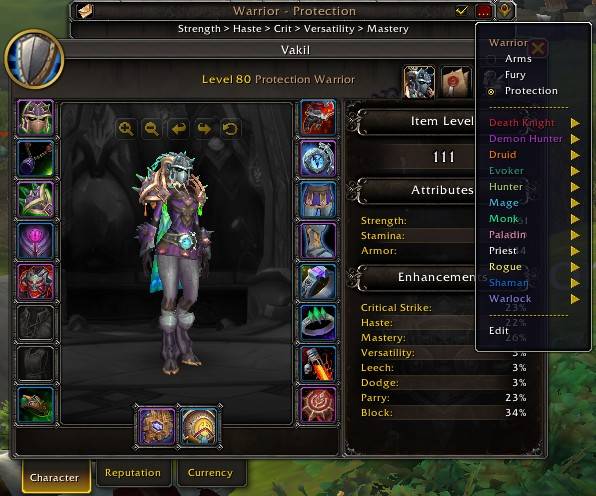
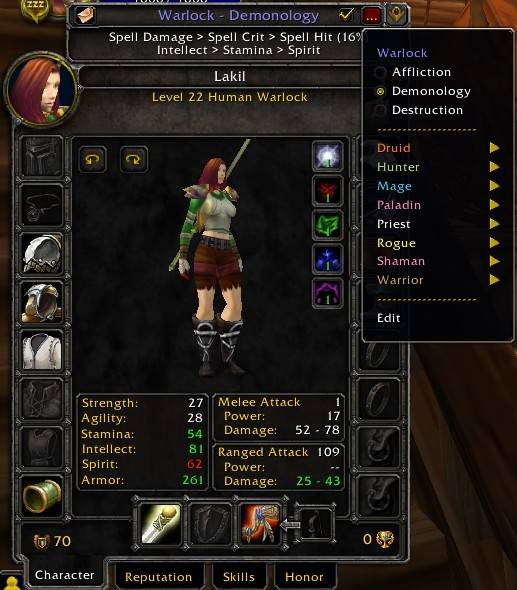
Want to check the stats for another class or specialization? The selection menu lets you choose any available class and specialization at any time.
With **Auto mode** enabled, this manual selection is only temporary. If Auto is disabled, Stat Priority Deluxe remembers your manual selection and restores it the next time you open the character window.
## Directly Attached to the Character Window
The stat priority is displayed in a compact window attached directly to Blizzard's character window. This means you do not need to open a separate interface and can see the most important stats exactly where you already compare your equipment.
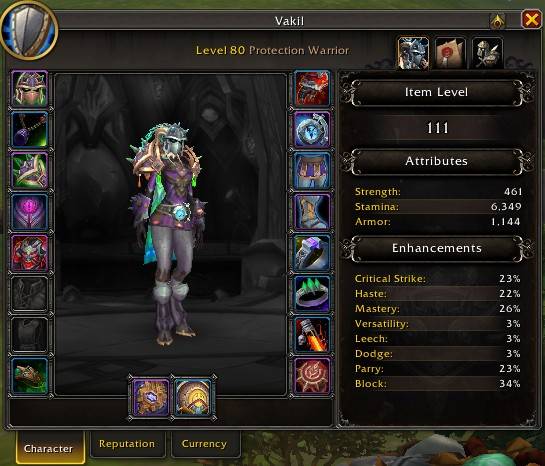
The window can be collapsed whenever you do not need it. Stat Priority Deluxe remembers its state for each character.
## Share Stat Priorities
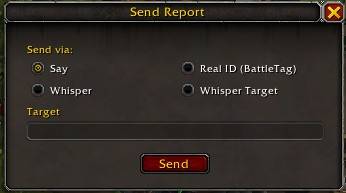
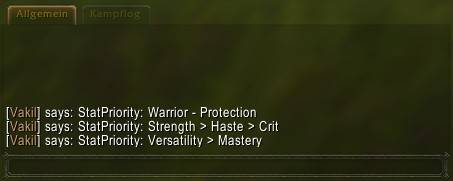
The built-in **Report function** lets you share the currently displayed stat priority directly in-game.
Supported options include **Say**, **Whisper**, your currently selected whisper target, and **BattleTag / Real ID**. Longer stat priorities are automatically split into several clear messages.
## Multilingual User Interface
Stat Priority Deluxe includes localization for the supported World of Warcraft languages included with the addon. General interface text and client-specific stat names are loaded according to your selected game language.
------------ German --------------------------------
**Stat Priority Deluxe** zeigt dir direkt im Charakterfenster die empfohlene **Stat-Priorität für deine Klasse und Spezialisierung**. Zusätzlich werden wichtige Stat-Caps angezeigt, damit du schnell erkennst, welche Werte für deinen Charakter besonders relevant sind.
## Kurzübersicht
- Automatische Erkennung von Klasse und Spezialisierung
- Stat-Prioritäten für alle Klassen und Spezialisierungen
- Stat-Strings bearbeiten: Passe Stat-Prioritäten individuell an und speichere deine Änderungen accountweit.
- Unterstützung für Vanilla, TBC Classic, Mists of Pandaria Classic und Retail
- Anzeige wichtiger Stat-Caps
- Vailla: Erweiterte Wertebox
- Separate Raid- und Mythic+-Prioritäten in Retail
- Manuelle Auswahl von Klasse und Spezialisierung
- Ein- und ausblendbares Fenster direkt am Charakterfenster
- Report-Funktion zum Teilen der Stat-Priorität
- Mehrsprachige Benutzeroberfläche
## Detail-Übersicht
## Automatische Erkennung
Stat Priority Deluxe erkennt automatisch deine aktuelle **Klasse und Spezialisierung** und zeigt direkt die dazu passende Stat-Priorität an. Du musst also normalerweise nichts einstellen und siehst beim Öffnen des Charakterfensters sofort die für deinen Charakter vorgesehenen Werte.
## Stat-Prioritäten für alle Klassen und Spezialisierungen
Für alle im jeweiligen Spielclient verfügbaren Klassen und Spezialisierungen sind eigene Stat-Prioritäten hinterlegt. So kannst du schnell sehen, welche Werte für deinen aktuellen Charakter besonders wichtig sind und in welcher Reihenfolge du sie normalerweise bevorzugen solltest.
## Stat-Strings bearbeiten
Mit dem integrierten Editor kannst du die Stat-Prioritäten jeder Klasse und Spezialisierung individuell anpassen. Deine Änderungen werden accountweit gespeichert und automatisch im Charakterfenster sowie beim Versenden von Reports verwendet. In Retail lassen sich Raid- und Mythic+-Prioritäten separat bearbeiten und Mythic+ bei Bedarf aktivieren oder deaktivieren. Über die Reset-Funktionen kannst du einzelne Klassen oder alle angepassten Stat-Strings jederzeit wieder auf die im Addon hinterlegten Standardwerte zurücksetzen.
## Unterstützung mehrerer WoW-Versionen
Stat Priority Deluxe unterstützt **Classic (Vanilla)**, **The Burning Crusade Classic**, **Mists of Pandaria Classic** und **Retail**. Die angezeigten Werte und verfügbaren Klassen beziehungsweise Spezialisierungen werden an die jeweilige WoW-Version angepasst.
## Stat-Caps
Neben der allgemeinen Reihenfolge der Stats zeigt Stat Priority Deluxe auch wichtige **Caps und Zielwerte** an, sofern für die jeweilige Spezialisierung entsprechende Werte hinterlegt sind. Dadurch erkennst du auf einen Blick, ob ein bestimmter Stat nur möglichst hoch sein sollte oder ob ein wichtiger Zielwert erreicht werden soll.
## Raid und Mythic+ in Retail
In Retail kann sich die optimale Stat-Priorität je nach Inhalt unterscheiden. Wenn für eine Spezialisierung unterschiedliche Empfehlungen für **Raid** und **Mythic+** vorhanden sind, kannst du direkt im Stat Priority Deluxe-Fenster zwischen beiden Varianten wechseln.
Der Umschalter wird nur angezeigt, wenn sich die hinterlegten Prioritäten tatsächlich unterscheiden. Deine Auswahl wird gespeichert und beim nächsten Spielen wieder verwendet.
## Manuelle Auswahl
Du möchtest die Werte einer anderen Klasse oder Spezialisierung ansehen? Über das Auswahlmenü kannst du jederzeit eine andere Kombination auswählen.
Mit aktivierter **Auto-Funktion** ist diese Auswahl nur vorübergehend. Wird Auto deaktiviert, merkt sich Stat Priority Deluxe deine manuelle Auswahl auch für das nächste Öffnen des Charakterfensters.
## Direkt am Charakterfenster
Die Stat-Priorität wird in einem kleinen Fenster direkt am Blizzard-Charakterfenster angezeigt. Dadurch musst du keine zusätzliche Übersicht öffnen und hast die wichtigsten Werte dort, wo du sie beim Vergleichen deiner Ausrüstung ohnehin brauchst.
Das Fenster kann bei Bedarf eingeklappt werden. Stat Priority Deluxe merkt sich den Zustand für deinen Charakter.
## Stat-Prioritäten teilen
Mit der integrierten **Report-Funktion** kannst du die aktuell angezeigte Stat-Priorität direkt im Spiel teilen.
Unterstützt werden unter anderem **Sagen**, **Flüstern**, ein aktuell angewähltes Flüsterziel sowie **BattleTag / Real ID**. Längere Prioritäten werden automatisch übersichtlich auf mehrere Nachrichten verteilt.
## Mehrsprachige Benutzeroberfläche
Stat Priority Deluxe enthält Lokalisierungen für die von World of Warcraft unterstützten Sprachen des Addons. Allgemeine Texte und clientspezifische Stat-Bezeichnungen werden passend zur eingestellten Spielsprache geladen.
Stat Priority Deluxe Team