


StartAttack Macros
- By
Instantly create /startattack Macros for your Abilities and replace them on your Actionbars. Just type /sam ingame to open it.
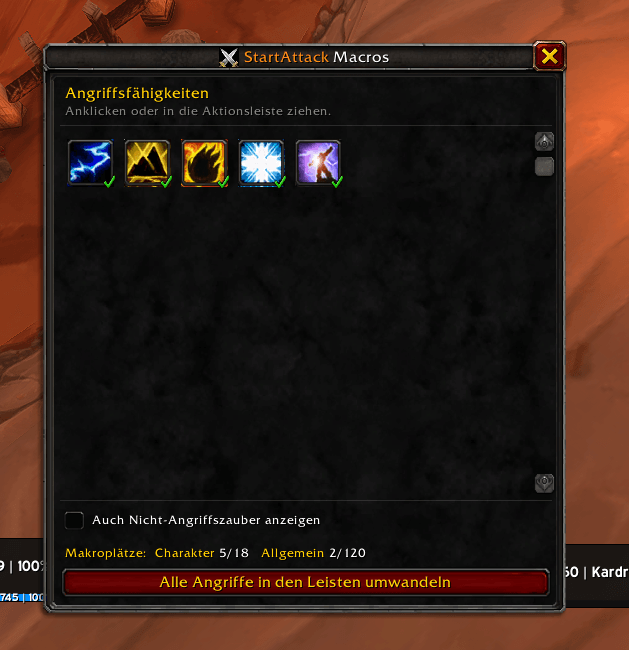
Bildschirmfoto_20261107_151020.png
Description
Never stand there doing nothing again. Every ability starts your auto-attack.
World of Warcraft Classic · WoW Forever · 10 languages
Yes, it's vibecoded - but it works great.
What it does
In Classic, using an ability like Sinister Strike or Heroic Strike does not always start your auto-attack, and that costs you a lot of damage. The usual fix is to write a macro for every single ability:#showtooltip Sinister Strike
/startattack
/cast Sinister Strike
StartAttack Macros does that for you.
- Spellbook window: all your attack abilities in one place. Click one (or drag it) and its
/startattackmacro is ready to drop onto your action bar. - One-click conversion: replaces every attack ability on your action bars with its macro, in the same slot.
- Smart: only attack abilities are listed. Ranks are merged (always casts the highest rank), and Auto Attack / Shoot / Auto Shot are skipped.
- Macro tracking: a check mark shows which abilities already have a macro, and a counter shows your free macro slots.
- Minimap button, Addon Compartment entry and a full options panel.
- Lightweight: no libraries, no dependencies.
- 10 languages: English, Deutsch, Français, Español, Italiano, Português, Русский, 한국어, 简体中文, 繁體中文
Why macros and not "automatic"?
Blizzard protects StartAttack(), so addons are not allowed to start your attack on their own. Macros are the only allowed way. This addon builds and places them for you.
Usage
| Command | Action |
|---|---|
/sam |
Open / close the window |
/sam convert |
Convert all attacks on your action bars |
/sam <spell name> |
Put the macro for one spell on your cursor |
/sam options |
Open the options |
/sam minimap |
Show / hide the minimap button |
Or: Esc → Options → AddOns → StartAttack Macros, or click the minimap button.
Macros are named
+SpellNameand use character-specific macro slots first, then general ones. Nothing can be changed in combat (Blizzard restriction).
Installation
- CurseForge app: search for StartAttack Macros.
- Manual: download the latest zip from Releases and extract it into
World of Warcraft\_classic_era_\Interface\AddOns\.
StartAttack Macros Team
