
StaggerMeter
- By
Easily see when you have enough Stagger Damage to make Purge worthwhile
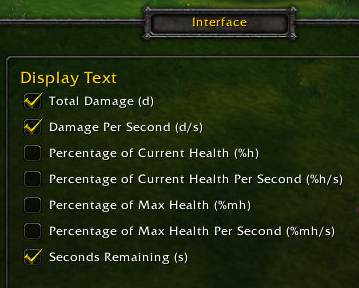
Display Text Options
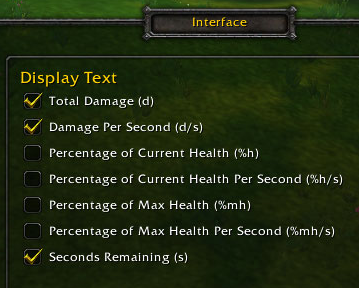
Display Text Options

Icon Only

Tall

Meter
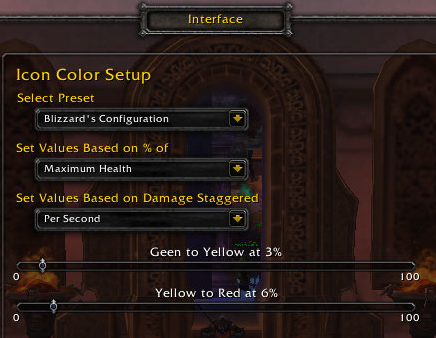
Options Icon
Description
Need to know when you should Purify your Stagger? Then this is just what you need! View your Staggering Damage in many different ways. Choose what works best for you!
Current Features:
- Play sound for critical events (Send me new sounds if you have one you'd like to use!)
- Fill Meters based on either Total Damage (Time Remaining * DPS) or DPS
- Option to View Text and/or Icon without the Meters
- Choose any of the following texts to display
- Damage Per Second
- Total Damage Being Staggered
- Percent of Current Health Being Staggered (Total or DPS)
- Percent of Max Health Being Staggered (Total or DPS)
- Seconds Remaining
- Hide When Not Staggering
- Icon Color Options
- StaggerMeter's Configuration
- Changes from Green to Yellow when Total Damage is > 20% of Current Health
- Changes from Yellow to Red when Total Damage is > 40% of Current Health
- Blizzard's Configuration
- Changes from Green to Yellow when Damage Per Second is > 3% of Max Health
- Changes from Yellow to Red when Damage Per Second is > 6% of Max Health
- Customizable Configuration
- Choose to base it on Total Damage (Time Remaining * DPS) or DPS
- Choose to base it on Current Health or Max Health
- Select your Green to Yellow and Yellow to Red Percentage Points
- StaggerMeter's Configuration
- Use /sm, /staggermeter, or /StaggerMeter to toggle show/hide
- Hold Alt to position wherever you want
- Resizable
StaggerMeter Team


