Sszorak Maelstrom Helper(스조라크 소용돌이 핼퍼)
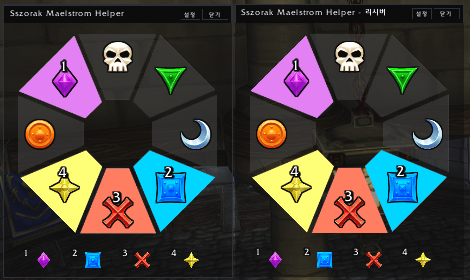
A Sszorak raid helper that lets raid leaders select wind knockback positions, automatically highlights the opposite marker, and shares the current 1–4 assignment order with the raid.
Required Setup
⚠️ Required: World Markers must match the addon layout
This addon assumes that the World Markers placed in the encounter area match the marker layout shown on the addon board.
Before pulling Sszorak, the World Markers must be placed as follows:
- 12 o'clock — Skull
- 1 o'clock — Triangle
- 3 o'clock — Moon
- 5 o'clock — Square
- 6 o'clock — Cross
- 7 o'clock — Star
- 9 o'clock — Circle
- 11 o'clock — Diamond
If your World Markers use a different layout, the positions shown by the addon will not match the actual locations in the room.
For example, selecting the 12 o'clock wind position activates the opposite 6 o'clock Cross marker.
The actual encounter area therefore also needs to have the Cross World Marker placed at 6 o'clock for the addon display to match the room correctly.
This addon cannot be used correctly with a different World Marker layout.
Your raid must place the World Markers according to the layout above.
How to Use
- Place the World Markers around the Sszorak encounter using the required layout above.
- Click the Ss minimap button or type
/smhto open the addon. - The Raid Leader or Raid Assistant selects a wind knockback position from the Control window.
- The marker on the opposite side becomes active.
- The active position is added to the 1–4 assignment order.
- Raid members using the addon can follow the same positions and order in the Receiver window.
- After four assignments, the next selection automatically starts a new sequence from #1.
Important
The addon does not automatically open just because the Sszorak encounter begins.
Open it manually with the Ss minimap button or /smh when your raid wants to use this assignment method.
The addon also requires the raid's World Marker layout to exactly match the layout listed above.
If your raid places the markers differently, the addon directions will not match the actual positions in the encounter area.
필수 사전 설정
⚠️ 필수: 세계 징표(빛기둥)를 애드온과 동일하게 배치해야 합니다
이 애드온은 전투 지역에 설치된 세계 징표(빛기둥)의 위치가 애드온 보드와 동일하다는 것을 기준으로 동작합니다.
따라서 스조라크 전투 시작 전에 반드시 아래와 같이 세계 징표를 배치해야 합니다.
- 12시 — 해골
- 1시 — 삼각형
- 3시 — 달
- 5시 — 네모
- 6시 — X
- 7시 — 별
- 9시 — 동그라미
- 11시 — 다이아몬드
이 배치가 다르면 애드온에서 표시되는 방향과 실제 전투 지역의 징표 위치가 서로 맞지 않습니다.
예를 들어 애드온에서 12시 위치를 선택하면 반대편인 6시 X 징표가 활성화됩니다.
따라서 실제 전투 지역에서도 반드시 6시 방향에 X 세계 징표가 설치되어 있어야 애드온의 안내와 실제 위치가 정확히 일치합니다.
다른 징표 배치를 사용하는 공대에서는 그대로 사용할 수 없습니다.
애드온을 사용하려면 위 징표 배치에 맞춰 세계 징표를 설치해야 합니다.
사용 순서
- 스조라크 전투 지역에 위 배치대로 세계 징표(빛기둥)를 설치합니다.
- 미니맵의 Ss 버튼을 클릭하거나
/smh를 입력하여 애드온 창을 엽니다. - 공대장 또는 부공대장이 Control 창에서 바람 밀치기 위치를 선택합니다.
- 선택한 위치의 반대편 징표가 활성화됩니다.
- 활성화된 위치가 1~4번 처리 순서에 추가됩니다.
- 애드온을 사용하는 공대원들은 Receiver 창에서 같은 위치와 순서를 확인합니다.
- 4개가 모두 지정된 후 다음 위치를 선택하면 새로운 1번부터 다시 시작합니다.
참고
이 애드온은 스조라크 전투가 시작됐다는 이유만으로 자동으로 창을 띄우지 않습니다.
사용하려는 공대에서 미니맵의 Ss 버튼 또는 /smh를 이용해 직접 창을 열어주세요.
또한 애드온의 방향 안내는 위에 지정된 세계 징표 배치를 기준으로 합니다.
세계 징표가 다른 위치에 설치되어 있거나 다른 징표 순서를 사용하는 경우 애드온의 표시와 실제 위치가 일치하지 않습니다.
Sszorak Maelstrom Helper(스조라크 소용돌이 핼퍼) Team