SpellSoundLibrary
- By
Spell cast sound replacement with a searchable, auditionable sound library pulled from LibSharedMedia media packs
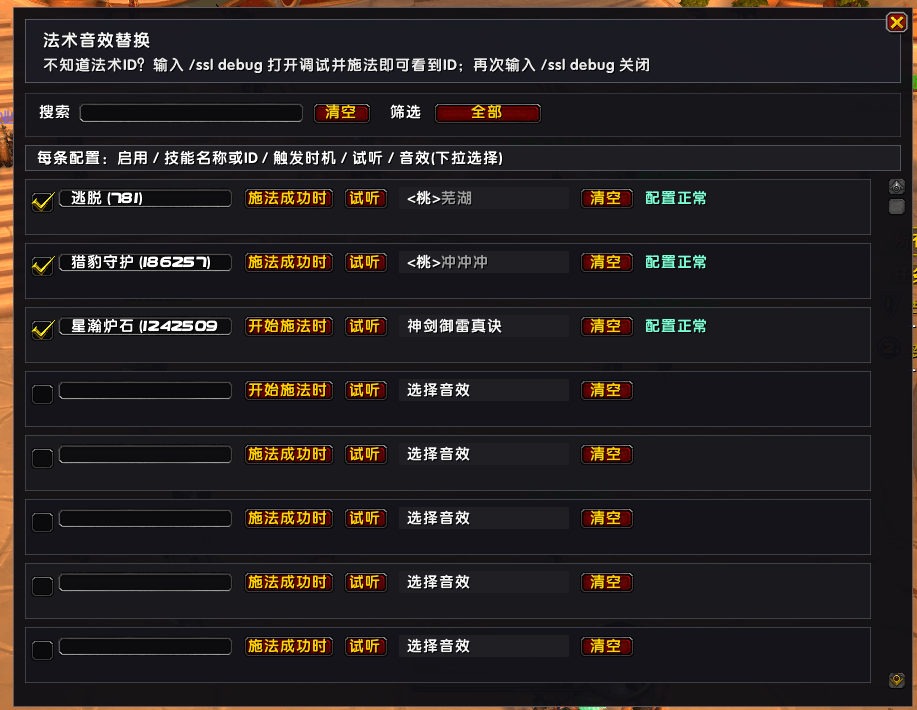
QQ20261015-140800.png
Description
-
Features
- Add custom sounds to the cast of any spell / toy / item
- Trigger options: on Cast Start or on Cast Success
- Searchable, auditionable dropdown sound library — click to select, scrollable
-
Usage
- Type
/sslto open the settings panel - Enter a spell name or ID in the "Spell Name or ID" field
- Click "Sound" to pick from the dropdown library (searchable / auditionable)
- Choose a trigger: Cast Start or Cast Success
- Check the row to enable it
Don't know the spell ID? Type
/ssl debugto enable debug, then cast — the spell ID appears in chat; type/ssl debugagain to disable.Toys / Items Toys cast spells — fill in the spell ID the toy actually casts (e.g. Starshine Hearthstone = 1242509).
- Type
功能
- 为任意技能 / 玩具 / 道具的施法添加自定义音效
- 触发时机可选:施法开始时 / 施法成功时
- 音效下拉面板:可搜索、逐条试听、点选即用、支持滚动
-
使用方法
- 输入
/ssl打开设置面板 - 在「技能名称或 ID」填技能名或法术 ID
- 点「音效」从下拉库选择(可搜索 / 试听)
- 选择触发时机:开始施法时 / 施法成功时
- 勾选该行启用即可
不知道法术 ID? 输入
/ssl debug打开调试,施法后聊天框会打印法术 ID;再次输入/ssl debug关闭。玩具 / 道具 玩具施放的是法术,填它实际施放的法术 ID 即可(例如星瀚炉石 = 1242509)。
- 输入
SpellSoundLibrary Team