


Spell Tracker AKM
- By
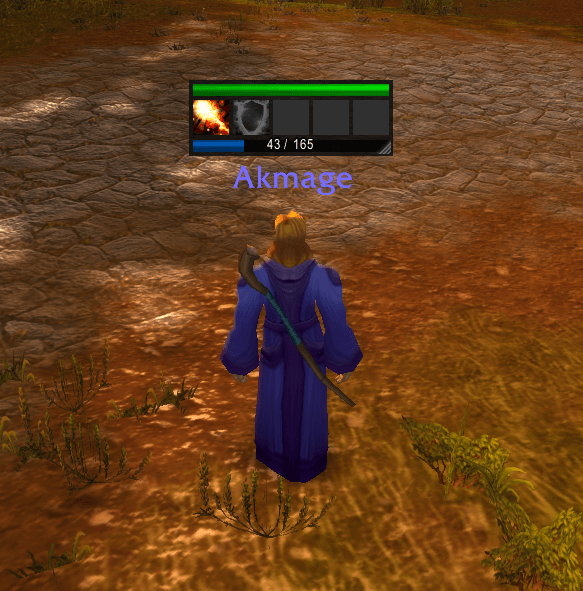
spell tracker akm.png
Description
Spell Tracker SoD
Spell Tracker is a lightweight, highly customizable cooldown tracker designed to keep your most important spells and trinkets right at your fingertips. Built originally for the Season of Discovery, it works flawlessly across Classic Era and Hardcore as well!
Instead of filling your screen with multiple action bars, simply drag the specific spells or trinkets you want to monitor into this compact tracker.
✨ Key Features
Dynamic Spell & Trinket Tracking: Drag and drop any spell directly from your Spellbook (including SoD Runes) or any trinket/usable item from your inventory.
Integrated Health & Resource Bars: A health bar sits neatly on top, while your class resource bar (Mana, Rage, or Energy) sits at the bottom—updating in real-time.
Smart Usability Indicators: Spell and trinket icons automatically turn gray (desaturated) when you don't have enough Mana, Rage, or Energy to use them.
Fully Resizable: Click and drag the bottom-right corner to scale the tracker to your perfect size. Dynamic Slots: Start with 5 slots and add as many as you need (up to 20). The frame automatically adjusts its width.
Per-Character Profiles: Your layout, tracked spells, and UI settings are saved individually for each character.
Universal Classic Compatibility: Uses the modern C_Container API, ensuring it works perfectly on WoW Classic 1.15.x (Season of Discovery, Classic Era, and Hardcore).
⌨️ Slash Commands Type /sts in your chat to access the following commands:
- /sts add — Add one spell slot.
- /sts remove — Remove one spell slot.
- /sts slots [number] — Set a specific number of slots (e.g., /sts slots 8).
- /sts reset — Reset the tracker's position to the center of your screen.
💡 How to Use Once logged in, the tracker will appear in the center of your screen. Move it by clicking and dragging the dark background area. Open your Spellbook (P) or Bags (B). Drag a spell or trinket and drop it onto one of the empty square slots. To remove a spell or trinket from the tracker, simply Right-Click the slot. Resize the frame by dragging the small handle in the bottom-right corner.
The Spell Tracker AKM Team
