
Spekifier1.JPG
Description
Spekifier
Compare loot across your specializations and choose your loot spec before the fight.
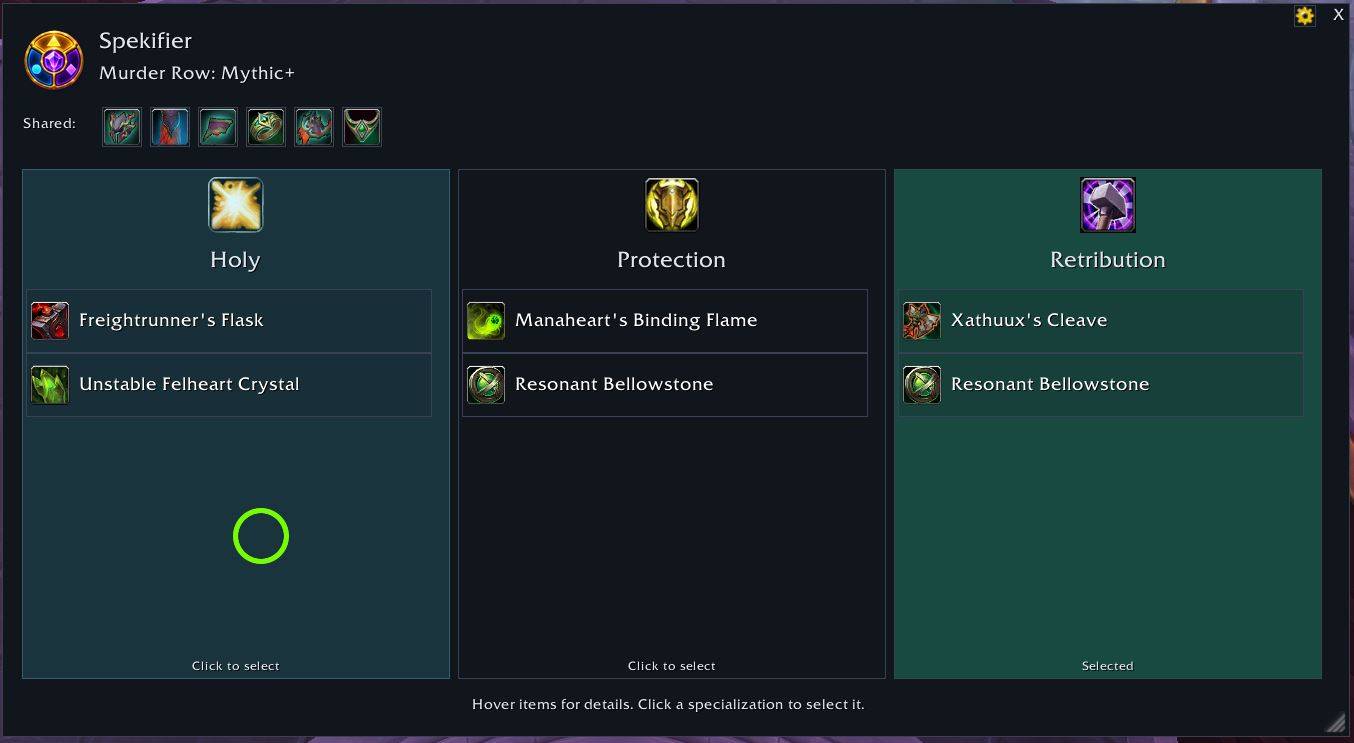
Spekifier is a World of Warcraft Retail addon that puts your class's loot options side by side. Target a supported raid boss or enter a supported Mythic dungeon to see what each spekialization can receive, then click a column to set your loot spekialization. The aim is simple: make it easier to choose which spek to collect gear for before rewards are decided, with fewer trips through the Adventure Guide and loot specialization menu.
Features
- Loot at a glance: one column per specialization, with item icons, names, and native item and equipped-item comparison tooltips.
- Focus on the differences: items available to every spec appear once in a shared row above the columns.
- Click to choose: select a loot specialization directly from its column, with confirmation from the game.
How to use it
- Outside combat, target a supported living raid boss inside its raid, or enter a supported dungeon on Mythic difficulty. The window opens automatically with default settings.
- Compare your options. Each column shows loot eligible for that specialization. Hover items for tooltips and scroll each column independently. Items eligible for every spec appear under Shared:; scroll that strip horizontally when needed.
- Choose your loot spec. Click a specialization's header, column background, or item row. Once the game confirms the change, the window closes.
- Use
/spekto see additional options.
Commands
All commands also work with /spekifier in place of /spek.
/spekor/spek help:: Show command help./spek toggleor/spek t:: Open or close the manual preview outside combat./spek optionsor/spek o:: Open addon settings./spek minimapor/spek mm:: Show or hide the minimap button./spek debug:: Print current context, loot data, and loot specialization diagnostics./spek debugmodeor/spek dm:: Toggle persistent diagnostic logging.
Spekifier Team
