


SpecLoot
- By
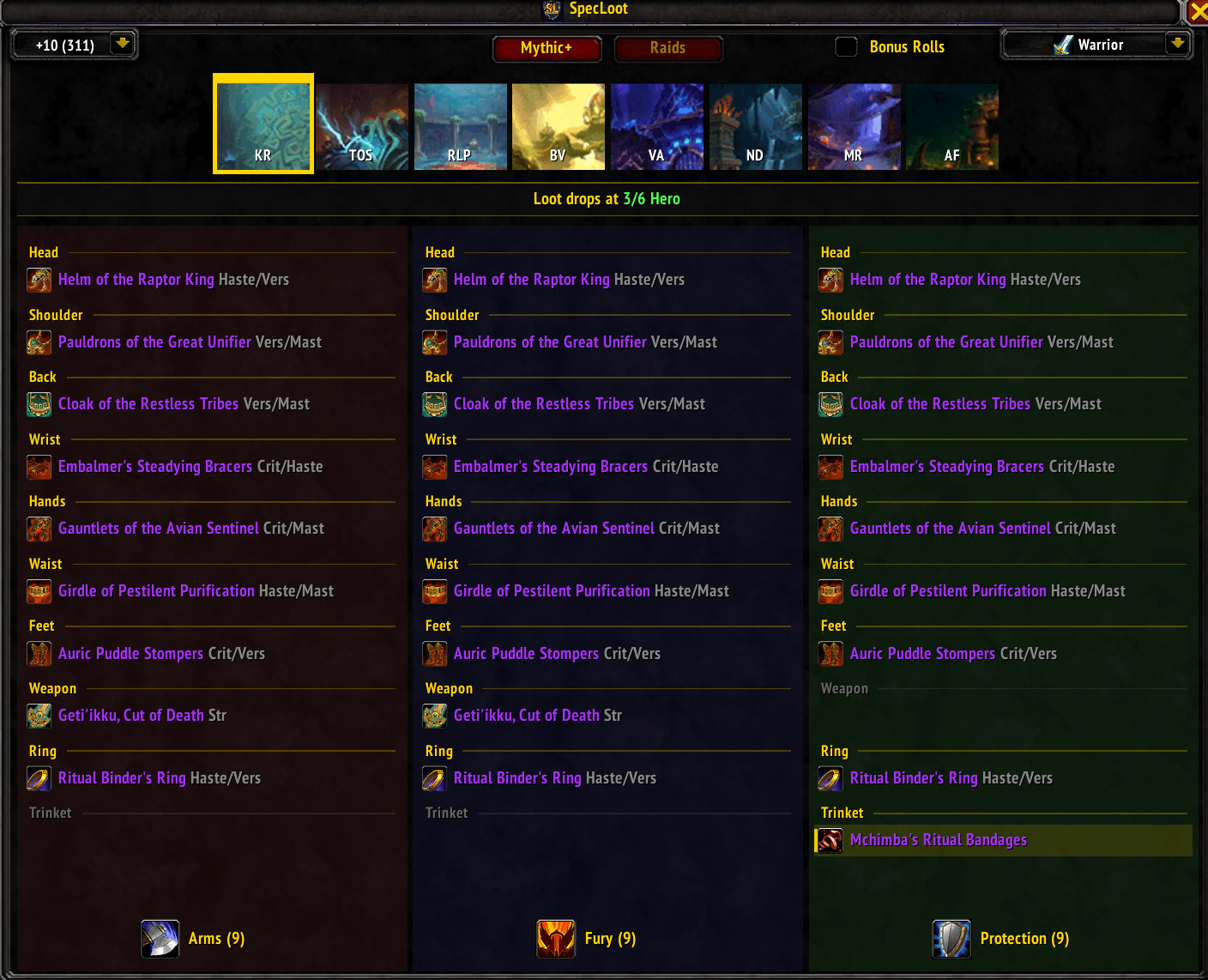
specloot-12.1.png
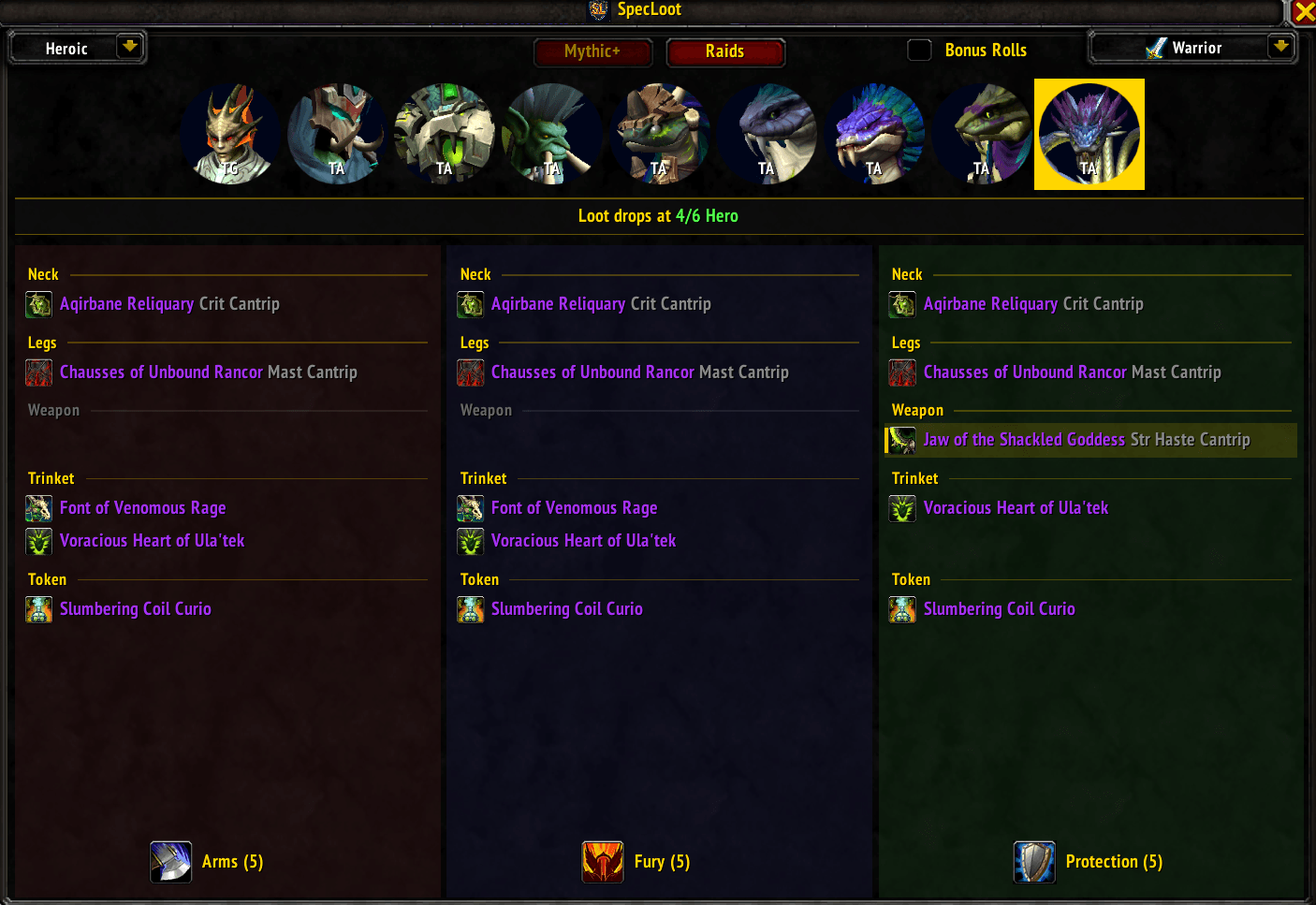
specloot-12.1-2.png
Description
SpecLoot is a lightweight World of Warcraft addon designed to help you optimize your loot specialization. It compares Mythic+ and Raid loot side-by-side across every spec of your class, making it easy to see where your Best-in-Slot (BiS) items are hiding.
Useful for picking which loot spec to set before pushing a key or pulling a boss, identifying which spec has the highest density of unique upgrades in a specific encounter, and tracking Great Vault / Bonus Roll priorities.
- Side-by-Side Comparison & Equipment Slot Headers: View loot for all specs of a class simultaneously organized by equipment slot (Head, Neck, Shoulder, Chest, Waist, Legs, Weapon, Trinket, etc.) with horizontally synchronized rows across all columns.
- Unified Multi-Spec Layout for Pure Casters: For classes sharing identical loot tables across all specializations (Mage and Warlock), automatically unifies into a single centered panel in Normal mode, displaying all 3 spec icons side-by-side at the bottom (
[Arcane] [Fire] [Frost] All Specializations (<total>)). - Item Secondary Stats & Weapon Primaries: Displays secondary stats next to item names in grey text, prioritized in standard order (Crit > Haste > Vers > Mast, e.g.
Crit/Mast,Vers/Mast,Haste/Vers). Weapons and off-hands include primary stat abbreviations (Str,Agi,Int, e.g.Str/Agi Haste/Mast,Agi/Int Crit/Haste). - Cantrip Identifiers: Items with special equip or on-use proc effects are tagged with
Cantrip(e.g.Str Haste Cantrip,Crit Cantrip). Trinkets remain clean without stat tags. - Spec-Exclusive Item Highlighting: Items that drop exclusively for a single spec within a class feature a subtle warm gold background tint, a left-edge gold accent bar, and a
★ Spec-Exclusive Itemtooltip note. - Upgrade Track Banners: Displays a unified banner above the columns with real-time drop tracks in Normal mode (e.g.
"Loot drops at 1/6 Myth","Loot drops at 3/6 Hero") and reward tracks in Bonus Rolls mode (e.g."Bonus rolls give 1/6 Myth loot"). - Dynamic Spec Footer Counts: Displays the total loot table count in Normal mode (e.g.
Guardian (8)) and remaining unobtained items in Bonus Rolls mode (e.g.Balance (5)), updating in real time. - Bonus Rolls & Great Vault Tracking: Check the "Bonus Rolls" mode toggle to view scaled Great Vault item levels and upgrade track badges (e.g.,
1/6 Myth,4/6 Myth,6/6 Myth). Right-click any item in this mode to mark it as received (applying a strikethrough line and dimming the icon), removing it from your active loot pool per-spec. Mythic+ keystone levels +2 through +9 have independent loot pools while +10 and above share a unified pool. Raid loot pools are isolated per difficulty (LFR, Normal, Heroic, Mythic). - Automated Bonus Roll Detection: Automatically captures bonus roll rewards (
BONUS_ROLL_RESULT), detects the active dungeon & keystone level or raid boss encounter, attributes the item to your effective loot specialization and difficulty/key tier, marks it as received in real-time, and prints a formatted confirmation to chat with scaled item level tooltips. - Smart Duplicate Highlighting: Hover over an item to see it light up in every spec panel where it appears.
- Addon Compartment & In-Game Icon: Integrated with the modern Minimap Addon Compartment menu and AddOns window.
- Difficulty-Aware Tooltips & Upgrade Tracks: Real-time item level previews and upgrade tracks based on Keystone level (+2 to +10) or Raid difficulty (LFR through Mythic).
- Tier Token & Omni-Curio Support: Accurately classifies class tier tokens and omni-curios for applicable specs while filtering out cosmetic transmogs, mounts, pets, and non-equipment clutter.
- Zero Manual In-Game Maintenance: Pre-packages current-season loot manifests while using an intelligent in-game Encounter Journal scraper for live validation and lazy-loaded spec caching without UI freeze or taint.
- Teleport Shortcuts: Right-click dungeon icons to cast that dungeon's teleport portal (if known).
| Command | Action |
|---|---|
/sl or /specloot |
Toggle the main interface |
/sl bonus list or /sl bonus rolls |
List all marked bonus roll items for the current character with item link, source, difficulty, and loot spec |
/sl bonus clear or /sl clear |
Reset all marked bonus roll items for the current character |
/sl testroll <id> |
Simulate receiving a bonus roll item |
/sl testkill <bossID> |
Simulate a raid boss kill |
/sl testkey <level> |
Simulate an active keystone level |
/sl status |
Check the health of your local loot cache |
/sl rescan |
Force a fresh scrape of the Encounter Journal |
/sl debug |
Re-scrape with per-encounter verbose debug output |
/sl probe <instID> <bossID> |
Diagnoses how many items the API returns for a specific encounter across all difficulties |
/sl help |
Show all available commands |
| Esc | Close the window |
- Mythic+ View: Select your Keystone level (+2 to +10) to see exact end-of-run item levels, or toggle Bonus Rolls mode for Great Vault rewards. Left-click a dungeon tile to see loot; right-click to teleport.
- Raid View: Switch via the top tabs. Select difficulty (LFR/N/H/M) and click a boss portrait to see their specific loot table broken down by spec, with accurate boss-specific item levels and upgrade tracks.
- Bonus Rolls Mode: Check the "Bonus Rolls" box in the header to switch to Great Vault / Bonus Roll reward tracks. Right-click any item to toggle it as received (struck through and dimmed per-spec). Marked items persist per-character across sessions.
- Class Browsing: Use the top-right dropdown to view loot for other classes. Spec data is lazily loaded and cached on the fly.
SpecLoot/: The WoW Addon files.SpecLoot.lua: Core logic, UI frames, bonus roll tracking, and slash commands.Data.lua: Manifests and pre-baked loot tables for the current season's dungeons and raids.Scraper.lua: Handles live querying of the Encounter Journal, safe tier selection, and UI event isolation.Output.lua: Copy/paste utility for debug logs.SpecLoot.toc: Addon metadata, TOC interface version, and saved variables (SpecLootDB,SpecLootCharDB).
tools/fetchloot/: A Go-based utility for developers to resolve new Instance IDs and generateData.luamanifests when a new WoW season begins.
If you are contributing or debugging content-patch breakage:
/sl debug: Performs a verbose scrape and dumps the output into a copyable text window./sl probe <instID> <bossID>: Diagnoses how many items the API returns for a specific encounter across all difficulties.
SpecLoot is designed to be "set and forget." Because it scrapes the game client directly and bundles pre-baked season tables, loot table changes by Blizzard are reflected smoothly. Developers only need to update Data.lua when the dungeon rotation changes (typically once per season). See the fetchloot README for the automation workflow.
SpecLoot Team
