Spam Control
- By
Spam Control is a World of Warcraft Classic addon that helps reduce unwanted chat messages, block spam, filter keywords and players, manage chat channels, and automatically decline unwanted guild invitations.
Screenshot 1.png
Description
Spam Control – World of Warcraft Classic Addon
Spam Control is a customisable chat management and spam-filtering addon for World of Warcraft Classic Era, designed to give players greater control over their in-game communication. Whether you're tired of gold-selling advertisements, repeated messages, unwanted whispers, or constant guild invitations, Spam Control helps keep your chat windows cleaner and more enjoyable.
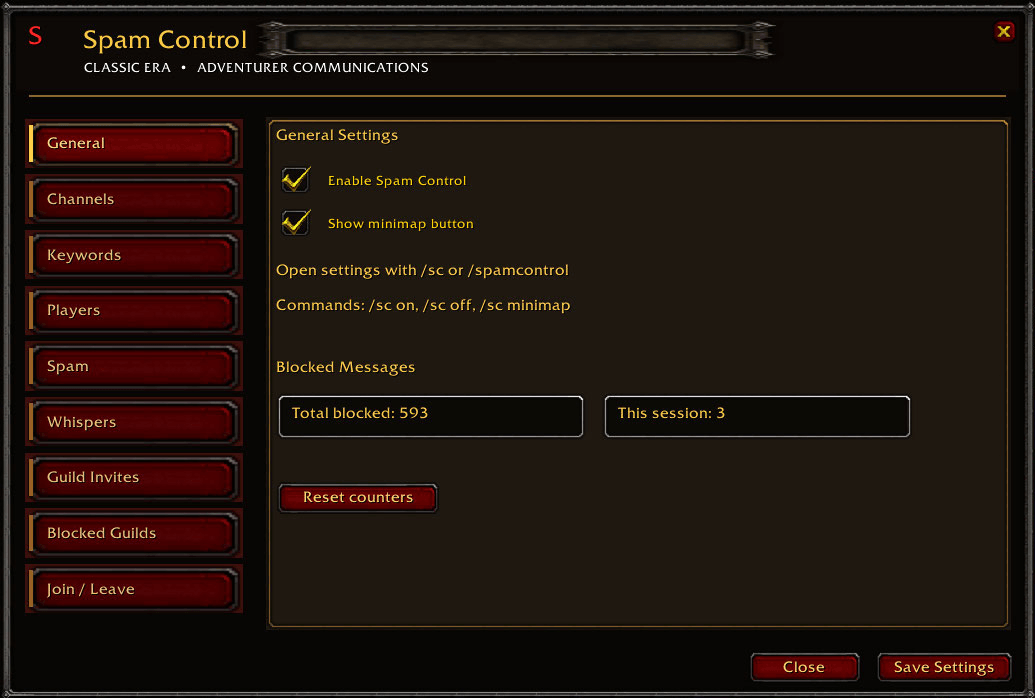
Featuring a traditional World of Warcraft Classic interface, Spam Control provides nine settings tabs, allowing players to customise how unwanted messages and invitations are handled.
Features
General Settings
Enable or disable Spam Control, control the minimap button, and monitor how many unwanted messages the addon has blocked. The addon tracks both your total blocked messages and the number blocked during your current gaming session, with an option to reset the counters.
Chat Channel Filtering
Choose which chat channels Spam Control monitors and filters. This allows you to target unwanted advertisements in public channels while keeping important conversations in other channels unaffected.
Keyword Blocking
Create your own list of words and phrases that Spam Control should detect and block. Messages containing your selected keywords can be filtered automatically.
Each keyword also has an individual counter showing how many times it has triggered a blocked message. Keywords can be added or removed through the settings interface, and their counters are saved between sessions.
Player Blocking
Manually add players to your blocked-player list to prevent their unwanted chat messages from appearing in monitored channels.
Players can be added or removed through the interface, allowing you to maintain a personalised block list without relying entirely on the game's standard ignore system. You can also quickly block unwanted players by right-clicking their names directly in the chat window and selecting the Spam Control block option, making it easy to stop unwanted messages without opening the addon's settings.
Spam Protection
Spam Control includes additional filtering designed to identify repeated messages and unwanted advertising patterns.
This helps reduce chat clutter caused by players repeatedly posting the same advertisements or messages.
Whisper Management
Manage unwanted private messages using keyword and player filtering.
Spam Control also provides configurable automatic whisper replies, allowing you to send a personalised response when supported filtering conditions are met.
Guild Invitation Control
Automatically decline unwanted guild invitations without repeatedly having to dismiss invitation pop-ups.
You can also configure a personalised whisper response to send to the inviting player when an invitation is declined.
The Guild Invites tab includes a manually managed guild list with Add and Remove buttons, allowing you to specify guilds whose invitations you want to reject. Selective rejection depends on the guild information provided by the game client.
Blocked Guilds
Maintain a separate list of guilds whose members you want to filter from chat.
Guilds can be manually added or removed, with the addon attempting to identify messages from members of those guilds when guild information is available.
This provides an additional level of chat filtering beyond individual player and keyword blocking.
Join / Leave Chat Channels
Manage your numbered chat-channel memberships directly through Spam Control.
The addon includes commonly used channels such as General, Trade, LocalDefense, WorldDefense, LookingForGroup, and World.
Each listed channel provides a Join or Leave option, depending on your current membership. You can also manually add custom channels, remove them from your saved list, and manage additional channels using the built-in navigation controls.
Channel availability depends on your realm and game version.
Classic World of Warcraft Interface
Spam Control is designed to complement the traditional World of Warcraft Classic appearance, featuring:
-
Classic-style red navigation buttons and gold text.
-
Dark backgrounds with decorative borders.
-
Nine organised settings tabs.
-
A circular minimap button featuring a red S.
-
Easy-to-use checkboxes, text fields, and Add/Remove buttons.
-
Persistent settings that are saved between gaming sessions.
Slash Commands
Open and manage the addon using the following commands:
-
/sc– Open Spam Control settings. -
/spamcontrol– Open Spam Control settings. -
/sc on– Enable Spam Control. -
/sc off– Disable Spam Control. -
/sc minimap– Toggle the minimap button.
Why Use Spam Control?
Public chat channels in World of Warcraft Classic can quickly become overwhelmed by advertisements, repeated messages, and unwanted communication.
Spam Control gives players the tools to decide what they want to see, who they want to hear from, and which channels they want to participate in.
Rather than forcing everyone to use the same filtering rules, Spam Control lets you build your own personalised chat experience.
Take control of your chat, reduce unwanted interruptions, and spend more time enjoying World of Warcraft Classic with Spam Control.
Spam Control Team