
SoundSwitch_Header_Black_1920x480.png

Ring.png
Button.png
Buttom_Headphones.png
mute.png
Description
SoundSwitch
Switch your sound output device with one click and keep a separate volume for every device.
Headphones for raids, speakers for the auction house: SoundSwitch changes the output device without a trip to the system settings and restores the volume you last used on that device. Works on Retail and WoW Forever.
Features
- One volume per device. Switch to your headphones and your headphone volume comes back, switch to the speakers and so does theirs.
- Quick selector. A small button in action button size. At rest it shows only the sound symbol, on mouseover a smooth volume ring, the percentage and the device name fade in. Choose the ring look (default) or a real game action button.
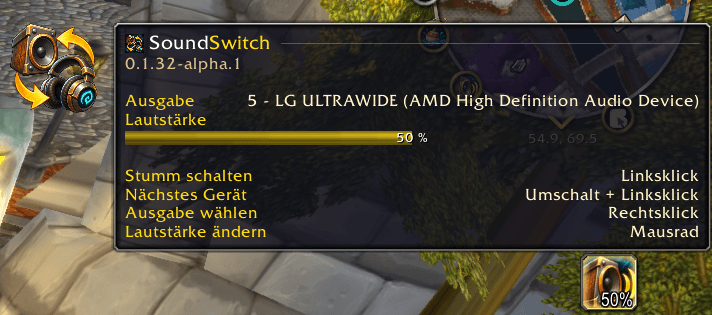
- Minimap button and addon compartment with the same controls and a tooltip with a live volume bar.
- Speaker and headphone icons per device that follow the volume (low, medium, high, muted).
- Skip devices you never want when switching to the next device, and optionally switch to a default device after login.
- Edit Mode support. Place the quick selector in the game's Edit Mode (stored per layout), optionally snapped to your action bars.
- Key bindings for volume up, volume down and next device.
- Localized: English, Deutsch, Français.
Controls
The same on the minimap button, the addon compartment and the quick selector:
- Left-click: mute
- Shift + left-click: next device
- Right-click: choose the output (the menu also opens the options)
- Mouse wheel: change the volume
On the quick selector, middle-click also switches to the next device and dragging the ring sets the volume.
Slash commands
/soundswitch (or /sndswitch) opens the options. Others: switch, up, down, minimap, quick, mask, debug, help.
Options
Game settings, category "SoundSwitch": volume step, switch to a default device at login, chat messages, minimap button, quick selector (look, resting transparency, snapping, lock) and a Devices page for rotation, default device and icon per device. Settings are account-wide.
Notes
- Idea based on the addon "SoundManager" by Zax; the implementation is original code.
- Newly added art files are loaded by the game only after a full restart, not after
/reload. - Found a bug or have an idea? Please leave a comment or open an issue.
SoundSwitch Team