


SoulMate
- By
Zrzut ekranu 2026-01-24 173830.png
Description
📘 SoulMate – Smart Soul Shard Manager for Warlocks
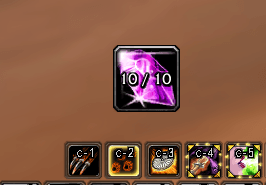
SoulMate is a lightweight and intuitive addon for Warlocks that manages Soul Shards, removes excess shards, and provides a customizable on‑screen button for manual cleanup.
Designed for WoW Classic / TBC Classic, with a clean UI and simple configuration.
---
✨ Features
- 🔢 Configurable shard limit (default 20, reset value 32)
- 🧹 Manual cleanup button that deletes excess shards with one click
- 🎛️ In‑game options panel for easy configuration
- 🎚️ Resizable and movable button with saved position
- 🔧 Slash commands for quick control
---
🧭 Slash Commands
Type `/sm` to view all available commands.
Shows the list of available commands.
/sm <number>
Sets the maximum allowed number of Soul Shards.
Example: /sm 25
/sm delete
Deletes one excess Soul Shard if you are above the limit.
/sm reset
Resets all settings to default values:
- Shard limit → 32
- Button size → 64 × 64
- Button position → center of the screen
---
## ⚙️ Options Panel
You can configure SoulMate through the in‑game settings:
Game Menu → Options → AddOns → SoulMate
Available options:
- Set shard limit
- Adjust button size (width × height)
- Values update instantly on the button
---
🖱️ Delete Button
SoulMate creates a small on‑screen button that:
- Displays your current shard count
- Turns red when you exceed the limit
- Deletes excess shards on click
- Can be moved by holding ALT + Left Mouse Button
- Saves its position automatically
---
## 🔧 Installation
1. Download the ZIP file from CurseForge
2. Extract it into: World of Warcraft/classic/Interface/AddOns/
3. Ensure the folder name is Soulmate
4. Enable the addon in the character selection screen
---
🧪 Compatibility
- WoW Classic
- WoW TBC Classic
---
## 📝 Changelog
v1.0.0
- Initial public release
- Manual delete button
- Options panel
- Slash commands /sm, /sm delete, /sm reset
- Configurable button size and position
---
💬 Feedback & Suggestions
If you have ideas, feature requests, or bug reports, feel free to leave a comment on CurseForge.
SoulMate will continue to evolve based on community feedback.
SoulMate Team
