Soulbound Guild
- By
Celebrate your level-ups with an epic fanfare and an animated Soulbound logo, replacing Blizzard’s level-up effect, with adjustable frequency and optional guild chat announcements.
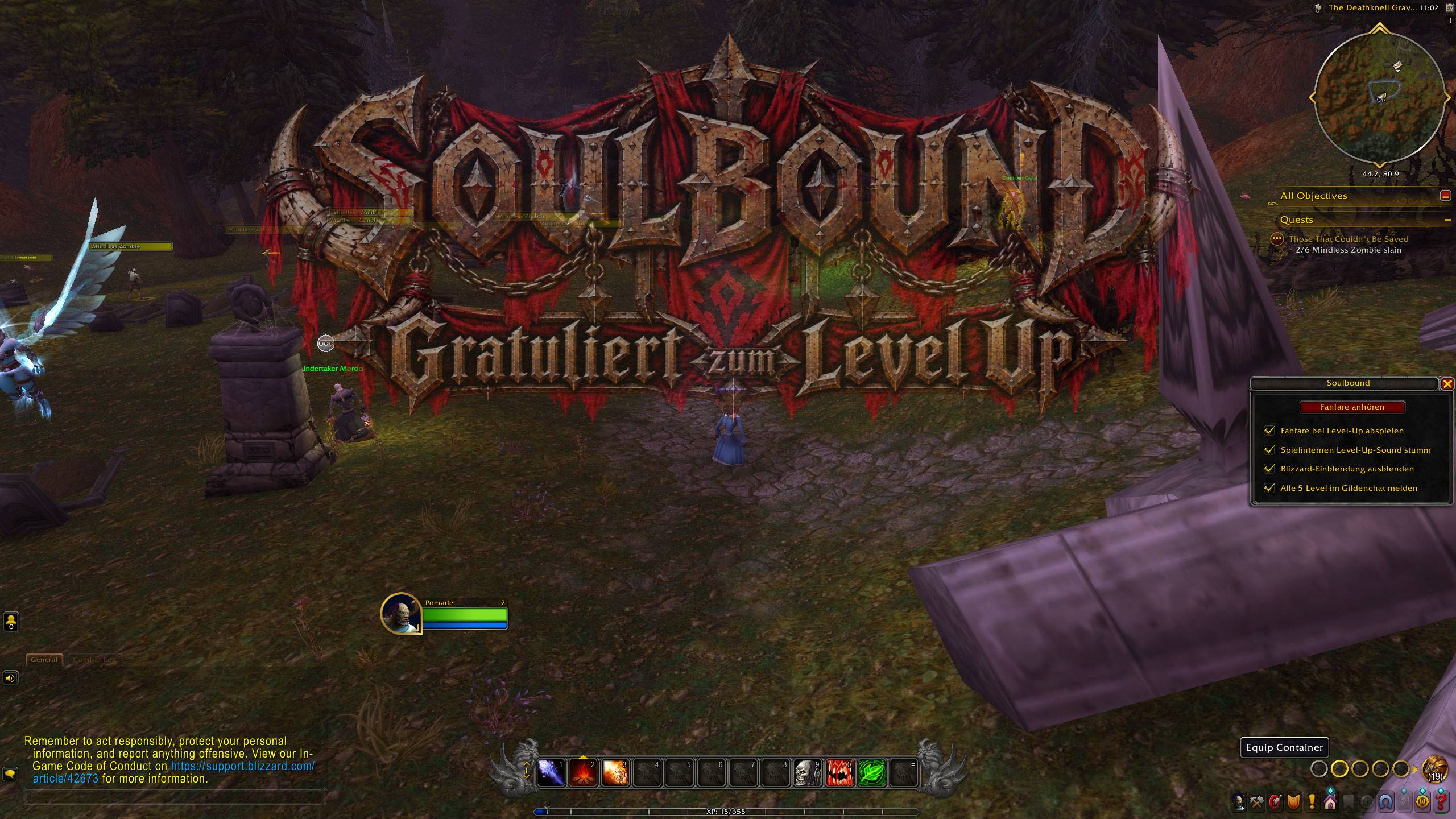
WoWScrnShot_102726_110253.jpg
Description
Soulbound
Celebrate every level-up in style.
Soulbound replaces the plain level-up moment with an epic fanfare and the Soulbound logo, zooming gently in and out over your screen while the music plays.
Features
- Epic level-up fanfare. A custom 10-second fanfare plays on every level-up.
- Animated logo overlay. The Soulbound logo appears in the upper part of the screen. It is 50% transparent and gently zooms in and out with the music. Mouse clicks pass straight through it, so it never gets in your way, even in combat.
- Scales with your resolution. The logo is sized relative to your screen, so it looks the same at 1080p, 1440p, 4K and on ultrawide monitors.
- Mute Blizzard's level-up sound so the fanfare plays on its own. Optional, on by default.
- Hide Blizzard's "Congratulations, you have reached level X" banner in the middle of the screen. Optional, on by default.
- Guild announcement every 5 levels. At levels 5, 10, 15 and so on, Soulbound posts a short message in guild chat. Optional, on by default. Nothing is sent if you are not in a guild.
- Lightweight. It needs no libraries and only reacts when you level up.
Usage
| Command | What it does |
|---|---|
/soulbound |
Opens the settings window |
/soulbound test |
Plays the fanfare and logo so you can preview them |
On Retail you can also open the settings from the AddOn menu next to the minimap.
Settings
- Play fanfare on level-up
- Mute the in-game level-up sound
- Hide the Blizzard level-up banner
- Announce every 5 levels in guild chat
The settings window also has a Play fanfare button to preview the effect at any time.
Compatibility
- World of Warcraft Forever (Classic)
- Classic Era
- Retail
- Forever
Notes
- The fanfare uses the Master sound channel, so you hear it even when sound effects are turned down.
- The settings window is currently in German. An English version may follow.
Feedback
Found a bug or have an idea? Leave a comment or open an issue. Feedback is always welcome!
Soulbound Guild Team