


Soul Journal
- By
Screenshot 2026-10-19 165107.png
Screenshot 2026-10-19 165115.png
Screenshot 2026-10-19 165047.png
Description
Soul Journal
Every Soul Shard in your bags came from something. Soul Journal keeps track of what it was.
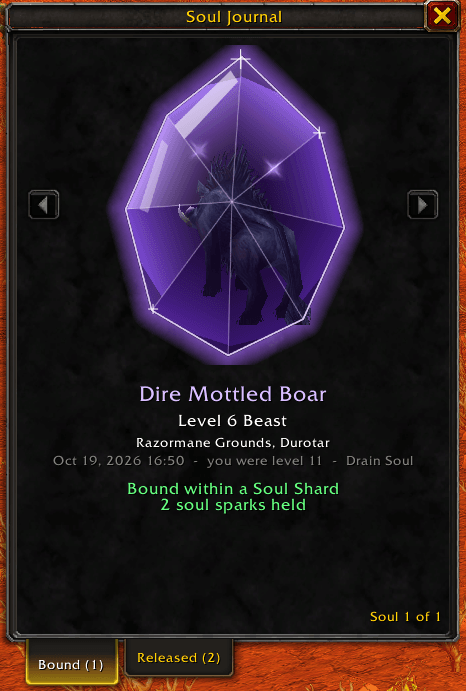
When Drain Soul or Shadowburn puts a shard in your bags, Soul Journal records whose soul it holds. Open the journal and you'll see that creature's ghost floating inside a crystal shard, slowly turning, with the details of how and where you caught it underneath.
Opening the journal
- Right-click a Soul Shard in your bags
- Or type
/souls(/souljournalalso works)
Right-clicking a shard won't open the journal while you have a vendor, bank, trade, mailbox or auction house window open, so selling and trading shards works as usual. You can drag the window anywhere, and Escape closes it.
What gets recorded
For each soul:
- Name and level
- Elite, rare, rare elite or boss status
- Creature type (Beast, Humanoid, Undead and so on)
- Race and class if it was a player, with the name shown in their class color
- Zone and subzone
- Date and time of the capture
- Your level at the time
- Which spell took it: Drain Soul or Shadowburn
Use the arrows beside the shard or your mouse wheel to page through your souls. Click the shard and you'll hear it clink like a gem being set down. Keep clicking and now and then the ghost will turn to face you and act out an emote.
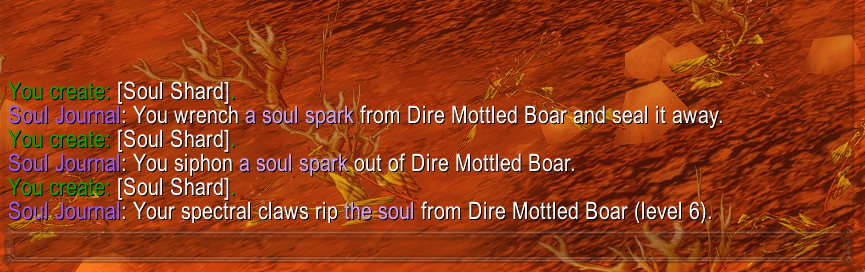
Every capture also gets a line in chat, picked from a handful so it doesn't get stale:
Your spectral claws rip the soul from Defias Pillager (level 14).
Soul sparks
Drain Soul can pull a shard out of a target before it dies. Those shards are sparks, small pieces torn from a soul that's still attached to a living creature. Each one shows up as a twinkling star on that creature's crystal. When the creature dies under Drain Soul, the soul joins its sparks in the same entry.
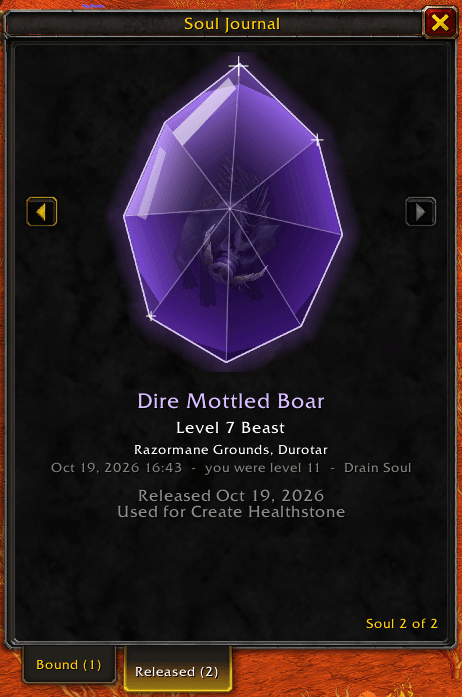
If the creature dies some other way or gets away, you keep its sparks, but the soul slipped away. Its ghost appears faint in the journal.
Bound and released
The journal has two tabs:
- Bound: souls and sparks still held in shards you're carrying
- Released: souls whose shards you've used, listed in the order you spent them
Shards all look alike, so the game can't tell which one a spell just used. Soul Journal spends them in a fixed order: sparks first, then whole souls, oldest first each time. Shards you already had before installing the addon count as the oldest of all, so they're used up before anything in the journal.
Released souls show what took them, such as "Used for Create Healthstone", "Used for Ritual of Summoning" or "Sold to a vendor". Trades and mail are recorded too.
Hovering over a Soul Shard adds a couple of lines to its tooltip: the name of your newest soul, and how many souls and sparks you're carrying.
Commands
/soulsopens or closes the journal/souls clearerases every record (after asking you to confirm)/souls helplists the commands
Records are kept per character.
Known limitations
WoW Forever doesn't let addons read the combat log, and during combat or inside instances the game sometimes hides a target's details from addons. Soul Journal reads what it can before and after the fight to fill in the gaps:
- If a name or level is hidden at the moment of capture, the addon fills it in after combat ends, as long as you still have the corpse targeted.
- If it can't get the name any other way, it takes it from the experience message for the kill.
- If none of that works, the soul goes into the journal as a Lost Soul with level "??" and appears as a generic human ghost. Player souls always show the human ghost, since there's no creature model to show for them.
- If the addon can't tell whether a Drain Soul shard came from a tick or the kill, it records a full soul.
- A shard you delete, or one used by a spell the addon doesn't know about, is still marked released, just without a reason.
Requirements
- WoW Forever only. It won't load on Retail, Classic Era or other clients.
- Warlock characters only. On other classes it stays loaded but does nothing.
Bug reports and suggestions are welcome in the comments or on the issue tracker.
Soul Journal Team
